


This post is sponsored by Silicon Labs.
Imagine walking up to your Mac and having it unlock automatically—no password, no Touch ID, just your presence. Then, when you walk away, it locks itself. This isn't science fiction; it's Bluetooth Channel Sounding in action.
If you've ever tried to build proximity-based features using RSSI (Received Signal Strength Indicator), you know the frustration. Signal strength fluctuates wildly based on obstacles, interference, and even how you're holding your phone. Trying to determine if someone is 1 meter away versus 3 meters away with RSSI is, frankly, a guessing game.
Channel Sounding changes that.
Channel Sounding is a Bluetooth Low Energy feature introduced in Bluetooth Core Specification 6.0 (September 2024) that measures distance between devices with sub-meter accuracy using Phase-Based Ranging (PBR). Unlike RSSI methods that estimate distance from signal strength, Channel Sounding measures the phase shift of radio signals across multiple frequencies to calculate the actual physical distance between devices.
In this post, I'll walk you through a complete working demo I built: a proximity-based Mac unlock system using a Pixel Watch 4, a Silicon Labs development kit, and a Python script. When I'm nearby, my Mac unlocks. When I walk away, it locks. The demo does require an external development kit for now—but think of it as a prototype for what could eventually be built into laptops natively. Unlike UWB, which requires proprietary hardware, Channel Sounding is a standard Bluetooth feature. The same radio that connects your wireless headphones could, in principle, handle secure ranging. Let's take a closer look at how it all works.
We'll cover:
- The roles involved: Bluetooth LE Central/Peripheral and CS Initiator/Reflector
- The architecture of all three components: Watch app, SoC firmware, and Mac script
- How GATT and the Ranging Service (RAS) fit into the picture
- A live demo of the complete system
All the source code for this demo—the Wear OS app (plus a pre-built APK), the Python unlock script, and the Silicon Labs SoC configuration—is available for free download so you can build and test this yourself.
What We're Building
Before we dive into the details, let's step back and look at the complete system. The demo consists of three components that work together to create a proximity-based unlock experience:
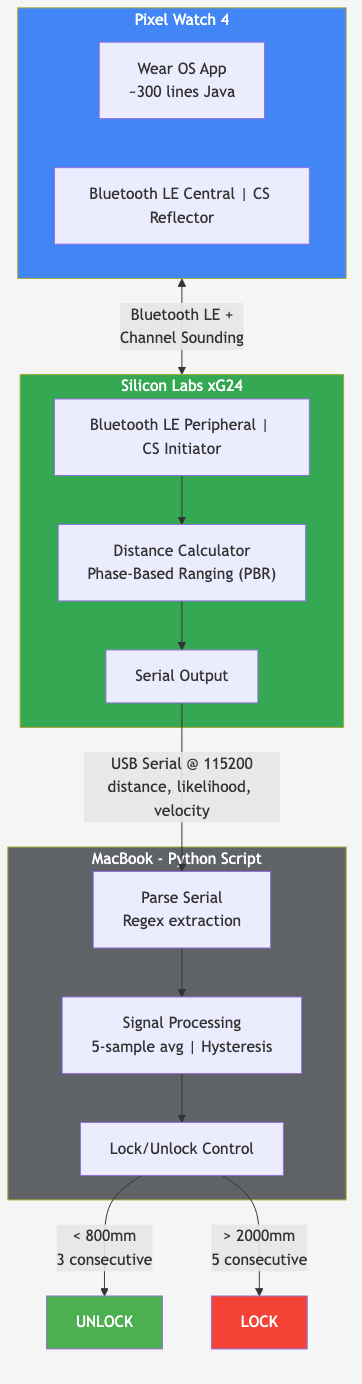
I'm providing all the source code for free—you can download the watch app (source code plus a pre-built APK if you just want to install and go), the Mac script, and get the SoC firmware from Silicon Labs to build this exact demo yourself.
1. Pixel Watch 4 (Wear OS)
The watch runs a custom Android app that acts as the Bluetooth LE Central (it initiates the connection) and the CS Reflector (it responds to ranging requests). The app is intentionally minimal—around 300 lines of Java—because the watch's job is simply to establish and maintain the Bluetooth LE connection. All the ranging calculations happen on the other device.
I didn't fully realize this until I pulled out my Bluetooth sniffer: the watch doesn't actually see any distance values. It participates in the Channel Sounding procedure by responding to radio signals, but the Initiator (the SoC in our case) performs all the distance calculations.
There's also a practical advantage to using a watch for proximity applications: a watch worn on your wrist is almost always in clear line of sight when you're walking toward something. Compare that to a phone that might be in your pocket or bag, where your body can obstruct the signal path. For ranging accuracy, that visibility matters.
2. Silicon Labs xG24-DK2606A (Channel Sounding Dev Kit)
The Silicon Labs SoC acts as the Bluetooth LE Peripheral (it advertises and waits for connections) and the CS Initiator (it controls ranging procedures and calculates distance). This might seem like an unusual pairing—we'll explore why these roles can be mixed in the roles section below.
The SoC is responsible for the ranging logic. It:
- Advertises for Bluetooth LE connections
- Schedules Channel Sounding procedures (as the Initiator)
- Processes the phase measurements to calculate distance
- Outputs distance values over USB serial
3. MacBook with Python Script
A Python script running on the Mac reads distance measurements from the SoC's serial output. The script applies smoothing and hysteresis to handle the natural variation in ranging measurements, then locks or unlocks the Mac based on configurable thresholds (80 cm to unlock, 200 cm to lock in my setup).
How It All Connects
The data flows in one direction:
- Watch ↔ SoC: Bluetooth LE connection carries Channel Sounding procedures. The devices exchange radio signals across multiple frequencies, and the phase shifts of these signals reveal the distance.
- SoC → Mac: The SoC calculates distance and sends measurements over USB serial (simple ASCII text, one measurement per line).
- Mac → Lock/Unlock: The Python script parses measurements and uses macOS APIs to control the screen lock.
What I like about this architecture is that each component does one thing well. The watch maintains the wireless link. The SoC handles the ranging math. The Mac makes the unlock decision. If you wanted to swap out the unlock behavior (say, for a smart door lock), you'd only need to replace the Mac component.
Understanding Channel Sounding Roles
One of the concepts that confused me early on was the relationship between traditional Bluetooth LE roles and Channel Sounding roles. Let's break this down because understanding these roles is essential for designing your own Channel Sounding applications.
Bluetooth LE Roles: Central and Peripheral
These are the standard Bluetooth LE connection roles you're probably familiar with:
- Central: Scans for devices, initiates connections, and controls connection timing. Typically the more powerful device (phone, laptop, gateway).
- Peripheral: Advertises its presence and waits for connection requests. Typically the low-power device (sensor, beacon, accessory).
For example, in a traditional setup, your phone (Central) connects to your fitness tracker (Peripheral). The Central controls when data exchanges happen by managing the connection parameters.
Channel Sounding Roles: Initiator and Reflector
Channel Sounding introduces a separate pair of roles that operate independently from the Bluetooth LE connection roles:
- Initiator: Controls the ranging procedure—schedules when ranging happens, collects phase data from both devices, and performs the distance calculation. The Initiator is the device that knows how far away the other device is.
- Reflector: Responds to ranging requests by transmitting and receiving signals at precise times. The Reflector participates in the ranging procedure but doesn't calculate the distance itself.
The key insight: the Reflector never sees the distance value. In our demo, the watch acts as the Reflector, which means the watch app has no idea how far away it is from the SoC. All it does is maintain the Bluetooth LE connection and let the Bluetooth stack handle the Channel Sounding procedure. The SoC (Initiator) performs all the math and outputs the distance.
Why These Roles Can Be Mixed
What surprised me when learning about Channel Sounding was that Bluetooth LE roles and CS roles are completely independent. According to the Bluetooth Core Specification, both Central and Peripheral devices can act as either Initiator or Reflector.
This means you can have:
- Central + Initiator: The device that controls the Bluetooth LE connection also controls ranging. For example, your phone acts as Central to connect to your car, and as Initiator to measure distance for passive entry.
- Central + Reflector: The device that controls the Bluetooth LE connection lets the other device handle ranging (our demo).
- Peripheral + Initiator: The accessory controls ranging even though it's the peripheral (useful when the accessory needs the distance)—this is what our demo uses.
- Peripheral + Reflector: The accessory responds to ranging requests (traditional sensor model).
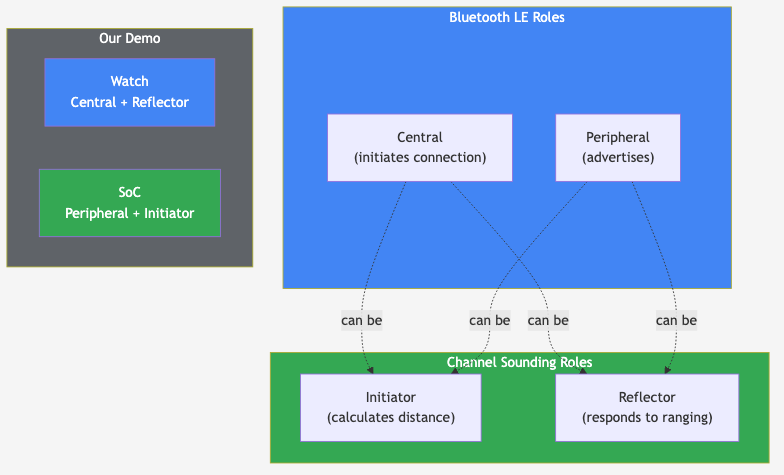
In our demo, we chose Watch as Central + Reflector and SoC as Peripheral + Initiator. Why? A few reasons:
- Simplicity: The watch app only needs to establish a connection—no ranging APIs required since the Android Ranging API doesn't provide callbacks when an external device initiates CS procedures.
- Algorithm control: Having the SoC as the Initiator gives us direct access to the ranging calculations and lets us customize how distance is computed.
- Existing code: Silicon Labs had already developed and tested the Peripheral + Initiator configuration on their SoC.
- Flexibility demonstration: This unusual role combination shows that Channel Sounding truly allows mixing roles based on your application needs.
The roles you choose depend on your specific use case. Consider questions like: Which device needs to know the distance? Which device has better processing power for the ranging calculations? Which device should control when ranging happens? Do you need more control over the distance measurement algorithm?
The Silicon Labs SoC: Peripheral + Initiator
Let's look at what the SoC does in this system. The xG24-DK2606A runs a Channel Sounding Initiator application that handles all the ranging logic. As the Bluetooth LE Peripheral, it advertises and waits for connections. As the CS Initiator, it controls when ranging procedures happen and performs all the distance calculations.
At a high level, the SoC is responsible for:
- Advertising: Broadcasting its presence so the watch can find and connect to it
- Accepting connections: Handling pairing and encryption when the watch connects
- Channel Sounding procedures: Scheduling and executing the ranging measurements
- Distance calculation: Processing the raw phase data to produce distance values
- Output: Sending distance measurements to the Mac via USB serial
The firmware uses Silicon Labs' Channel Sounding sample application as a foundation. For this demo, the key configuration choices were antenna selection and pairing behavior—but the ranging logic itself comes from Silicon Labs' well-tested implementation.
The GATT Ranging Service (RAS)
Let's dig into one aspect of the architecture that isn't immediately obvious: the role of GATT (Generic Attribute Profile) in Channel Sounding applications. In two-way ranging, both devices take measurements during the CS procedure. The Reflector then sends its measurements to the Initiator via the GATT Ranging Service (RAS), and the Initiator combines both sets of data to calculate the final distance.
The Ranging Service (UUID 0x185B) is defined in the Bluetooth specification and includes several characteristics:
- Real-time Ranging Data (UUID 0x2C15): Streams ranging measurements as they're captured
- On-demand Data (UUID 0x2C16): Allows requesting specific ranging data
- RAS Control Point (UUID 0x2C17): Controls ranging behavior and configuration
In our demo, the watch (Reflector) sends its measured phase data to the SoC (Initiator) via RAS. The Android Bluetooth stack handles this RAS communication automatically—the watch app doesn't need to explicitly manage the GATT characteristics. The SoC receives the Reflector's measurements, combines them with its own, and calculates the distance.
This layered architecture is worth understanding: Channel Sounding operates at the link layer (handled by the Bluetooth controller), while the RAS service provides the application-layer mechanism for exchanging ranging data between devices. The Initiator needs data from both sides to perform accurate distance calculations.
Antenna Configuration and Diversity
The demo uses an asymmetric antenna setup that affects ranging accuracy:
- Pixel Watch 4: Single antenna
- Silicon Labs xG24-DK2606A: Two antennas with antenna diversity
This creates a 2-antenna path for Channel Sounding measurements. The SoC can switch between antennas during the ranging procedure (and does so in this demo), which helps mitigate multipath interference and improves accuracy in real-world environments.
Antenna diversity is particularly valuable for Channel Sounding because:
- Different antenna positions capture different signal paths
- Reduces the impact of signal reflections and obstacles
For this demo, the key configuration choices were antenna selection timing and pairing behavior—but the ranging logic itself comes from Silicon Labs' well-tested implementation.
The Watch App: Central + Reflector
The Wear OS app is intentionally minimal. Since the watch acts as the Reflector, it doesn't need to do any ranging calculations—its entire job is to establish and maintain a Bluetooth LE connection to the SoC. The Bluetooth stack handles the Channel Sounding procedure at the link layer without any app involvement.
This is a key architectural insight: the app doesn't call any Channel Sounding APIs. It simply creates a standard Bluetooth LE connection, and the underlying Bluetooth controller handles the ranging procedures automatically when the Initiator (SoC) requests them.
Connection Flow
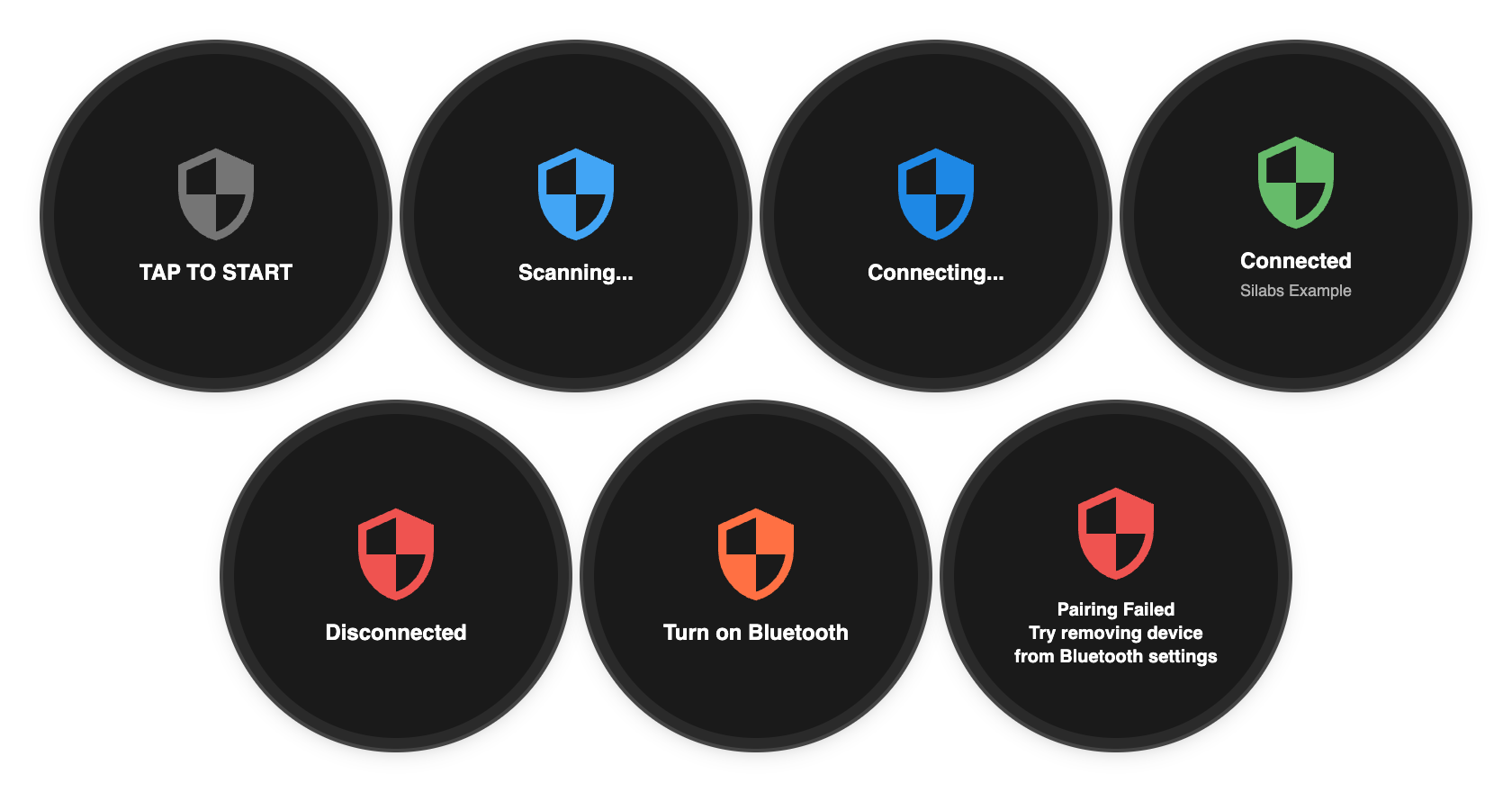
The app follows a straightforward connection flow:

- Idle: Waiting for user interaction (tap to start in this demo)
- Scanning: Looking for the SoC by its advertised name
- Connecting: Establishing the Bluetooth LE connection and handling pairing
- Connected: Link established—Channel Sounding procedures now run automatically at the link layer
The app also handles error states like Bluetooth being disabled, connection failures, and pairing issues. These are important for user experience but don't affect the core ranging functionality.
Why the Watch Doesn't See Distance Values
One thing worth emphasizing: the watch app has no idea how far away it is from the SoC. As the Reflector, it participates in the ranging procedure by responding to radio signals at precise times, but all the distance calculations happen on the Initiator side.
If the watch needed to know the distance (for example, to display it on screen), it would need to either become the Initiator itself, or the SoC would need to send the calculated distance back over GATT. In our architecture, neither is necessary—the Mac receives the distance directly from the SoC over USB.
Background Behavior
An important characteristic of this architecture: the Bluetooth LE connection persists even when the watch app goes to the background. Channel Sounding procedures continue running at the link layer because they're managed by the Bluetooth controller, not the application. You can switch to a different watch face and the proximity demo keeps working.
The tap-to-start behavior is purely for the demo—it gives a clear trigger point for the video. In a production application, you'd want the connection to happen automatically when the watch comes within range, using background scanning and automatic reconnection.
The Mac Unlock Script: Distance Processing and Control
The final piece is a Python script running on the Mac that reads distance measurements from the SoC and controls the screen lock. The script bridges the gap between raw ranging data and meaningful actions.
This script is provided for demonstration and educational purposes only. What you should understand about how it works:
- Password storage: Your Mac password is stored in macOS Keychain (encrypted), not in plain text.
- Password entry: The script types your password programmatically using macOS APIs. While safety checks verify the lock screen is active before typing, this approach has inherent security implications compared to Apple's native unlock mechanisms.
- Not production-ready: This is a proof-of-concept to demonstrate Channel Sounding capabilities—it is not a secure authentication system.
What the Script Does
The script has three core responsibilities:
- Receive measurements: Read distance data from the SoC via USB serial
- Process the data: Apply smoothing and thresholds to make reliable decisions
- Control the Mac: Lock or unlock the screen based on processed distance
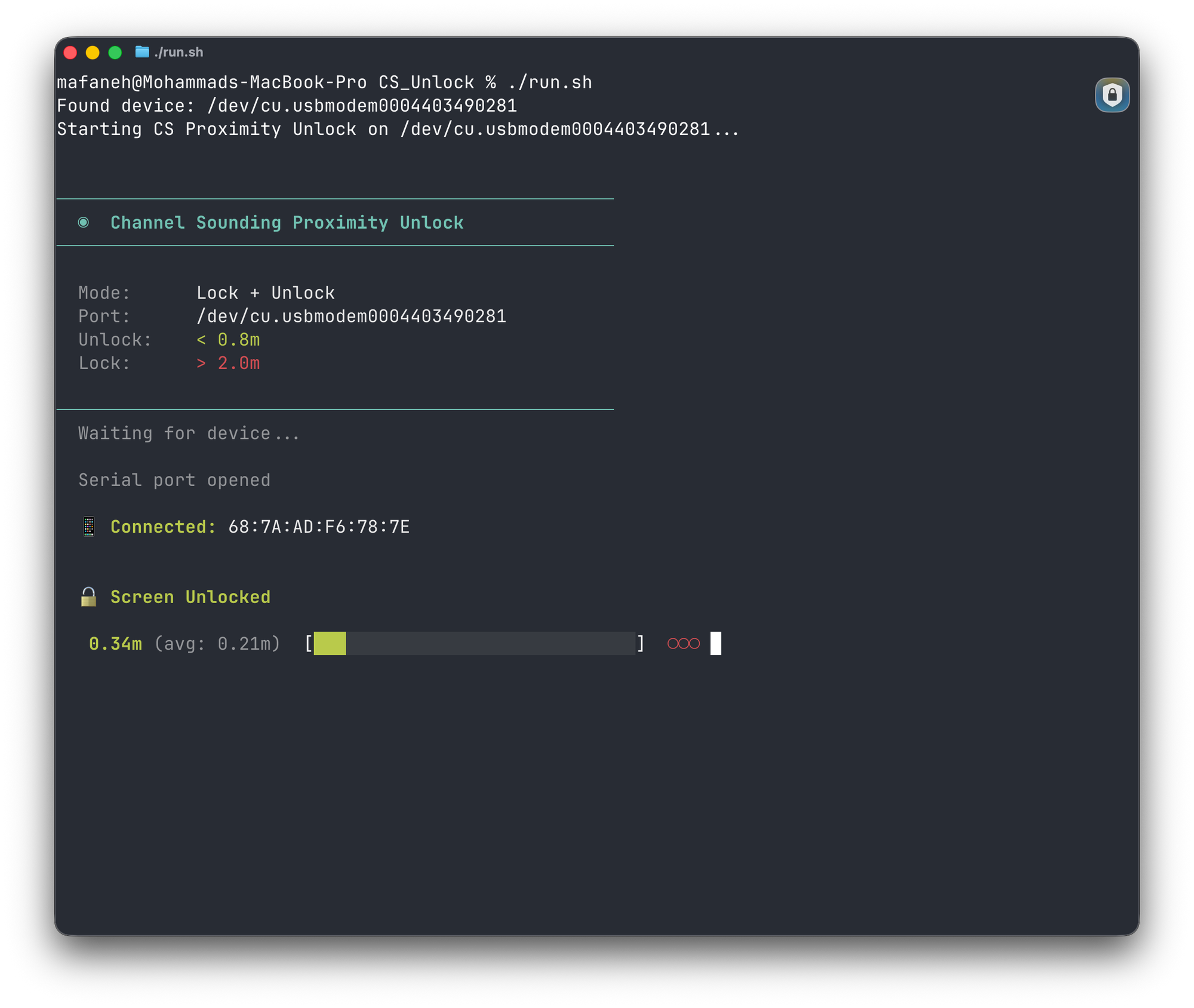
Each measurement from the SoC includes the distance (in millimeters), a confidence score, and velocity. The script monitors for both measurement data and connection events—when a device disconnects, the script automatically locks the screen as a safety measure.
Why Signal Processing Matters
Raw distance measurements can vary between readings, even under ideal conditions. A single outlier could trigger an unwanted lock or unlock. The script addresses this with two techniques:
- Moving average: Instead of reacting to individual measurements, the script maintains a rolling window of recent readings and uses their average. For example, if five readings come in as 75 cm, 82 cm, 68 cm, 79 cm, and 76 cm, the averaged value of 76 cm gives a more stable picture than any single reading.
- Consecutive reading requirement: Before triggering an action, the script requires multiple consecutive readings past the threshold. This prevents brief fluctuations from causing false triggers.
Proximity Zones and Hysteresis

Let's look at how the script decides when to act. It defines three proximity zones:
- Near zone: Close enough to unlock (configurable, around 80 cm in my setup)
- Dead zone: Between near and far—no action taken
- Far zone: Far enough to lock (configurable, around 200 cm in my setup)
The gap between unlock and lock thresholds (the "dead zone") is intentional. It prevents oscillation when you're at the edge of a threshold—you have to move decisively closer or further away to trigger an action. For example, if you're sitting at 1.5 meters (between the 80 cm unlock and 200 cm lock thresholds), the system stays in its current state rather than rapidly toggling. This is a classic hysteresis pattern used in many control systems.
The script also includes safety checks that verify the lock screen is active before attempting to unlock. This prevents the password from being typed into the wrong application if something unexpected happens with macOS window focus.
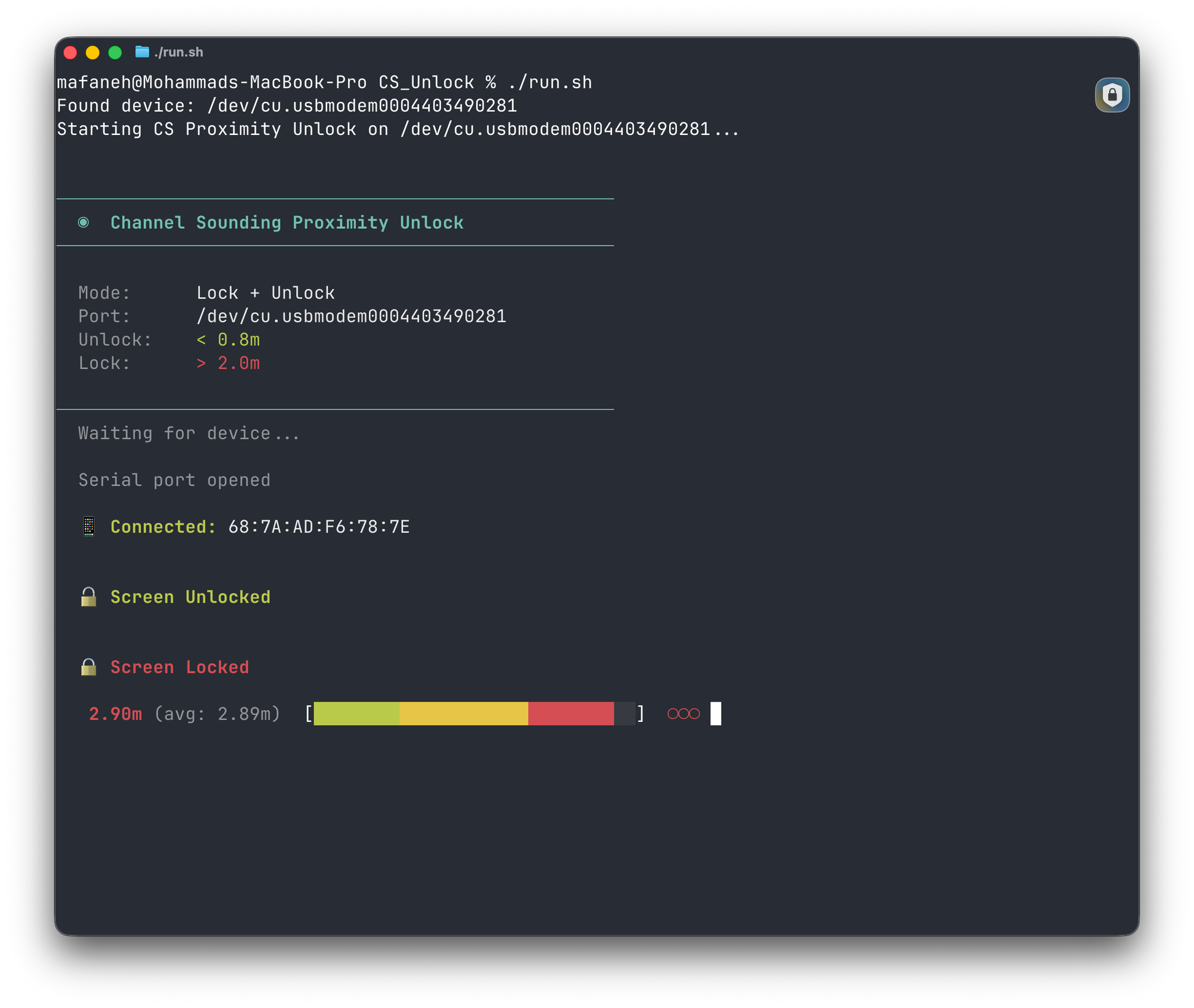
Live Demo
Now let's see everything working together. In this video, I walk through the hardware setup, explain the threshold distances, show the raw serial output from the SoC, and then run a live test with a measuring tape to demonstrate the lock and unlock behavior at precise distances.
What to Watch For
In the video, here are the key moments to watch for:
- Hardware and setup: I walk through the three components—the Pixel Watch 4 (Reflector), the Silicon Labs xG24 dev kit with dual antennas (Initiator), and the Python script reading distance measurements from the SoC's serial port.
- Raw serial output: Before running the Python script, I show what the firmware outputs directly to the serial port—this gives you a sense of the raw data the script works with.
- Initial pairing: When I tap the watch screen, it scans for the SoC, pairs, and establishes the Bluetooth LE connection. The Python script immediately starts displaying live distance measurements.
- Walking to the two-meter mark: With a measuring tape on the ground, I walk back to exactly two meters. You can see the distance readings climbing in the terminal, and when I hit the threshold, the Mac locks.
- The dead zone: As I walk back toward the Mac, I pause around 1.1–1.2 meters—right in the dead zone between the lock and unlock thresholds. Nothing happens, which is exactly what the hysteresis is designed to do.
- Walking to 0.8 meters: When I step closer to the 0.8-meter mark, the Mac automatically unlocks. No button press, no Touch ID—just my presence.
The key thing to notice is how accurate the distance readings are compared to the actual measuring tape on the ground. Channel Sounding provides readings at a high rate, and with the smoothing and hysteresis I've configured, the lock/unlock actions feel responsive without being twitchy.
What This Demo Shows (and What It Doesn't)
This is a demo, not a production application. A few things to keep in mind:
- Tap-to-start is for demo purposes. In a real product, you'd want the watch to automatically scan and connect in the background when you're near your Mac.
- The password typing approach is for demo purposes. Production applications would use macOS APIs for seamless unlock without needing to store a password.
- Line of sight matters. Channel Sounding works best with clear line of sight. Obstacles between the watch and SoC can affect accuracy, though it's still much better than RSSI.
What this demo does show is the potential. Bluetooth Channel Sounding provides the accuracy needed for true proximity-based access control. Whether it's your Mac, your car, or your front door, the technology enables knowing not just "is this device nearby" but "is this device within arm's reach."
In a production implementation, the experience would be completely passive—you'd simply walk toward your Mac and it unlocks, walk away and it locks, with no user interaction required. That's the real promise of Channel Sounding: security that works in the background without demanding your attention.
Want to try this yourself? Grab the watch app and the Mac script—you can have this running in an afternoon.
What's Next
Beyond Proximity Unlock
The proximity unlock demo is just one application. Channel Sounding enables many other use cases:
- Digital car keys: Unlock your car as you approach, with the precision to know whether you're at the driver door or the trunk.
- Smart door locks: Hands-free home access that actually works reliably, not just "sometimes when you're holding your phone the right way."
- Asset tracking: Find tagged items with sub-meter precision—useful in warehouses, hospitals, and large facilities.
- Industrial access control: Secure zones that respond to exactly where a worker is standing, not just "somewhere in the building."
- Retail and hospitality: Personalized experiences triggered by precise customer location, not broad proximity.
Beyond the Development Kit
You might be wondering why this demo needs an external development kit at all. The answer is timing—Channel Sounding was only added to the Bluetooth specification in September 2024, and laptop manufacturers haven't shipped Bluetooth chips with this capability yet.
But what makes this interesting: Channel Sounding doesn't require new hardware categories. Unlike UWB, which needs dedicated chips (Apple's U1/U2, for example), Channel Sounding is an extension of standard Bluetooth. The same radio that pairs your AirPods could, in principle, handle secure ranging.
What we're building with a dev kit today is really a prototype for functionality that could ship natively in your next MacBook or PC. Intel, Qualcomm, and Apple all make Bluetooth silicon—once they add Channel Sounding support, this kind of proximity unlock could work out of the box. No dongle, no extra hardware, just your laptop and your watch.
Summary
In this post, we covered:
- What Channel Sounding is and why it's fundamentally different from RSSI-based approaches (introduced in Bluetooth Core Specification 6.0)
- The difference between Bluetooth LE roles (Central/Peripheral) and CS roles (Initiator/Reflector)—and why they can be mixed independently
- The three-component architecture: Watch (Central + Reflector), SoC (Peripheral + Initiator), and Mac (distance processing and control)
- How the GATT Ranging Service (RAS) provides an application-layer interface to ranging data
- Signal processing concepts like smoothing, hysteresis, and proximity zones for reliable decision-making
- A complete working demo of proximity-based access control
You should now be able to understand how Channel Sounding works at a conceptual level, why it's fundamentally different from RSSI-based approaches, and how the various roles and layers fit together in a real system. No more guessing games with signal strength—Channel Sounding gives you the precision to know exactly where devices are. Whether you're building digital keys, smart locks, or other proximity-based applications, this technology provides the accuracy foundation you need.
Resources
Get the Code
Documentation & References
- Silicon Labs xG24-DK2606A Channel Sounding Dev Kit
- Silicon Labs Channel Sounding Documentation
- Bluetooth Core Specification 6.0
- Bluetooth SIG Channel Sounding Overview


