


If you’ve been following Bluetooth audio over the last few years, you’ve probably noticed two names showing up everywhere: Bluetooth LE Audio and Auracast. They’re often used interchangeably, and that’s the first thing worth straightening out, because they’re not the same thing.
LE Audio is the entire next-generation Bluetooth audio platform. It’s the replacement story for A2DP, the stereo audio profile that’s powered Bluetooth headphones since the early 2000s. Auracast is one feature inside LE Audio, specifically the broadcast audio feature, where a single transmitter can send audio to an unlimited number of receivers without any pairing.
The relationship is something like: LE Audio is the road, Auracast is one (very interesting) car on that road.
In this post, we’ll cover:
- What Bluetooth LE Audio actually is, and the three building blocks underneath it
- What Auracast is, how it works end-to-end, and how it differs from A2DP
- The six LE Audio profiles you’ll keep seeing referenced (BAP, PBP, CAP, TMAP, HAP, GMAP) and what each one is responsible for
- What the LE Audio software situation looks like from a developer’s perspective today
- A short FAQ at the bottom covering the questions I get asked most
Key takeaways
- LE Audio is the umbrella name for the new Bluetooth audio stack built on Bluetooth LE (not Classic). Its three foundational building blocks are the LC3 codec, isochronous channels (CIS and BIS, introduced in Bluetooth 5.2), and multi-stream audio.
- Auracast is one feature within LE Audio: one-to-many broadcast audio over Broadcast Isochronous Streams (BIS), with no pairing required between source and receiver.
- The LE Audio profile suite (BAP, PBP, CAP, TMAP, HAP) was published in mid-2022. The Gaming Audio Profile (GMAP) was added later.
- The three Auracast use cases worth knowing: public venues (airports, gyms, gate announcements), assistive listening (hearing aids in public spaces, a huge accessibility story), and personal audio sharing (one phone driving multiple sets of headphones).
- Six LE Audio profiles cover the layered stack: BAP (foundation), PBP (public Auracast streams), CAP (coordination across devices), TMAP (telephony and media), HAP (hearing aids), GMAP (low-latency gaming).
What is Bluetooth LE Audio?
LE Audio is the rebuild of Bluetooth audio on top of Bluetooth Low Energy. That’s worth pausing on. For two decades, all the Bluetooth audio you’ve ever heard (headphones, speakers, hands-free in your car) ran on Bluetooth Classic, also called BR/EDR (Basic Rate / Enhanced Data Rate). LE Audio moves the entire audio stack over to Bluetooth LE, which is the lower-power radio that’s been used mostly for sensors, beacons, and notifications until now.
Let’s look at the three things that make LE Audio possible:
1. The LC3 codec. LC3 stands for Low Complexity Communication Codec. It replaces the SBC codec that’s been mandatory for A2DP. LC3 delivers better audio quality at lower bitrates than SBC, which is the whole reason LE Audio can match or beat Classic audio quality while using less radio time and less battery. That last point matters a lot for earbuds, where every milliwatt saved is more battery life.
2. Isochronous channels. Introduced in Bluetooth Core Specification version 5.2, isochronous channels are the time-synchronized transport that audio needs to work over Bluetooth LE. They come in two flavors:
- CIS (Connected Isochronous Stream): unicast, one-to-one. Used for things like a phone streaming music to a single pair of earbuds.
- BIS (Broadcast Isochronous Stream): broadcast, one-to-many. This is the foundation Auracast is built on.
3. Multi-stream audio. LE Audio is natively multi-stream from the bottom up. A pair of true wireless earbuds can each receive their own independent, synchronized stream from the phone (a real left and a real right channel), instead of the awkward Classic-Bluetooth workaround where one bud forwards audio to the other.
The LE Audio profile suite (the upper-layer specifications that define how all of this gets used in real products) was rolled out by the Bluetooth SIG between late 2021 and mid-2022. Basic Audio Profile v1.0 was adopted 2021-09-14, with v1.0.1 following on 2022-06-21. Common Audio Profile v1.0 landed 2022-03-22, Hearing Access Profile v1.0 on 2022-06-07, Telephony and Media Audio Profile v1.0 on 2022-06-11, and Public Broadcast Profile v1.0 on 2022-07-05 (per the spec front matter on each profile’s Bluetooth SIG specification page).
If you want a deeper look at the spec-mechanics layer (LC3 frame structure, presentation delay, EATT, LE Power Control), we have a separate post on Bluetooth 5.2 features that goes into those details. This post stays focused on Auracast and the profile stack.
What is Auracast?
Let’s start with the short definition. Auracast is the Bluetooth SIG’s brand name for broadcast audio built on top of Broadcast Isochronous Streams. Functionally, an Auracast transmitter advertises one or more audio streams over BIS, and any nearby receiver can discover and join those streams without pairing, without prior knowledge of the transmitter, and without limit on how many receivers can listen at once.
Let’s walk through what that actually looks like end-to-end:
- The transmitter (say, a TV at the airport gate, or a microphone at a yoga class) configures one or more Broadcast Isochronous Groups (BIGs), each containing one or more BIS. Each BIS carries an LC3-encoded audio stream.
- Alongside the audio data, the transmitter sends out Extended Advertisements containing a Broadcast Audio Announcement (defined in the Basic Audio Profile, Service UUID 0x1852) and, if it claims Auracast compliance, a Public Broadcast Announcement (defined in the Public Broadcast Profile, Service UUID 0x1856). A third element, the Basic Audio Announcement (BAP, Service UUID 0x1851), travels in the periodic advertising train and carries the Broadcast Audio Source Endpoint (BASE) structure that describes the actual audio stream configuration. Together, these three tell a receiver what’s available, at what quality, and how to decode it.
- A receiver (your earbuds, your hearing aid, your phone) scans for those advertisements, picks a stream that matches its capabilities, and synchronizes to the BIG to start decoding audio.
- Optionally, an Auracast Assistant (typically your phone) can scan on behalf of a constrained device (like a hearing aid that doesn’t have a great UI), find the right stream, and tell the receiver which BIG to lock onto. The Assistant is what makes “tap the airport gate sign with your phone, your hearing aids start playing the announcement” actually work.
Three use-case archetypes are worth keeping in your head, because they map directly onto how Bluetooth SIG positions Auracast publicly (“Share your audio,” “Unmute your world,” “Hear your best”):
- Public venues. Airports, gyms, train stations, conference rooms, museum exhibits, gate announcements. Anywhere there’s a TV on mute or a sound system that would benefit from a wireless overlay.
- Assistive listening. Hearing aid users in public spaces. This is the huge one for accessibility (no more dragging hearing-loop wiring around historic buildings).
- Personal audio sharing. One phone, multiple listeners, each on their own headphones. You and a friend on a plane watching the same movie, each with your own earbuds.
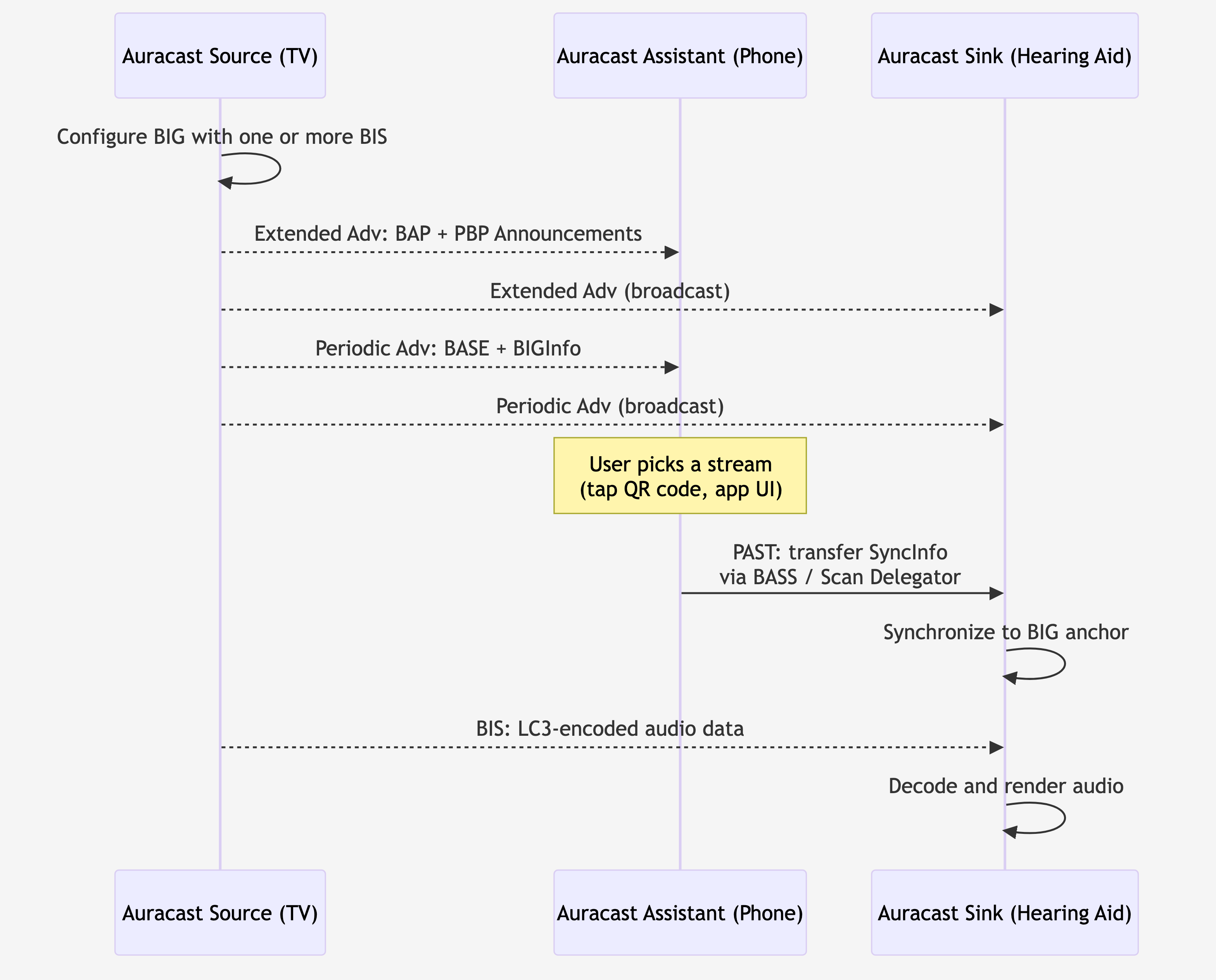
Figure 1: Auracast end-to-end. The Source advertises the broadcast (extended adv and periodic adv). The Assistant helps a constrained Sink find the right stream by transferring SyncInfo via the BASS / Scan Delegator path. The Sink synchronizes to the BIG and decodes the LC3 audio.
How is this different from A2DP?
A2DP (Advanced Audio Distribution Profile) is the legacy stereo audio profile that’s powered Bluetooth headphones since the early 2000s. A reasonable comparison:
| Dimension | A2DP | Auracast |
|---|---|---|
| Transport | Bluetooth Classic (BR/EDR) | Bluetooth LE (BIS, introduced in 5.2) |
| Topology | Unicast, one-to-one | Broadcast, one-to-unlimited |
| Mandatory codec | SBC (with AAC, aptX, LDAC as optional) | LC3 |
| Pairing required? | Yes | No |
| Native multi-stream | No (TWS hacks around it) | Yes |
| Encryption | Per-connection (paired) | Optional, via 16-octet Broadcast_Code shared out-of-band |
Auracast is also explicitly designed to be discoverable without bonding. A2DP requires a pairing dance up front. Auracast receivers just listen for advertisements and join. That changes the user experience pretty fundamentally: you don’t “pair with an airport,” you just walk up and tune in.
One nuance worth knowing: Auracast streams can be encrypted. The transmitter optionally sets a 16-octet Broadcast_Code that receivers need in order to decrypt the BIS payload (defined in the Core Specification v6.3 §4.4.6.10). For public Auracast streams this is usually disabled (you want the airport announcement to reach everyone), but for private personal Auracast (you sharing your music with one specific friend) you can lock it with a code distributed via a QR code or the Auracast Assistant flow.
-
Broadcast Audio Announcement, Service UUID
0x1852, defined by BAP -
Public Broadcast Announcement, Service UUID
0x1856, defined by PBP - Broadcast_Name (human-readable identifier of the broadcast)
-
Basic Audio Announcement, Service UUID
0x1851, defined by BAP - BASE: codec configuration, audio channel allocation, presentation delay, metadata
- BIGInfo: BIS scheduling parameters and encryption status
Figure 2: The three advertising elements an Auracast transmitter sends. The Extended Advertising train carries the Broadcast Audio Announcement (0x1852, BAP) and the Public Broadcast Announcement (0x1856, PBP), the Periodic Advertising train carries the Basic Audio Announcement (0x1851, BAP) and the BASE plus BIGInfo, and the actual audio rides on the Broadcast Isochronous Stream (BIS).
The LE Audio profile stack
Let’s now step back and look at the LE Audio profile stack as a whole. LE Audio is intentionally layered: each profile builds on the ones below it, and devices can implement just the layers they need. Let’s walk through all six, because while it can feel like a lot of acronyms, the layering actually makes a lot of sense once you see it.
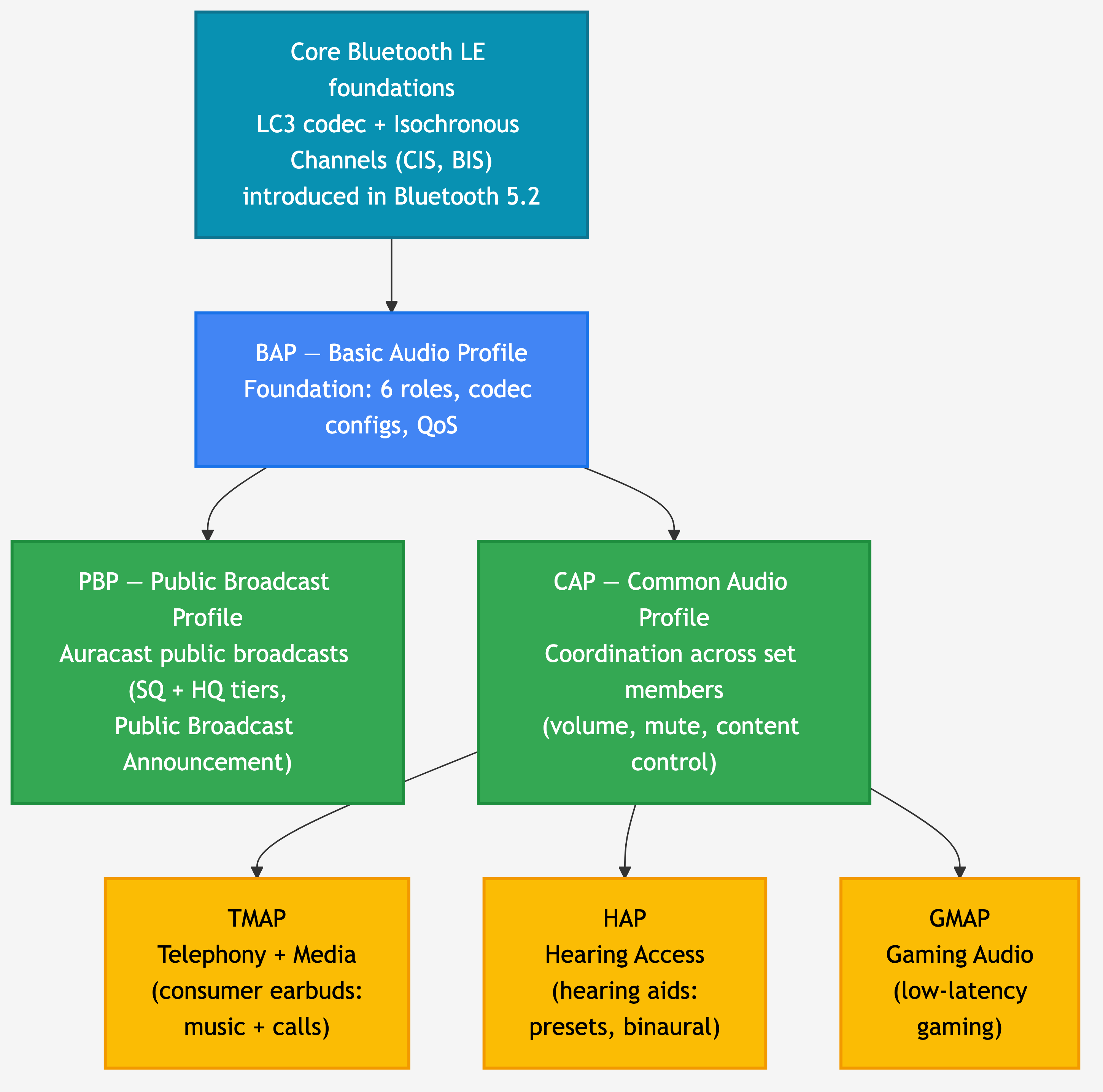
Figure 3: The LE Audio profile stack. BAP is the foundation every device implements. PBP adds the Auracast public-broadcast rules on top of BAP. CAP adds the coordination layer used by the consumer-product profiles (TMAP for media + telephony, HAP for hearing aids, GMAP for gaming).
BAP: Basic Audio Profile
BAP is the foundation. Everything else in the LE Audio stack depends on it.
BAP defines six profile roles (per BAP v1.0.2 §2.2):
- Unicast Server (a device that exposes audio capabilities and receives a unicast stream, e.g. an earbud)
- Unicast Client (a device that initiates unicast streams, e.g. a phone)
- Broadcast Source (a transmitter of broadcast audio, e.g. an Auracast TV)
- Broadcast Sink (a receiver of broadcast audio, e.g. an Auracast-compatible earbud)
- Broadcast Assistant (a helper device that scans on behalf of a constrained receiver, e.g. your phone helping your hearing aid find a stream)
- Scan Delegator (the constrained device’s side of the Assistant relationship)
BAP also defines the codec configurations every LE Audio device must support, plus the Quality of Service (QoS) configurations for unicast audio (retransmission counts, transport latency, presentation delay, framing). Those QoS configurations are what let a chipset claim “compatible with LE Audio” with confidence.
If you implement nothing else, you implement BAP. Everything from a $20 earbud to a public Auracast loudspeaker speaks BAP underneath.
PBP: Public Broadcast Profile
PBP is the profile that defines what Auracast actually looks like over the air for public-venue broadcasts. It’s a thin layer on top of BAP that adds two important things.
First, it defines two stream quality tiers:
- Standard Quality (SQ): 16 kHz or 24 kHz sample rate with 10 ms frames. PBP-compliant (Auracast) receivers are required to support SQ, which means every Auracast receiver is guaranteed to be able to play it.
- High Quality (HQ): 48 kHz sample rate with 10 ms frames. Optional. Lets premium devices stream higher-fidelity audio when the receiver can handle it.
Second, PBP defines the Public Broadcast Announcement (Service UUID 0x1856), which is the data element a transmitter includes in its Extended Advertisements to tell receivers “this is an Auracast-compliant public broadcast, and here’s whether I’m transmitting at SQ, HQ, or both.” Public Auracast transmitters are required to make at least one SQ stream available, so a hearing aid that can only decode SQ never gets shut out of an airport announcement.
The Auracast Transmitter Recommendations document spells out the rules for public transmitters specifically: you must transmit at least one SQ stream, you must publish the Public Broadcast Announcement, and you should usually leave the stream unencrypted (so receivers can join without a code).
CAP: Common Audio Profile
CAP is the coordination layer. Where BAP defines how a single device participates in audio streaming, CAP defines how multiple devices stay in sync, particularly when they belong to a Coordinated Set (the canonical example: a left earbud and a right earbud that act as one logical device).
CAP defines three roles (per CAP v1.0.1 §2.1):
- Acceptor (a peripheral that renders or transmits audio, e.g. an earbud or hearing aid)
- Initiator (a central that starts and controls audio streams, e.g. a phone or laptop)
- Commander (a controller that orchestrates a Coordinated Set’s behavior, e.g. a hearing aid remote that adjusts both ears simultaneously, or a phone’s volume slider that needs to set the same level on both earbuds at once)
Underneath, CAP uses the Coordinated Set Identification Service (CSIS) so that set members can find each other and recognize that they belong together. CAP procedures cover synchronized volume control, synchronized mute, microphone control, content control, and the audio-stream transitions between unicast and broadcast (the famous “your earbuds switch from listening to your phone’s music to listening to the gym TV’s Auracast and back again” handoff).
CAP is one of those profiles you don’t see, but you feel. Without it, your two earbuds would slowly drift on volume, and switching between music and Auracast would feel clunky.
TMAP: Telephony and Media Audio Profile
TMAP is the consumer-product profile. It sits on top of CAP and defines the roles and requirements for the two use cases most people actually use audio for: media playback and phone calls.
For our purposes, the two TMAP roles you’ll see referenced most often are Broadcast Media Sender and Broadcast Media Receiver (defined in TMAP §3.5.2). The Auracast Transmitter Recommendations document explicitly maps “Auracast transmitter” and “Auracast receiver” to these TMAP roles, which is how TMAP shows up in the Auracast story.
TMAP also defines unicast roles for telephony (call gateway and call terminal), so a hands-free LE Audio earbud + phone pair speaks TMAP for both the music-streaming and phone-call directions. If you’re building a consumer earbud or headphone with LE Audio, TMAP is the profile your product will most likely claim conformance with.
HAP: Hearing Access Profile
HAP is the hearing-aid-specific profile, and it’s one of the most genuinely consequential parts of the LE Audio rollout for end users.
HAP defines four roles (per HAP v1.0.1 §2.1):
- HA (Hearing Aid). Implemented on the hearing aid itself. Can be a single Monaural Hearing Aid, a Banded Hearing Aid (one device with separate left/right outputs), or a member of a Binaural Hearing Aid Set (matched left + right pair).
- HAUC (Hearing Aid Unicast Client). A device that sends unicast audio to the hearing aid, typically a smartphone, tablet, or laptop.
- HARC (Hearing Aid Remote Controller). A device (e.g. a dedicated remote, or your phone in remote-controller mode) that adjusts hearing-aid volume, mute, and presets (named hearing-aid configurations like “quiet room,” “restaurant,” “outdoor”).
- IAC (Immediate Alert Client). A device that can grab the HA wearer’s attention (think: a doorbell triggering an alert through the hearing aid).
The preset system is one of HAP’s defining features. The Hearing Access Service exposes a list of named preset records (in UTF-8, localized to the wearer’s language), and a controller can switch between them via the Preset Control Point characteristic. So a hearing aid wearer with a “noisy restaurant” preset can hit one button on a remote and the hearing aid adjusts every parameter to match.
HAP requires Bluetooth Core Specification 5.2 or later for the HA, HAUC, and HARC roles (because isochronous channels are required). The simpler IAC role can run on Core 4.2.
GMAP: Gaming Audio Profile
GMAP is the most recent addition to the LE Audio profile family. It’s optimized for the one use case the original LE Audio profile set didn’t tune for: low-latency gaming.
GMAP defines four roles (per GMAP v1.0.1 §2.2):
- UGG (Unicast Game Gateway): smartphones, gaming devices, laptops, tablets, PCs (the source of game audio)
- UGT (Unicast Game Terminal): gaming headphones, earbuds, wireless microphones (the rendering side)
- BGS (Broadcast Game Sender): broadcast game audio source
- BGR (Broadcast Game Receiver): broadcast game audio sink
What makes GMAP “low latency” is its set of mandatory codec configurations and the corresponding QoS constraints. GMAP devices target end-to-end audio latency in the 20-30 ms range with various reliability/latency trade-offs the controller can pick from (per GMAP v1.0.1 §3.5.2.3 Table 3.22). For comparison, the LE Audio default media QoS settings target higher transport latency for better reliability, which is fine for music but noticeable in gaming.
If you’ve ever fired a gun in a competitive shooter and heard the muzzle flash three frames before the sound, you understand why GMAP exists.
Getting started as a developer
Let’s bring this down to ground level. Here’s the honest 2026 picture of where LE Audio is on the silicon and SDK side.
Nordic Semiconductor is the most LE Audio-ready of
the silicon vendors I track. Their flagship LE Audio chip is the
nRF5340, a dual-core SoC explicitly architected for LE
Audio: the 128 MHz application core handles LC3 encode/decode and your
application, and the 64 MHz network core runs a dedicated LE Audio
Bluetooth controller (per the nRF5340
Audio DK product page). The newer nRF54H20 is also
positioned for LE Audio applications. nRF Connect SDK ships the full
stack: LE Audio Controller, Zephyr-based Bluetooth Host, the licensed
LC3 codec library, the LE Audio profiles from Zephyr, and a complete
reference application at applications/nrf5340_audio that
you can build as a USB dongle, TWS earbud, headset, or broadcast
receiver. NCS v2.0.0 introduced experimental LE Audio support; v2.6.0
promoted isochronous channels to “supported” maturity; v2.8.0 added the
nRF Auraconfig sample, which can act as an Auracast
broadcaster with configurable presets.
Beyond Nordic, two other vendors have shipping LE Audio support today worth knowing about. NXP’s IW612 connectivity SoC brings BIS and CIS to MCUXpresso, and STMicroelectronics’ STM32WBA family (Bluetooth 5.4) provides LE Audio through STM32CubeWBA. Coverage on both is less mature than Nordic’s flagship LE Audio platform, so the safest move is to confirm the specific profiles you need (BAP, PBP, CAP, TMAP, HAP, GMAP) with the vendor’s FAE before committing.
Several other Bluetooth LE silicon vendors don’t yet ship LE Audio in their public SDKs as of mid-2026, so plan around current shipping reality if you’re evaluating options outside the three above.
For learning the stack itself, the Bluetooth SIG publishes all six profile specifications (BAP, PBP, CAP, TMAP, HAP, GMAP) as free downloads on bluetooth.com. The two Auracast guideline documents (Auracast Transmitter Recommendations, and the Auracast Receiver and Assistant how-to papers) are also worth reading early because they’re written for implementers, not spec lawyers.
Frequently asked questions
Is Auracast the same as LE Audio?
No. LE Audio is the entire next-generation Bluetooth audio platform (built on Bluetooth LE, using the LC3 codec and isochronous channels). Auracast is one feature within LE Audio: the broadcast-audio feature, built on Broadcast Isochronous Streams (BIS). Every Auracast device is an LE Audio device, but not every LE Audio device implements Auracast.
Do I need a special chipset to support Auracast?
Yes. You need a Bluetooth chipset whose controller supports isochronous channels, which were introduced in Bluetooth Core Specification 5.2. Most pre-2022 Bluetooth LE silicon doesn’t support BIS, so you can’t add Auracast in software alone. Nordic’s nRF5340 is the canonical Auracast-capable chip today; NXP’s IW612 and STMicroelectronics’ STM32WBA also ship the foundation in their respective SDKs.
Does Auracast replace A2DP?
Over time, yes, but not overnight. A2DP and Bluetooth Classic audio aren’t being deprecated; they’ll coexist with LE Audio for years, especially in cars and legacy hardware. The long-term direction is that new audio products move to LE Audio, and Auracast handles the broadcast use cases (public venues, assistive listening, personal sharing) that A2DP literally cannot.
Can Auracast actually be used for hearing aids?
Yes, and that’s one of its most important use cases. The Hearing Access Profile (HAP) maps a hearing aid to the BAP Broadcast Sink role, so a HAP-compliant hearing aid can directly receive a public Auracast broadcast (an airport announcement, a movie theater’s audio feed, a church’s sermon). The user experience is typically “tap the QR code at the venue with your phone, your hearing aids join the broadcast,” with the phone acting as the Auracast Assistant.
What Bluetooth version do I need for Auracast?
Bluetooth Core Specification 5.2 or later for the controller-level isochronous channel support that Auracast requires. The profile specifications themselves (BAP, PBP, CAP, etc.) were published as standalone documents in 2022 and reference Core 5.2 features.
Is Auracast encrypted?
Optionally. The Core Specification defines BIG-level encryption using a 16-octet Broadcast_Code that the transmitter sets and that receivers must obtain (typically via a QR code, a tap-to-share mechanism, or the Auracast Assistant). Public Auracast transmitters at venues usually leave streams unencrypted (the goal is universal access), while personal-sharing scenarios commonly enable the Broadcast_Code to keep the audio private.
When will Auracast be everywhere?
Honestly, I’d rather not put a date on it. The chipset support is here, the profile stack is published, and the first wave of Auracast-capable phones, hearing aids, and venue installations is shipping. Mainstream rollout in public venues (airports, gyms, transit) is the gating factor and that’s an infrastructure-replacement timeline, which historically takes years for any new audio standard. I’d plan around 2027-2028 for “broadly noticeable in public” and treat anything sooner as a bonus.
Wrapping up
In this post, we covered:
- What Bluetooth LE Audio is (the umbrella stack on Bluetooth LE) and the three building blocks underneath it: LC3, isochronous channels, and multi-stream audio
- What Auracast is (broadcast audio over BIS, no pairing) and how it compares to A2DP across transport, topology, codec, and discovery
- The six LE Audio profiles (BAP as foundation, PBP for public Auracast, CAP for coordination, TMAP for consumer media + telephony, HAP for hearing aids, GMAP for low-latency gaming) and the role each one plays
- Where the developer-side reality stands in 2026, and which vendors are ready today
You should now be able to read any LE Audio or Auracast announcement and place it correctly in the stack (is this a BAP-level change, a CAP coordination feature, a HAP preset update?). You should also have a clear answer to the most common confusion in this space: LE Audio and Auracast aren’t the same thing. Auracast is one feature within LE Audio.


