


There’s a lot of confusion in the developer community - not only about what Amazon Sidewalk is - but also about what it can and can’t do. To help you make sense of this new technology and start developing your own Amazon Sidewalk-enabled devices, in this article, we'll walk through:
- The basics of Amazon Sidewalk
- Sidewalk bridge devices vs. Sidewalk-enabled devices
- The network architecture
- Sidewalk network communication technologies
- How Bluetooth LE is used on the network
And - be sure to check out the video at the end for a step-by-step demo using an Amazon Sidewalk kit provided by Silicon Labs.
What is Amazon Sidewalk?
Amazon Sidewalk is a low-bandwidth network developed by Amazon to allow low-power devices to communicate over longer distances than Bluetooth or Wi-Fi would typically allow for. The idea is to provide a free community network that will open up the possibility for the development of new types of devices for things like tracking packages, finding lost pets, or even remotely detecting wildfires. There are many business and personal applications for the Sidewalk network.
You can read more about Amazon's positioning of the Sidewalk network here.
What are Sidewalk Enabled Devices?
Sidewalk enabled devices, or endpoints as Amazon Sidewalk calls them, are devices that can connect to the Sidewalk network. These end-user devices could be things like smart lights, motion sensors, security sensors, and door locks. As a developer, your focus will likely be on designing and creating these low-power Sidewalk devices.
Note: I'll use "sidewalk-enabled device" and "endpoint" interchangeably in this article.
What are Sidewalk Bridges?
A sidewalk-enabled device connects to the network through what are called Sidewalk Bridges, or Sidewalk Gateways. These gateways are Amazon devices like an Amazon Echo or the Ring Spotlight Cam Wired. The Echo or Ring devices share a portion of their internet bandwidth with the Sidewalk community to provide connectivity to the endpoints.
Note: I'll use "Gateway" and "Sidewalk Bridge" interchangeably in this article.
Amazon Sidewalk Wireless Protocols
Amazon Sidewalk utilizes a few wireless protocols in order to support both short and long range communication on the network:
- For short-distance communication, it uses Bluetooth Low Energy.
- For medium range, it uses SubG-FSK (HDR).
- For longer distances, it uses LoRa - also referred to as SubG-CSS (LDR).
Sidewalk Bridges (i.e. the Echo and Ring devices) support all three technologies, but automatic switching between the three modulations is not currently supported at the Amazon Sidewalk endpoints. It's also important to note that CSS provides the lowest data rates, while FSK and Bluetooth LE provide higher data rates.
We'll take a closer look at how Bluetooth LE is used by the Ring devices and Echo devices later in this article.
Communication on the Sidewalk Network
Amazon Sidewalk supports both synchronous and asynchronous communication modes. For any communication between Sidewalk devices on the network, the Sidewalk devices must register with the Sidewalk network, which requires keys that are defined at the time of manufacturing of the endpoint.
After registration, communication can start. Communication occurs through what’s called frames, which contain either commands to control the connection or data sent to the Sidewalk Cloud servers.
Just as you would expect with Bluetooth LE communication, Amazon Sidewalk supports low power mode to help optimize the endpoints’ power consumption.
Amazon Sidewalk Network Architecture
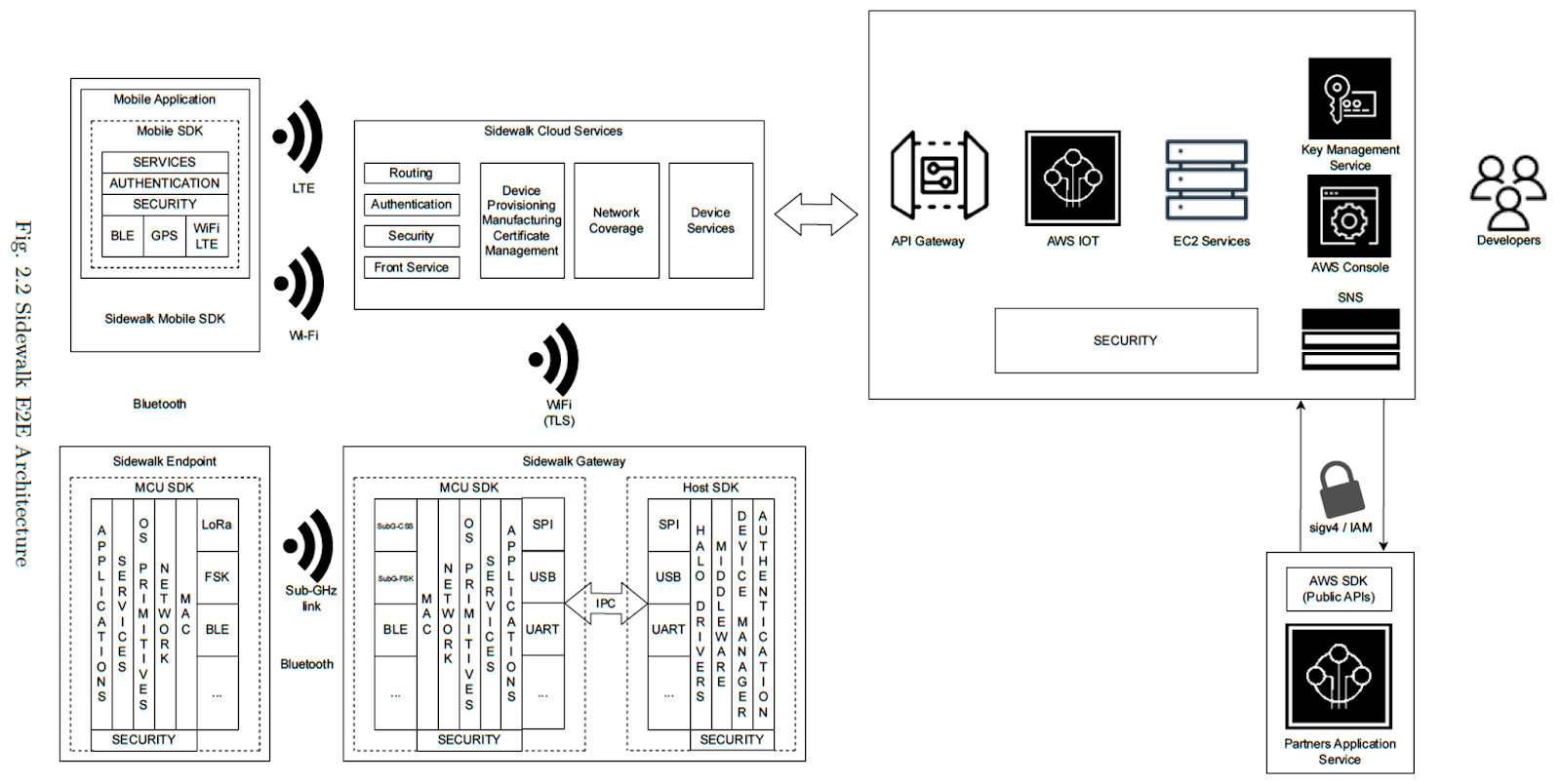
Now that we’ve covered the basics of Amazon Sidewalk, let’s look more in-depth at the architecture. You can see a visual representation of the Sidewalk architecture below. Let's walk through each of the elements of the architecture.
User Interface - Mobile App or Web Interface
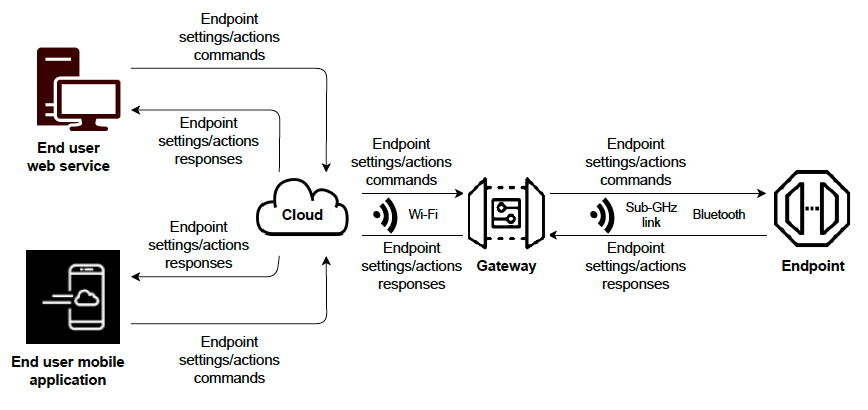
The end-user interface, in the case of Amazon Sidewalk, could be a mobile app or web interface. This is what allows the user to interact with the endpoints - to configure settings, initiate actions or commands, and get responses from other sidewalk devices or sidewalk bridges (like the Echo and Ring devices).
The Cloud
The cloud is the central entity of the system, which:
- Provides application-level services for various types of endpoints
- Participates in communication between end-user applications and endpoints
- Acts as a database for central routing and storing information about the endpoints
- Has knowledge about the network topology, coverage, and gateways currently configured to support roaming
The cloud works to select the best gateways based on the RSSI and other parameters to route downlink traffic. This is especially important when the endpoint is not within range of its user’s gateways, and so it’s in roaming mode.
Amazon Bridges (Gateways)
Sidewalk Bridges, like Echo and Ring devices, are nodes that:
- Provide connectivity to endpoints
- Act as passthrough nodes for routing traffic from endpoints to the cloud
- Perform periodic scans of neighboring nodes and relay this information to the cloud
It's important to note that a Sidewalk Bridge doesn't have access to the application data that’s sent from or received by the endpoints because data is encrypted at the network and the application level.
Sidewalk-Enabled Devices (Endpoints)
Finally, let’s talk about endpoints. Remember, endpoints are things like sensors, outdoor lights, smart locks, Tile trackers, and other smart home devices. Essentially, they provide specific functionality to the owner of the device.
They are only responsible for routing their data and maintaining their own connection with the network. They also don’t connect to the internet themselves. Instead, they rely on the Sidewalk Bridge to access Sidewalk.
Amazon Sidewalk Network Configurations - WAN & PAN
With a general understanding of the architecture of an Amazon Sidewalk network, let’s talk about the two possible network modes: WAN and PAN.
Wide Area Network (WAN)
The Amazon Sidewalk network operates in WAN - or wide area network mode - when it involves Sidewalk-enabled devices and Sidewalk Bridges from different owners. In this mode, neighboring Sidewalk Bridges cooperate in order to provide network coverage to the endpoints.
Keep in mind that, by default, Sidewalk Bridges participate in the WAN, but if an owner chooses, they can opt out of this via their account settings in the Alexa app or Ring app. In that case, the gateways would only participate in their own private area network - which we will get to shortly.
A few important things to know about WAN mode:
- Endpoint-to-endpoint communication is not supported
- All three technologies - SubG-FSK, SubG-CSS, and Bluetooth LE can be used by endpoints in the WAN.
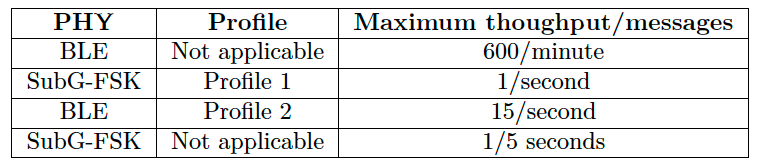
- There are some restrictions on how many messages endpoints can transmit on the WAN:
Another important thing to keep in mind is that each network topology has its own privacy and security model. For the WAN, endpoints have a unique device key, which changes periodically, and in this scenario the cloud bears the responsibility of verifying the authenticity and integrity of incoming messages from the endpoint.
Personal Area Network (PAN)
The network operates in a personal area network, or PAN, mode when involving only endpoints and gateways that belong to the same user.
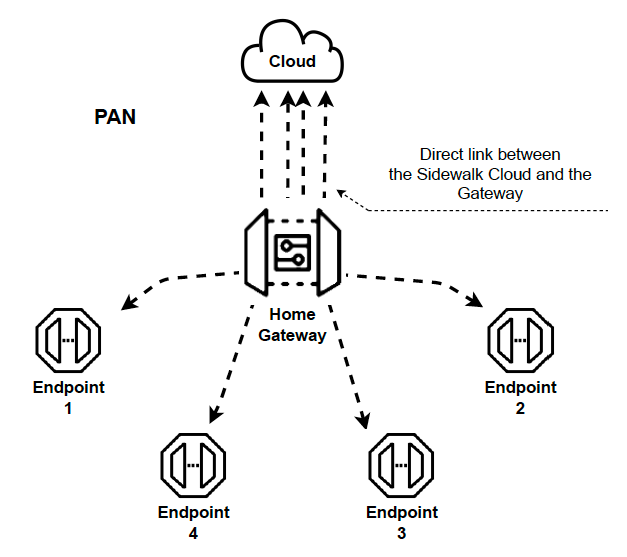
A few important things to know about PAN mode:
- When in PAN mode, the user can set their own data usage limits and routing prioritization
- The PAN uses Bluetooth LE for communication between the endpoints and gateways
- The PAN restricts the number of messages over Bluetooth LE to 600 per minute, which and when, if exceeded, the device may be disconnected from the Sidewalk network
Like with the WAN, the PAN has its own security model. Endpoints within the same PAN share the same security key, referred to as the PAN key, or broadcast key, which is provided at the time of provisioning.
Bluetooth Low Energy & Amazon Sidewalk
Now that we've covered much of the basics of the Amazon Sidewalk network, its architecture, and how it operates, let's take a closer look specifically at how Bluetooth LE is used to enable Sidewalk.
As we’ve seen, Amazon Sidewalk utilizes three different communication technologies, with Bluetooth LE being a major one. Bluetooth LE provides power-efficient, low-latency communication within the network. In fact, it’s the most efficient technology of the three and provides the highest data rate, but with that comes a shorter range.
In Bluetooth LE terminology:
- The Sidewalk endpoints act as Bluetooth LE peripherals
- The Bridges (i.e. echo devices or ring devices) act as Bluetooth LE centrals.
When utilizing Bluetooth LE, the endpoints must support at least Bluetooth version 4.2. Both the 1M and 2M PHYs are supported, but only one connection at a time can be maintained and no extended advertising or connection-oriented channels are supported.
- During advertising, endpoints start out with 160 ms as the advertising interval for 30 seconds and then switch to a 1-second interval after that.
- During connection, the central enforces a 30 ms - 4s interval.
Supported Bluetooth LE Messages
There are two types of Bluetooth LE messages supported on Amazon Sidewalk. The first is a Beacon frame, which is sent during advertising and used for:
- Initiating registration of an endpoint on the network
- Initiating the counter-based time synchronization procedure from the cloud
- Initiating an endpoint encrypted connection
- And for presence detection or determining a device's state - in other words, if it’s online or offline.
The Beacon frame contains a header with information related to the Bluetooth LE advertising type and UUID of the service, which is called Alexa Mobile Accessory, or AMA. It also contains manufacturer-specific data such as information about the Amazon Sidewalk application, network service, device state, and other application-specific data
The second type of Bluetooth LE message supported by Amazon Sidewalk is a Data frame, which has a few different types of commands that can be used:
- Management commands: used for managing endpoints in the Sidewalk network
- Custom commands: used to exchange data for a user’s own application
- Metrics commands: used to send various statistics and measurements about the communication link itself
- Security commands: implement Sidewalk security and registration
These commands use a few different types of interactions:
- Get/Read: used by the sender to request data from the receiver.
- Set/Write: used to request an action to be performed by the receiver.
- Notify: used to provide information to the receiver.
- Response: the receiver responding to the Get/Read, Set/Write, or Notify interactions.
Summary & Amazon Sidewalk - Silicon Labs Demo
Amazon Sidewalk technology is still early, but it holds a lot of potential for enabling a new era of Bluetooth LE devices. If you'd like to see the Amazon Sidewalk in action, be sure to check out the video version of this article which includes a step-by-step demo using an Amazon Sidewalk Kit provided by Silicon Labs.


