


Sponsored by Nordic Semiconductor
Wi-Fi has become a cornerstone of modern connectivity, powering everything from laptops and smartphones to smart home devices and industrial IoT systems. However, while Wi-Fi excels in delivering reliable, high-speed data transfer, Wi-Fi onboarding—especially for IoT devices—remains a significant challenge.
What is Wi-Fi?
Wi-Fi is one of the most widely used wireless technologies, enabling devices to connect to the internet or local networks without physical cables.
Based on IEEE 802.11 standards, Wi-Fi operates in various frequency bands (2.4 GHz, 5 GHz, and, more recently, 6 GHz with Wi-Fi 6E). It powers everything from smartphones and laptops to smart home devices and industrial IoT solutions.
While Wi-Fi is known for providing high-speed data connectivity, its role extends beyond web browsing and video streaming. In the IoT landscape, Wi-Fi is a critical backbone for devices requiring constant or periodic internet access while balancing power consumption and efficiency.
However, traditional Wi-Fi onboarding—connecting a device to a network—can be a pain point, especially for constrained IoT devices. This challenge becomes particularly evident in IoT deployments where devices may need to be provisioned at scale, in environments with limited access, or by users with varying technical expertise.
Traditional Wi-Fi onboarding methods often involve complex processes that can lead to setup failures, user frustration, and increased support costs. These limitations have driven the industry to seek more efficient and user-friendly alternatives for connecting IoT devices to Wi-Fi networks. Enter Bluetooth Low Energy (LE): a technology that offers a seamless, user-friendly solution for Wi-Fi onboarding.
In this post, we will:
- Learn about the role of Wi-Fi in IoT and low-power applications
- Explore Bluetooth Low Energy's role in making onboarding IoT devices on Wi-Fi networks simpler and more user-friendly.
- Learn how Wi-Fi onboarding using Bluetooth Low Energy works
- Learn about Nordic Semiconductor's low-power Wi-Fi solutions
- 🎥 Run a live demo of Wi-Fi onboarding using Bluetooth LE
- Explain the process of Wi-Fi onboarding using Bluetooth LE via sniffer capture
The Role of Wi-Fi in IoT and Low-Power Connectivity
Wi-Fi is a go-to solution for many IoT applications, but its role in low-power, constrained devices differs greatly from its use in traditional computing. Unlike smartphones and laptops, which prioritize high throughput and low latency, IoT devices have unique connectivity requirements:
- Power Efficiency – Many IoT devices run on batteries and need to minimize energy consumption.
- Intermittent Connectivity – Devices like smart sensors or industrial monitors may only need to transmit data periodically.
- Scalability – Networks must support a large number of connected devices without congestion.
- Security – IoT devices often operate in environments with strict security requirements, such as smart homes and industrial settings.
Wi-Fi 6 and Its Role in IoT
Wi-Fi 6 (802.11ax) introduces several key enhancements that make it more suitable for IoT applications, addressing issues like congestion, power efficiency, and scalability.
Features of Wi-Fi 6 Unique to IoT Applications
1. Orthogonal Frequency-Division Multiple Access (OFDMA)
- Allows multiple devices to share a single transmission channel efficiently, reducing latency and improving performance in dense environments.
- IoT devices, which often send small bursts of data, benefit from OFDMA as it reduces contention for airtime.
2. Basic Service Set (BSS) Coloring & Beamforming
- BSS Coloring helps reduce interference by allowing access points (APs) to distinguish between overlapping networks.
- Beamforming improves signal reliability and range, ensuring IoT devices can maintain stable connections even at the edge of coverage.
3. Target Wake Time (TWT)
- One of the most critical features for IoT, TWT allows devices to schedule when they wake up and communicate, significantly extending battery life.
- This is especially useful for battery-operated sensors and other low-power devices that don’t need to transmit data constantly.
With these enhancements, Wi-Fi 6 is better suited for IoT deployments than its predecessors, but connectivity challenges still exist—especially when it comes to onboarding. This is where Bluetooth Low Energy (LE) plays a crucial role.
Nordic’s Wi-Fi Solution and the nRF70 Series
Nordic Semiconductor, known for its leadership in Bluetooth Low Energy (LE), has expanded into Wi-Fi with the nRF70 series—a low-power Wi-Fi 6 companion IC designed specifically for IoT applications.
Unlike traditional Wi-Fi chipsets optimized for high throughput, the nRF70 series focuses on power efficiency, coexistence with Bluetooth LE, and secure, scalable connectivity.
Key Features of the nRF70 Series for IoT
- Wi-Fi 6 for Low-Power Applications
- Seamless Bluetooth LE Coexistence
- Ultra-Low Power Consumption
- 2.4 GHz Wi-Fi 6 for IoT Applications
With Nordic’s nRF70 Wi-Fi companion IC, developers can create low-power, dual-radio IoT solutions that leverage Bluetooth LE for seamless onboarding and control while using Wi-Fi for higher-bandwidth data exchange when needed.
Nordic's Wi-Fi Solution Options
Nordic has a few solutions available for Wi-Fi connectivity based on the nRF70 Series. The series is designed to operate alongside Nordic’s existing nRF52 and nRF53 Series Bluetooth LE and nRF91 Series cellular IoT devices. In addition, the nRF70 Series can also be used with non-Nordic host devices.
The portfolio consists of:
- nRF7002
- nRF7001
- nRF7001 IC
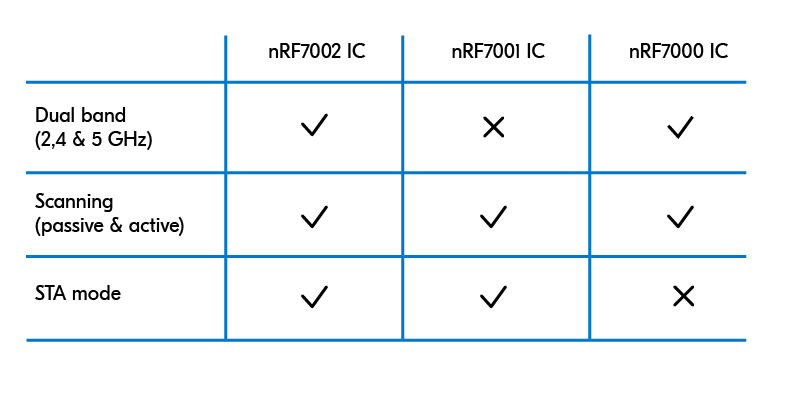
nRF7002
The nRF7002 is the first device in our portfolio of unique Wi-Fi products, and it provides all the features of the nRF70 Series.
nRF7001
With its single-band 2.4 GHz radio, the nRF7001 IC is intended for customers who don’t need dual-band functionality.
It has all the same main features as the nRF7002 IC.
nRF7000
The nRF7000 IC is designed explicitly for SSID-based Wi-Fi locationing. It enables active and passive scanning of Wi-Fi networks to acquire the SSIDs of nearby APs for locationing purposes.
Nordic's Wi-Fi Development Hardware
Nordic also offers a few boards for Wi-Fi development:
nRF7002 Development Kit
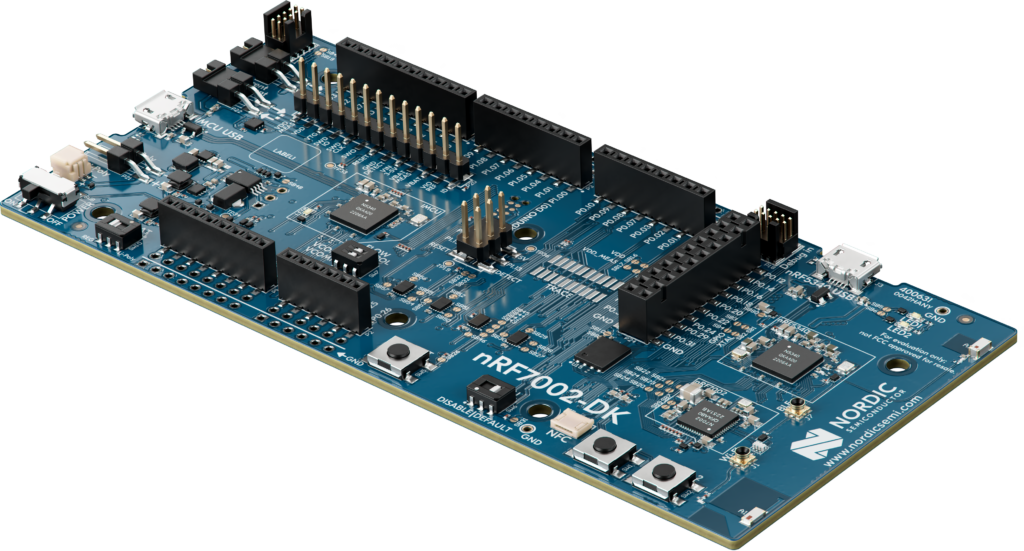
The nRF7002 DK combines the Wi-Fi 6 capabilities of the nRF7002 companion IC with the multi-protocol capabilities of the nRF5340 System on Chip (SoC), like Bluetooth LE, Bluetooth mesh, NFC, Matter, Thread, Zigbee, etc. The DK provides everything needed to start developing low-power Wi-Fi applications.
nRF7002 Evaluation Kit
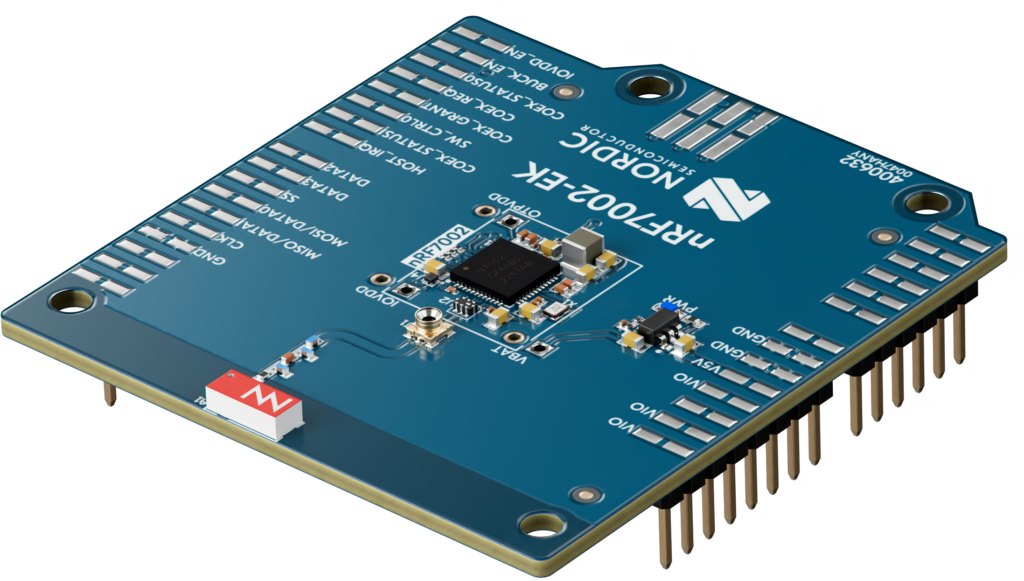
The nRF7002 EK comes in the form of an Arduino shield and is designed to complement the nRF52840 DK, nRF5340 DK, and nRF9160 DK.
nRF7002 Evaluation Board
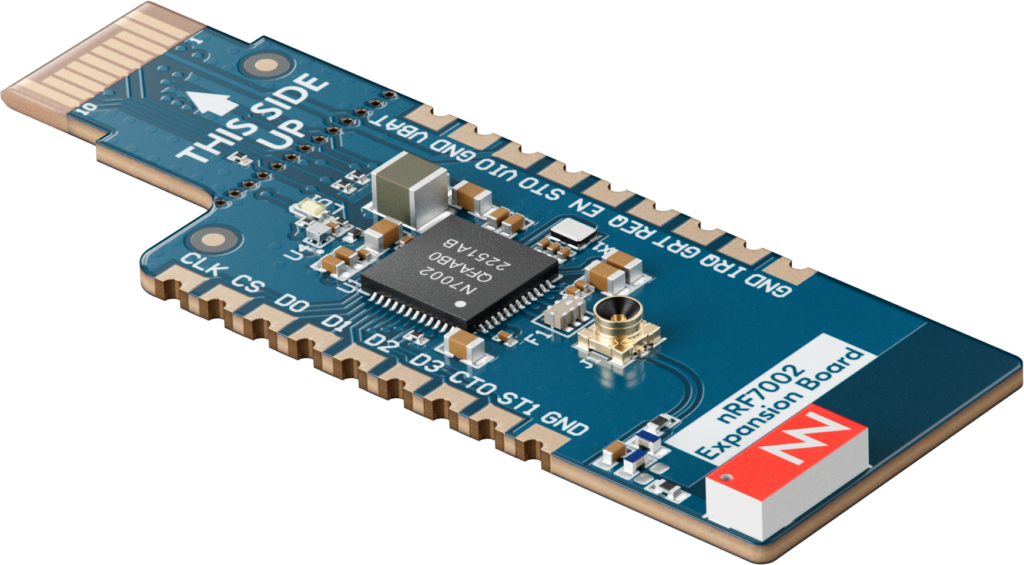
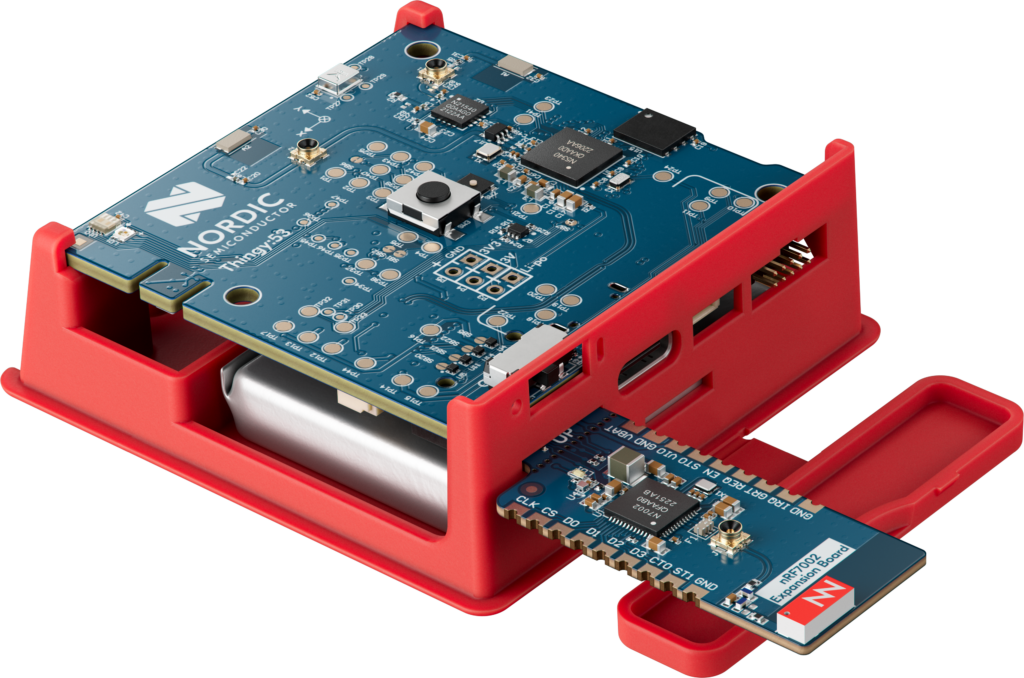
The nRF7002 EB is a plug-in board intended to add Wi-Fi 6 connectivity to the Nordic Thingy:53.
Wi-Fi Onboarding: The Challenge
Before an IoT device can communicate over Wi-Fi, it must be connected to a network—a process known as Wi-Fi provisioning or onboarding. This involves:
- Scanning for available networks
- Selecting the correct Wi-Fi network
- Entering credentials (SSID & password)
- Authenticating and connecting to the network
For traditional consumer devices like laptops and smartphones, this is straightforward.
But for IoT devices—which often lack a screen, keyboard, or even user input options—Wi-Fi provisioning can be a frustrating experience.
Problems with Traditional Wi-Fi Onboarding
No Universal Standard for Onboarding
- Solutions like Wi-Fi Easy Connect™ (DPP) exist but are not widely supported on iOS and many Android devices, making it difficult to rely on a single approach.
The “Wi-Fi Network Shuffle”
- Many provisioning methods require users to connect to the device’s temporary Wi-Fi network (Soft AP), select their home Wi-Fi, enter credentials, and then wait for the device to reboot—all while possibly losing internet access on their phone.
- Phones resist connecting to networks without internet, leading to confusion and frustration for end-users.
- Confusion for end-users on which step of the process they're at, especially when the process involves navigating to different screens to complete the onboarding.
Inconsistent User Experience Across Devices
- Different phones, OS versions, and settings result in unpredictable behavior, making support and troubleshooting difficult.
Lack of Feedback During the Process
- Many apps rely on guesswork to determine whether provisioning is successful, often leaving users confused when something goes wrong.
For industrial and commercial applications, IT-managed networks and enterprise authentication add further complexity, making traditional Wi-Fi onboarding even more challenging or sometimes even impossible!
💡 Solution? Use Bluetooth LE for Wi-Fi onboarding!
Why Use Bluetooth LE for Wi-Fi Onboarding?
There are quite a few reasons to implement the use of Bluetooth LE for Wi-Fi onboarding (instead of the traditional SoftAP method).
Here are some of the most prominent ones:
Seamless User Experience
- No need to switch Wi-Fi networks mid-process.
- The phone remains connected to the internet while provisioning happens over Bluetooth LE.
- Works consistently across iOS, Android, and other platforms.
Reliable Communication
- Bluetooth LE remains connected even if the Wi-Fi network is temporarily down.
- Stronger debugging capabilities—Bluetooth LE allows mobile apps to receive real-time feedback on the provisioning process.
Security & Flexibility
- Bluetooth LE-based provisioning can include additional configuration steps beyond just Wi-Fi credentials.
Suitable for More Deployment Scenarios
- Enterprise Environments – Many corporate networks block multicast traffic (mDNS), making Wi-Fi-based onboarding harder.
- Matter Support – Bluetooth LE is the preferred method for Wi-Fi onboarding in Matter-certified devices.
Wi-Fi Onboarding Sample Application and How It Works (nRF Connect SDK)
Nordic Semiconductor provides a Wi-Fi provisioning sample in the nRF Connect SDK, demonstrating Bluetooth LE-based Wi-Fi onboarding for the nRF70 Series.
In this article, we'll reference this example and demonstrate how it works down to the Bluetooth LE packet level. We'll be using the nRF Connect SDK (v2.9.0).
Here's a simplified step-by-step of the Wi-Fi onboarding process using Bluetooth LE:
- The Wi-Fi-enabled device advertises as a Bluetooth LE peripheral
- The device advertises with a specific service UUID (provisioning service) and a specific device name
- The phone scans for devices with the specific service UUID
- The user selects the device in question
- The phone connects to the device and then pairs with it (no bonding)
- Once the user selects the Scan operation, the phone sends a message (GATT write) to initiate a Wi-Fi scan for networks to join
- The results of the scan are sent back to the phone (via GATT notifications)
- The user is presented with the scan results
- The user can then choose a network from the list and enter the security passkey for the network
- The phone will send a message (GATT write), including the Wi-Fi network name (SSID) and the Wi-Fi passphrase/password
- The device will then attempt to join the network using the credentials entered by the user
- During the process, the status is reported by the device back to the phone to provide the user with up-to-date status, including when the process is complete and whether it is successful or not
The smartphone application that we'll be using is the Nordic Semiconductor nRF Wi-Fi Provisioner app (available for both iOS and Android):
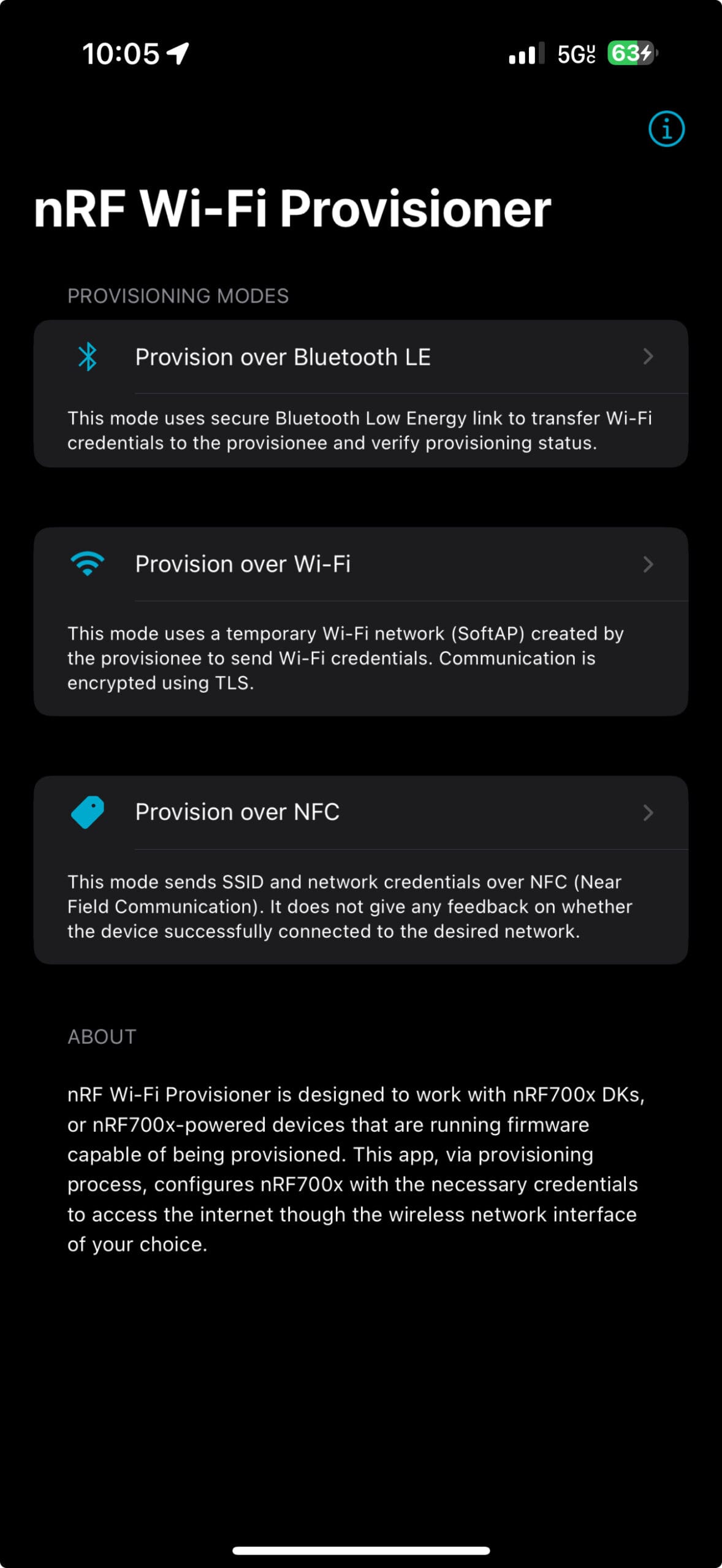
As you can see, there are multiple Wi-Fi provisioning modes: over Bluetooth LE, over Wi-Fi, and over NFC.
For our exercise, we'll be using the "Wi-Fi provisioning over Bluetooth LE" mode.
Step #1: We'll start by creating a new project based on the existing example in the SDK:

Step #2: Once we've created the project, we can go ahead and add a Build Configuration for it by choosing nRF7002dk/nrf5340/cpuapp as the Board Target.

Step #3: If you left the box labeled "Build after generating configuration" checked, the project will be built automatically after adding the Build Configuration. This process will take a few seconds, but it should build fine with no issues out of the box.
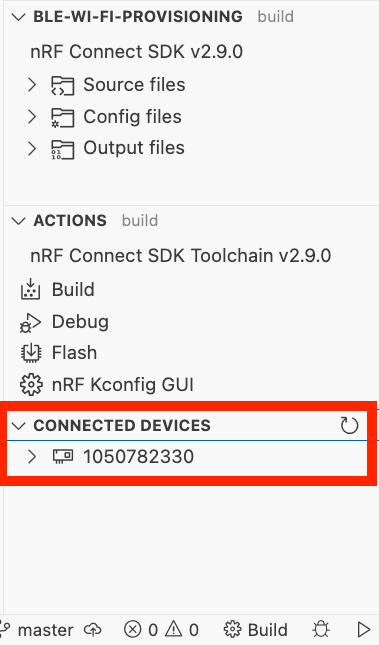
Step #4: Make sure you connect the nRF7002 DK to your computer and that it is recognized in Visual Studio Code within the nRF Connect Extension:
[Optional] Step #5: Since the DK and phone will be establishing Bluetooth LE pairing between them, and we want to sniff the communication in the process, we need to know the pairing key (i.e., the LTK).
To do this, we'll enable one configuration that prints out the LTK so we can enter it into the sniffer's software and decrypt the Bluetooth LE communication between the DK and the phone. Add the following (highlighted) line to the prj.conf file in the project:
#
# Copyright (c) 2022 Nordic Semiconductor ASA
#
# SPDX-License-Identifier: LicenseRef-Nordic-5-Clause
#

CONFIG_BT_LOG_SNIFFER_INFO=y

CONFIG_WIFI=y
CONFIG_WIFI_NRF70=y
CONFIG_NRF70_SR_COEX=y
CONFIG_NRF70_SR_COEX_RF_SWITCH=y

# WPA supplicant
CONFIG_WIFI_NM_WPA_SUPPLICANT=y

# Networking
CONFIG_NETWORKING=y
CONFIG_NET_SOCKETS=y
CONFIG_NET_LOG=y
CONFIG_NET_IPV6=n
CONFIG_NET_IPV4=y
CONFIG_NET_UDP=y
CONFIG_NET_TCP=y
CONFIG_NET_DHCPV4=y
CONFIG_DNS_RESOLVER=y

CONFIG_NET_STATISTICS=y

CONFIG_NET_PKT_RX_COUNT=8
CONFIG_NET_PKT_TX_COUNT=8

# Below section is the primary contributor to SRAM and is currently
# tuned for performance, but this will be revisited in the future.
CONFIG_NET_BUF_RX_COUNT=16
CONFIG_NET_BUF_TX_COUNT=16
CONFIG_HEAP_MEM_POOL_SIZE=183600
CONFIG_NET_TC_TX_COUNT=1

CONFIG_NET_IF_UNICAST_IPV4_ADDR_COUNT=1
CONFIG_NET_MAX_CONTEXTS=5
CONFIG_NET_CONTEXT_SYNC_RECV=y

CONFIG_INIT_STACKS=y

CONFIG_NET_L2_ETHERNET=y

CONFIG_NET_CONFIG_SETTINGS=y
CONFIG_NET_CONFIG_INIT_TIMEOUT=0

CONFIG_NET_CONFIG_MY_IPV4_ADDR="192.165.100.150"
CONFIG_NET_CONFIG_PEER_IPV4_ADDR="192.165.100.1"

CONFIG_NET_SOCKETS_POLL_MAX=10

# Memories
CONFIG_MAIN_STACK_SIZE=5200
CONFIG_NET_TX_STACK_SIZE=4096
CONFIG_NET_RX_STACK_SIZE=4096

# Debugging
CONFIG_STACK_SENTINEL=y
CONFIG_DEBUG_COREDUMP=y
CONFIG_DEBUG_COREDUMP_BACKEND_LOGGING=y
CONFIG_DEBUG_COREDUMP_MEMORY_DUMP_MIN=y

# Kernel options
CONFIG_ENTROPY_GENERATOR=y

# Logging
CONFIG_LOG=y

CONFIG_NET_L2_WIFI_MGMT=y

CONFIG_BT=y
CONFIG_BT_SMP=y
CONFIG_BT_PERIPHERAL=y

CONFIG_BT_BUF_ACL_RX_SIZE=151
CONFIG_BT_L2CAP_TX_MTU=147
CONFIG_BT_BUF_ACL_TX_SIZE=151

CONFIG_BT_RX_STACK_SIZE=5120
CONFIG_BT_BONDABLE=n
CONFIG_BT_DEVICE_NAME_DYNAMIC=y

CONFIG_FLASH=y
CONFIG_FLASH_PAGE_LAYOUT=y
CONFIG_FLASH_MAP=y

CONFIG_NVS=y

CONFIG_SETTINGS=y
CONFIG_SETTINGS_NVS=y

CONFIG_WIFI_CREDENTIALS=y
CONFIG_WIFI_CREDENTIALS_MAX_ENTRIES=1

CONFIG_NANOPB=y

CONFIG_BT_WIFI_PROV=y
CONFIG_BT_WIFI_PROV_LOG_LEVEL_INF=y

CONFIG_WIFI_MGMT_EXT=y
# Setting BT supervision timeout to 75units (750ms) to avoid timeout of BT connection when radio is granted to Wi-Fi during scan.
CONFIG_BT_PERIPHERAL_PREF_TIMEOUT=75

# Similar to shell sample, add this option to ensure the event can get served.
CONFIG_NET_MGMT_EVENT_QUEUE_TIMEOUT=5000
Now we're ready to re-build our project and flash it to the DK. Click the Rebuild button, then Flash to the DK:


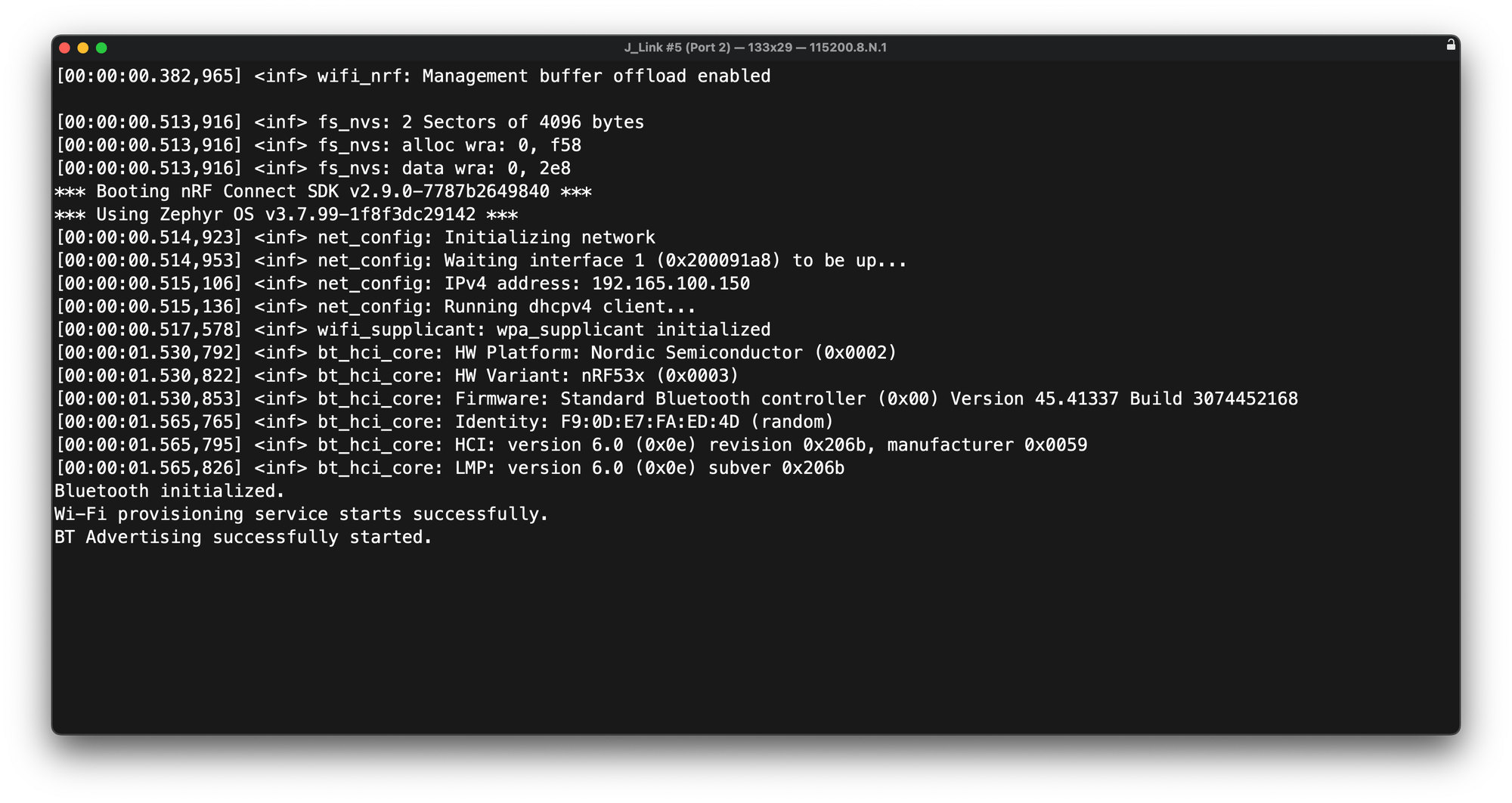
Step #6: Open a serial terminal program (such as PuTTY, minicom, Serial, or within nRF Connect Extension in VS Code):
Step #7: Launch the nRF Wi-Fi Provisioner mobile app:
- Click "Provision over Bluetooth LE."
- The app will scan for specific devices advertising the WiFi Provisioning Service UUID.
- Select your device from the list, and you should be presented with the following screen that asks you to Pair with the Bluetooth LE device (the nRF7002 DK).
- Once you pair, the following screen will show up. Press "Scan," and the phone will then instruct the DK (over LE) to scan for nearby Wi-Fi access points and return the results to the phone to display to you.
Click each image below to expand.
Once the Wi-Fi scan results are back and shown to you, select the one you'd like the DK to connect to and scroll to the bottom of the screen to enter the password for the access point. From there, press "Set," and the phone will send a message containing the Wi-Fi network and the password to which to connect.
Once this is successful, the app will show that the device is now provisioned and connected to the Wi-Fi network.
Click each image below to expand.
And that's it! 🎉 Now you've provisioned your Wi-Fi device (the nRF7002 DK in this case) to connect to the Wi-Fi network of choice.
For more details on the Bluetooth LE packets involved and a live demo of the whole process, check out the video in the next section.
Video Tutorial and Demo
To see this in action, check out our demo video where we:
- Unbox the nRF7002 DK
- Use Bluetooth LE to provision an IoT device onto Wi-Fi
- Walk through the mobile app experience
- Demonstrate real-time provisioning status and feedback
- Walkthrough of BLE sniffer capture of the process (plus explanation of steps)
Conclusion
Wi-Fi is essential for IoT devices and deployments, but onboarding devices remains a major challenge. Traditional provisioning methods are often frustrating, inconsistent, and unreliable. Bluetooth LE simplifies this process, providing a seamless, secure, and user-friendly alternative. By eliminating network switching issues and offering real-time feedback, BLE ensures a smoother onboarding experience.
Nordic Semiconductor’s nRF70 series, combined with nRF Connect SDK, enables low-power, dual-radio IoT solutions that leverage BLE for onboarding and Wi-Fi for data transfer.
By adopting Bluetooth LE-based provisioning, developers can enhance user experience, reduce support issues, and streamline deployments.
References and Important Links
Here are some important references and links to learn more about Wi-Fi provisioning, Nordic's Wi-Fi solutions, and Bluetooth LE-based Wi-Fi provisioning:
- Wi-Fi Hardware
- Nordic Wi-Fi solutions: https://www.nordicsemi.com/Products/Wireless/WiFi
- nRF7002 DK: https://www.nordicsemi.com/Products/Development-hardware/nRF7002-DK
- Wi-Fi Provisioning [Nordic DevAcademy Wi-Fi Fundamentals course]: https://academy.nordicsemi.com/courses/wi-fi-fundamentals/lessons/lesson-2-wifi-fundamentals/topic/wifi-provisioning/
- Nordic Wi-Fi Provisioning Documentation:
- https://docs.nordicsemi.com/bundle/ncs-latest/page/nrf/samples/wifi/provisioning/ble/README.html#wifi-provisioning
- https://docs.nordicsemi.com/bundle/ncs-latest/page/nrf/libraries/bluetooth_services/services/wifi_prov.html
- https://docs.nordicsemi.com/bundle/ncs-latest/page/nrf/libraries/networking/wifi_credentials.html


