Introduction
In the previous blog article, we covered the iBeacon standard, which is a beacon standard developed by Apple. After Apple released the iBeacon standard back in 2013, Google followed suit with its Eddystone standard in 2015.
Unfortunately, both Eddystone and iBeacon have not changed much or improved since their releases. In fact, the Eddystone project repo was even recently archived on GitHub.
Nevertheless, they have both remained pretty popular due to the fact that they provide a sort of reference or standard for Bluetooth beacons. iBeacon is also a special case for iOS since it’s the only way on iOS to be able to reliably and continuously monitor Bluetooth LE devices in the background.
If you prefer to watch the full tutorial with step-by-step implementation and testing, then check out the accompanying YouTube video:
Eddystone Packet Format
Here’s what the Eddystone format looks like:
If you recall, advertising packets are formatted in Length-Type-Value tuples. In this case, the packet includes the following advertising data types:
- Flags
- Complete list of 16-bit UUIDs
- and Service Data for a 16-bit UUID
Similar to iBeacon, the Flags field in Eddystone is also set to enable the "BR/EDR not supported" and "LE General Discoverable" bits.
The complete list of 16-bit UUIDs includes the Eddystone UUID which is 0xFEAA (shown here in little-endian format which reverses the bytes).
The Service data includes a length field that depends on the frame type included in the packet, the type which is 16 hex, the 16-bit Eddystone UUID 0xFEAA (little endian format here as well), and finally, the actual data which could be one of the following frames:
- Eddystone-UID, which is used to broadcast a unique 16-byte Beacon ID composed of a 10-byte namespace and a 6-byte instance
- Eddystone-URL, which is used to broadcast a URL using a compressed encoding format in order to fit more within the limited advertisement packet
- Eddystone-TLM, which is used to broadcast telemetry data. This data includes battery voltage level reading, temperature reading, advertising count, and time since power-on
- and Eddystone-EID, which is used to broadcast an encrypted ephemeral identifier that changes periodically at a rate determined during the initial registration with a web service
As you can see, the Eddystone standard (just like iBeacon) really just defines the format of the data included in the advertising packets. You can find more details about the Eddystone standard on the Eddystone Specification GitHub page.
Setup
Now, let’s go ahead and implement an Eddystone beacon on the BG22 Explorer Kit, which is a $10 development kit provided by Silicon Labs. We’ll be discovering the Eddystone beacon device from the Silicon Labs EFR Connect mobile app.
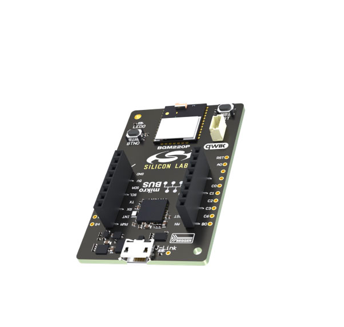
The Eddystone beacon we'll be implementing will include two Eddystone frames:
- Eddystone-UID (for identification)
- and Eddystone-TLM (for telemetry data)
We'll accomplish this by sending out alternating advertising packets (UID and TLM). We'll utilize the Advertising Sets feature to do this.
We first have to download and install Simplicity Studio, which is the official IDE from Silicon Labs for working with their chipsets and development kits.
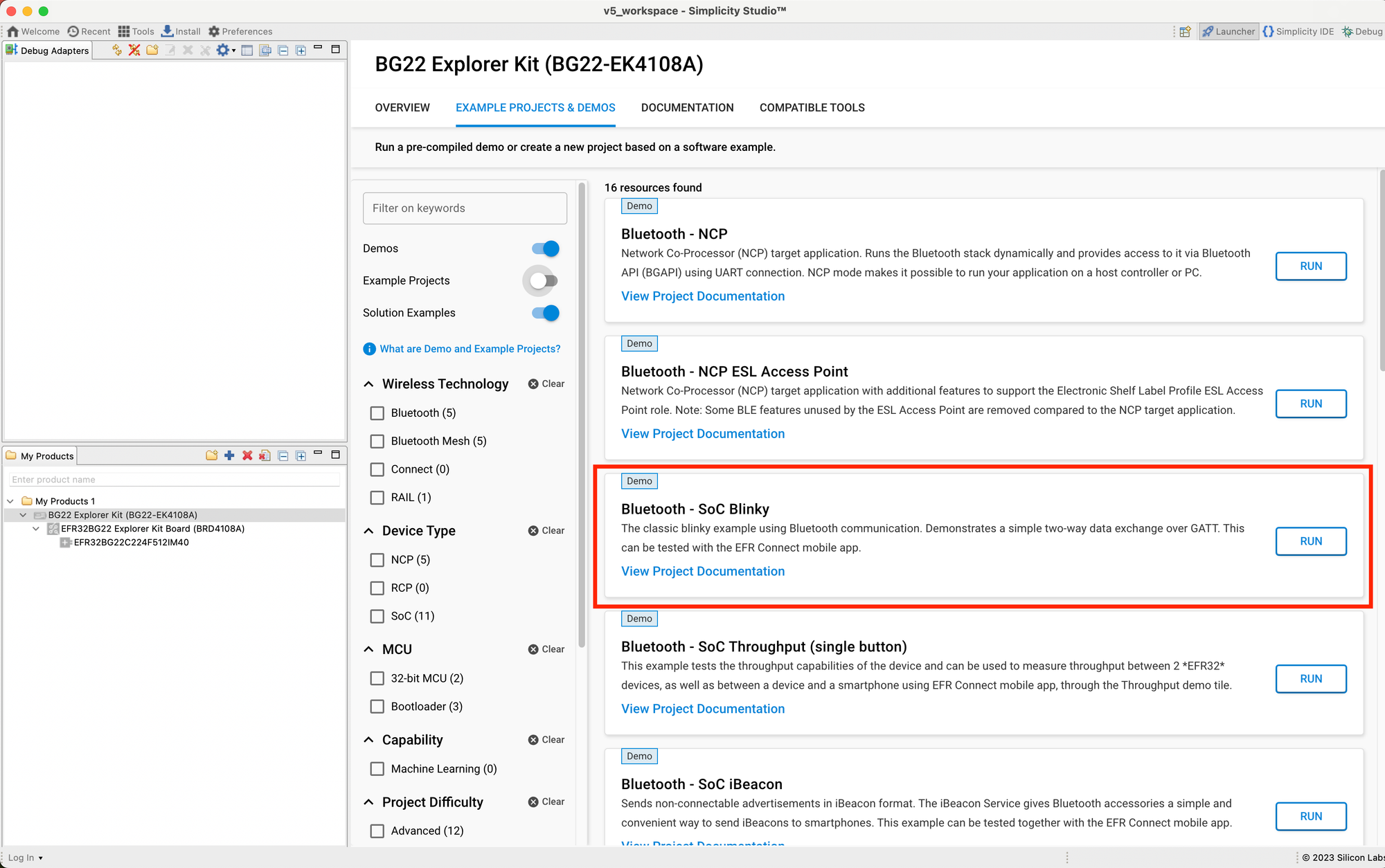
Once installed and set up, we'll want to connect our development kit, the BG22 Explorer Kit, to the computer. Next, we'll want to flash the bootloader to the dev kit. The easiest way to do this is to load one of the existing demos.
Let's go ahead and load the "SoC Blinky" demo:
Now, we'll start the implementation of the project. We'll be using the "SoC Empty" example as a starting point:
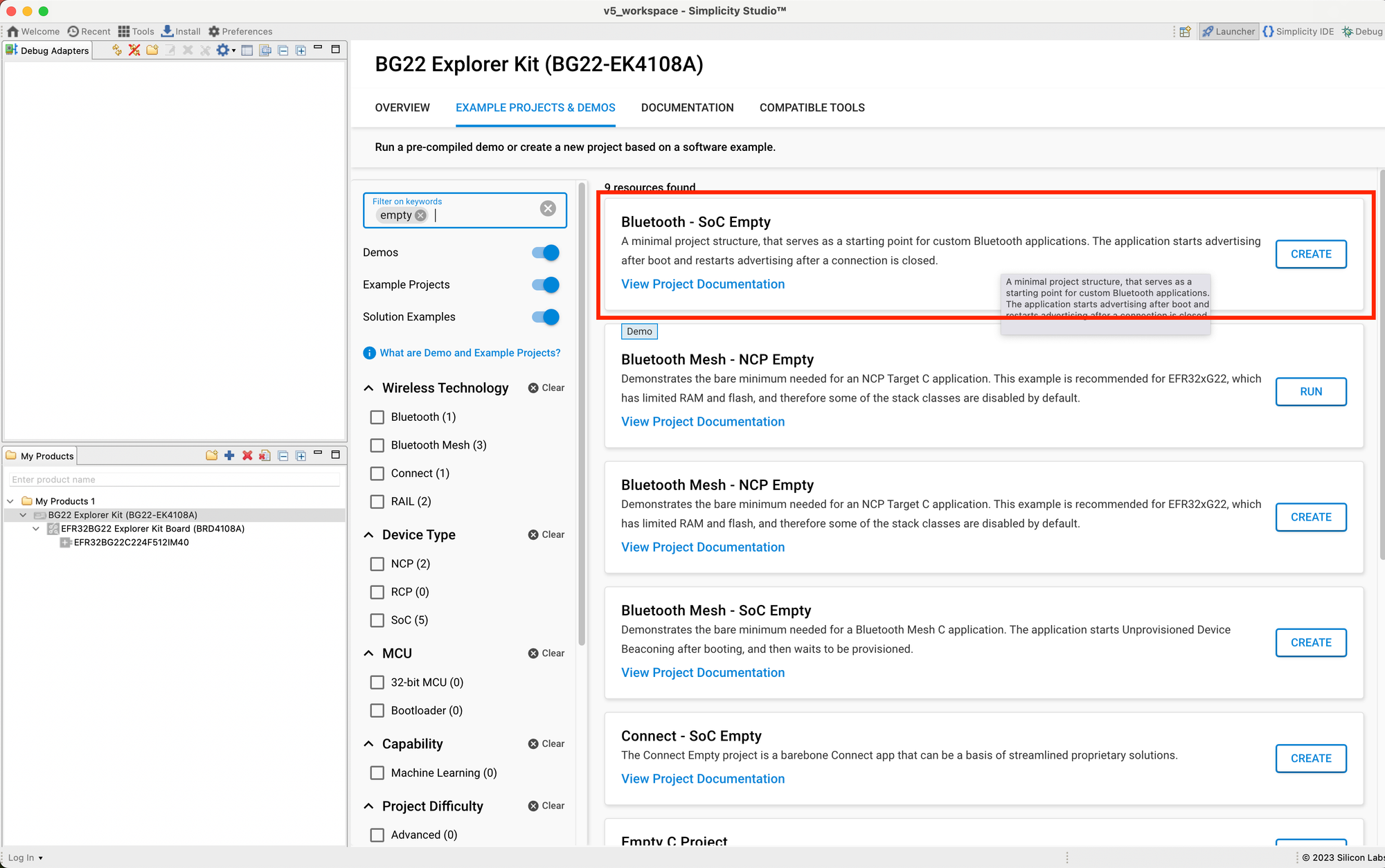
Once you've gone through the process of creating the project using the SoC Empty example, let's go ahead and install a couple of Software Components in our project so we can print out log messages to the serial terminal.
The way we do this is by opening the <Project Name>.slcp file, then navigating to the Software Components tab:
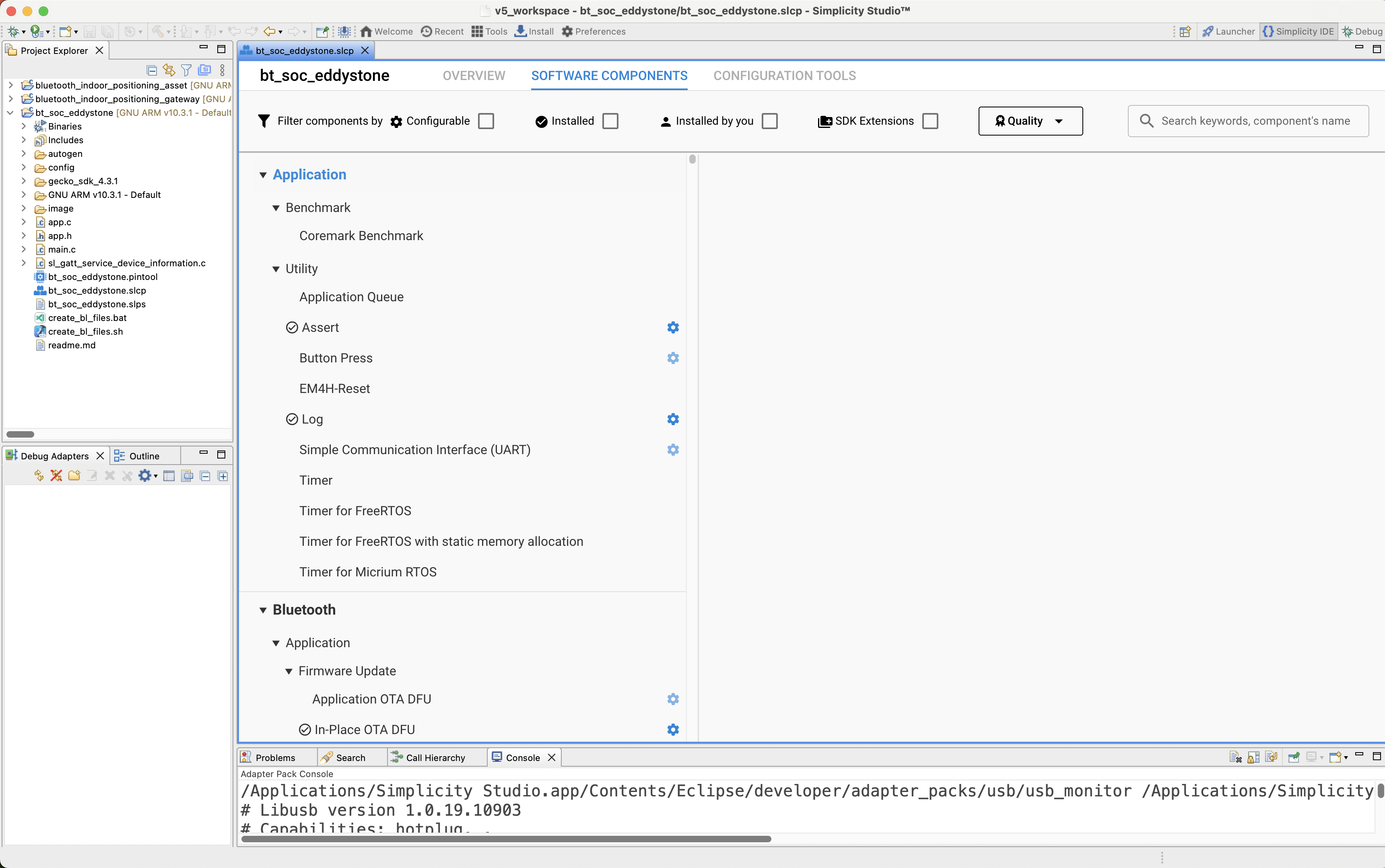
Let's search for the following components:
- "io stream", and then install Services --> IO Stream --> Driver --> IO Stream: USART
- "log", and then install Application --> Utility --> Log
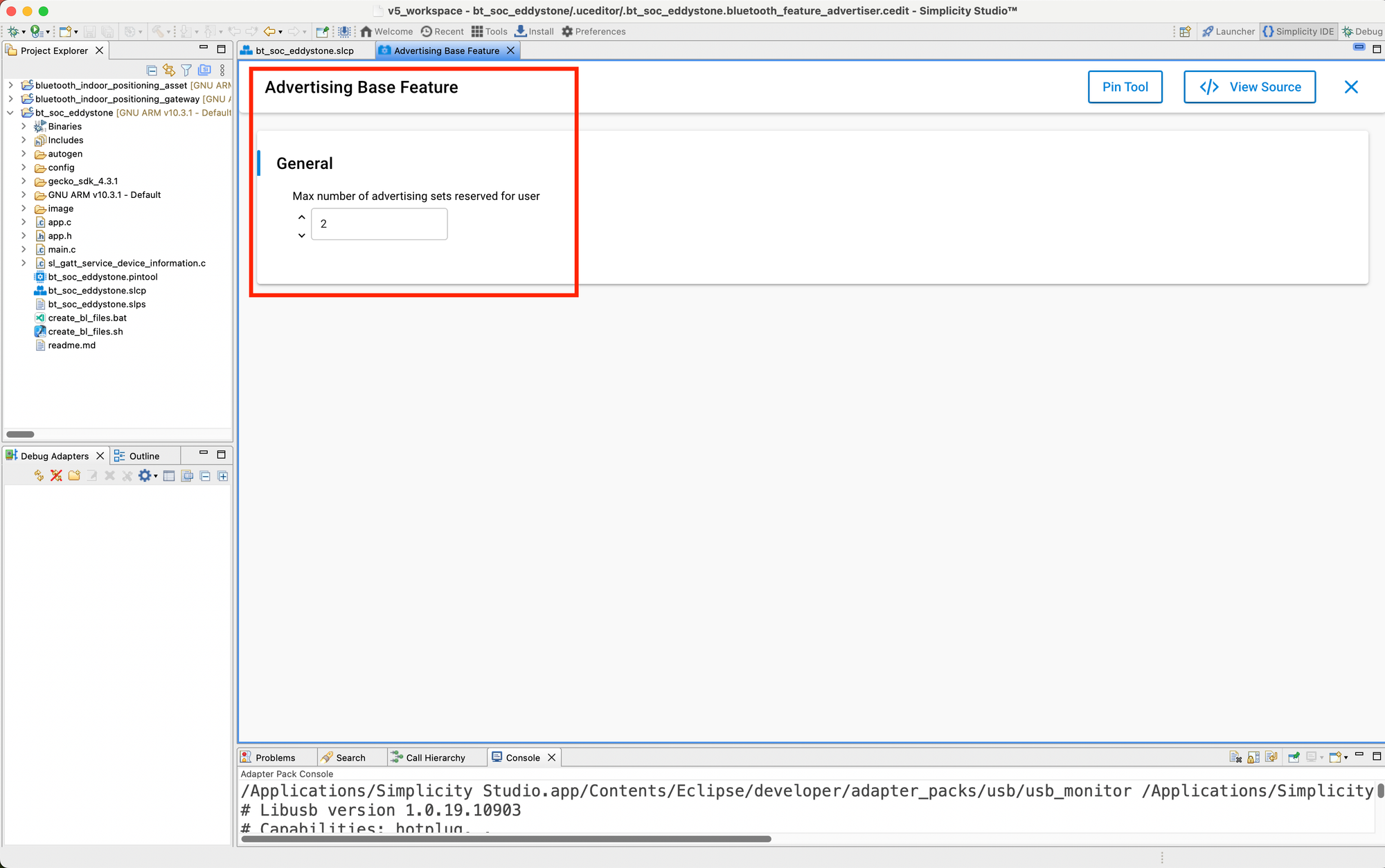
- "advertising base feature", and then configure the "Max number of advertising sets reserved for user" to 2:
Implementation
Now that we have all the configurations set up, we can move on to the code implementation portion.
Let's open up app.c and start implementing.
Step #1: Advertising Set Handles
Let's start by adding the following variables:
// The advertising set handle allocated from Bluetooth stack. static uint8_t advertising_set_handle_uid = 0xff;
static uint8_t advertising_set_handle_tlm = 0xff;
We'll be using these handles for creating the two advertising sets (one for UID and the other for TLM).
Step #2: Define the advertising data
For this, we'll define a data structure to define the advertising data and then we'll instantiate two variables, one for holding the UID data and the other for the TLM data.
Both types will include the following fields:
- Flags
- Length field (1 byte) = 0x02
- Type field (1 byte) = 0x01
- Flags value field (1 byte) = 0x06 (LE General Discoverable + BR/EDR not supported)
- 16-bit UUID List
- Length field (1 byte) = 0x03
- Type field (1 byte) = 0x03
- UUID list value field (2 bytes, little-endian) = { 0xAA, 0xFE }
- 16-bit UUID Service Data
- Length field (1 byte) = variable depending on the frame type (UID, EID, TLM, URL)
- Type field (1 byte) = 0x16
- 16-bit Service UUID (2 bytes, little-endian) = { 0xAA, 0xFE }
- Service Data (variable length. For UID, this will be 20 bytes, and for TLM, it will be 14 bytes). In this example, I chose arbitrary values for the various fields.
See the linked YouTube video at the top of the article for more details.
// Advertising Data typedef struct {
    // Flags uint8_t flags_len;
    uint8_t flags_type;
    uint8_t flags_value;
    // 16-bit UUID List uint8_t uuid_list_len;
    uint8_t uuid_list_type;
    uint8_t uuid_list_value[2];
    // Service Data (16-bit UUID) uint8_t service_data_len;
    uint8_t service_data_type;
    uint8_t service_data_uuid[2];
    union {
        uint8_t service_data_uid[20];
        uint8_t service_data_tlm[14];
    };
} eddystone_data_t;
static const eddystone_data_t adv_data_uid = {
    // Flags .flags_len = 0x02, .flags_type = 0x01, .flags_value = 0x06, // 16-bit UUID List .uuid_list_len = 0x03, .uuid_list_type = 0x03, .uuid_list_value = {
        0xAA, 0xFE
    }, // Little endian UUID (0xFEAA) // 16-bit UUID Service Data .service_data_len = 0x17, .service_data_type = 0x16, .service_data_uuid = {
    0xAA, 0xFE
}, // Little endian UUID (0xFEAA) .service_data_uid  = {
0x00, \ 0x00, \ 0x01, 0x02, 0x03, 0x04, 0x05, 0x06, 0x07, 0x08, 0x09, 0x0A,\ 0x11, 0x022, 0x33, 0x44, 0x55, 0x66, \ 0x00, 0x00 \
}
};
static const eddystone_data_t adv_data_tlm = {
    // Flags .flags_len = 0x02, .flags_type = 0x01, .flags_value = 0x06, // 16-bit UUID List .uuid_list_len = 0x03, .uuid_list_type = 0x03, .uuid_list_value = {
        0xAA, 0xFE
    }, // Little endian UUID (0xFEAA) // 16-bit UUID Service Data .service_data_len = 0x11, .service_data_type = 0x16, .service_data_uuid = {
    0xAA, 0xFE
}, // Little endian UUID (0xFEAA) .service_data_tlm = {
0x20,\ 0x00,\ 0x00, 0x64,\ 0x48, 0x80,\ 0x00, 0x00, 0x00, 0x01,\ 0x00, 0x00, 0x00, 0x02 \
}
};
Step #3: Add code to create the two advertising sets and set the corresponding advertising data
/**************************************************************************//** * Bluetooth stack event handler. * This overrides the dummy weak implementation. * * @param[in] evt Event coming from the Bluetooth stack. *****************************************************************************/ void sl_bt_on_event(sl_bt_msg_t *evt) {
    sl_status_t sc;
    switch (SL_BT_MSG_ID(evt->header)) {
        // ------------------------------- // This event indicates the device has started and the radio is ready. // Do not call any stack command before receiving this boot event! case sl_bt_evt_system_boot_id: app_log_info("Eddystone Example Started!\n");
        // Create an advertising set. sc = sl_bt_advertiser_create_set(&advertising_set_handle_uid);
        app_assert_status(sc);
        sc = sl_bt_legacy_advertiser_set_data(advertising_set_handle_uid, sl_bt_advertiser_advertising_data_packet, sizeof(adv_data_uid), (uint8_t *)&adv_data_uid);
        app_assert_status(sc);
        // Set advertising interval to 100ms. sc = sl_bt_advertiser_set_timing( advertising_set_handle_uid, 160, // min. adv. interval (milliseconds * 1.6) 160, // max. adv. interval (milliseconds * 1.6) 0,   // adv. duration 0);
        // max. num. adv. events app_assert_status(sc);
        // Start advertising and enable connections. sc = sl_bt_legacy_advertiser_start(advertising_set_handle_uid, sl_bt_advertiser_non_connectable);
        app_assert_status(sc);
        // Create an advertising set. sc = sl_bt_advertiser_create_set(&advertising_set_handle_tlm);
        app_assert_status(sc);
        sc = sl_bt_legacy_advertiser_set_data(advertising_set_handle_tlm, sl_bt_advertiser_advertising_data_packet, sizeof(adv_data_tlm), (uint8_t *)&adv_data_tlm);
        app_assert_status(sc);
        // Set advertising interval to 100ms. sc = sl_bt_advertiser_set_timing( advertising_set_handle_tlm, 160, // min. adv. interval (milliseconds * 1.6) 160, // max. adv. interval (milliseconds * 1.6) 0,   // adv. duration 0);
        // max. num. adv. events app_assert_status(sc);
        // Start advertising and enable connections. sc = sl_bt_legacy_advertiser_start(advertising_set_handle_tlm, sl_bt_advertiser_non_connectable);
        app_assert_status(sc);
        break;
        /////////////////////////////////////////////////////////////////////////// // Add additional event handlers here as your application requires!      // /////////////////////////////////////////////////////////////////////////// // ------------------------------- // Default event handler. default: break;
    }
}
And that's it! That completes our implementation of an Eddystone beacon.
For details on testing and final steps, refer to the linked YouTube video at the top of the article.
Full Source Code (app.c)
/***************************************************************************//** * @file * @brief Core application logic. ******************************************************************************* * # License * <b>Copyright 2020 Silicon Laboratories Inc. www.silabs.com</b> ******************************************************************************* * * SPDX-License-Identifier: Zlib * * The licensor of this software is Silicon Laboratories Inc. * * This software is provided 'as-is', without any express or implied * warranty. In no event will the authors be held liable for any damages * arising from the use of this software. * * Permission is granted to anyone to use this software for any purpose, * including commercial applications, and to alter it and redistribute it * freely, subject to the following restrictions: * * 1. The origin of this software must not be misrepresented;
you must not *    claim that you wrote the original software. If you use this software *    in a product, an acknowledgment in the product documentation would be *    appreciated but is not required. * 2. Altered source versions must be plainly marked as such, and must not be *    misrepresented as being the original software. * 3. This notice may not be removed or altered from any source distribution. * ******************************************************************************/
#include "em_common.h"
#include "app_assert.h"
#include "sl_bluetooth.h"
#include "app.h" // The advertising set handle allocated from Bluetooth stack. static uint8_t advertising_set_handle_uid = 0xff;
static uint8_t advertising_set_handle_tlm = 0xff;
// Advertising Data typedef struct {
    // Flags uint8_t flags_len;
    uint8_t flags_type;
    uint8_t flags_value;
    // 16-bit UUID List uint8_t uuid_list_len;
    uint8_t uuid_list_type;
    uint8_t uuid_list_value[2];
    // Service Data (16-bit UUID) uint8_t service_data_len;
    uint8_t service_data_type;
    uint8_t service_data_uuid[2];
    union {
        uint8_t service_data_uid[20];
        uint8_t service_data_tlm[14];
    };
} eddystone_data_t;
static const eddystone_data_t adv_data_uid = {
    // Flags .flags_len = 0x02, .flags_type = 0x01, .flags_value = 0x06, // 16-bit UUID List .uuid_list_len = 0x03, .uuid_list_type = 0x03, .uuid_list_value = {
        0xAA, 0xFE
    }, // Little endian UUID (0xFEAA) // 16-bit UUID Service Data .service_data_len = 0x17, .service_data_type = 0x16, .service_data_uuid = {
    0xAA, 0xFE
}, // Little endian UUID (0xFEAA) .service_data_uid  = {
0x00, \ 0x00, \ 0x01, 0x02, 0x03, 0x04, 0x05, 0x06, 0x07, 0x08, 0x09, 0x0A,\ 0x11, 0x022, 0x33, 0x44, 0x55, 0x66, \ 0x00, 0x00 \
}
};
static const eddystone_data_t adv_data_tlm = {
    // Flags .flags_len = 0x02, .flags_type = 0x01, .flags_value = 0x06, // 16-bit UUID List .uuid_list_len = 0x03, .uuid_list_type = 0x03, .uuid_list_value = {
        0xAA, 0xFE
    }, // Little endian UUID (0xFEAA) // 16-bit UUID Service Data .service_data_len = 0x11, .service_data_type = 0x16, .service_data_uuid = {
    0xAA, 0xFE
}, // Little endian UUID (0xFEAA) .service_data_tlm = {
0x20,\ 0x00,\ 0x00, 0x64,\ 0x48, 0x80,\ 0x00, 0x00, 0x00, 0x01,\ 0x00, 0x00, 0x00, 0x02 \
}
};
/**************************************************************************//** * Application Init. *****************************************************************************/ SL_WEAK void app_init(void) {
    ///////////////////////////////////////////////////////////////////////////// // Put your additional application init code here!                         // // This is called once during start-up.                                    // /////////////////////////////////////////////////////////////////////////////
} /**************************************************************************//** * Application Process Action. *****************************************************************************/ SL_WEAK void app_process_action(void) {
///////////////////////////////////////////////////////////////////////////// // Put your additional application code here!                              // // This is called infinitely.                                              // // Do not call blocking functions from here!                               // /////////////////////////////////////////////////////////////////////////////
} /**************************************************************************//** * Bluetooth stack event handler. * This overrides the dummy weak implementation. * * @param[in] evt Event coming from the Bluetooth stack. *****************************************************************************/ void sl_bt_on_event(sl_bt_msg_t *evt) {
sl_status_t sc;
switch (SL_BT_MSG_ID(evt->header)) {
    // ------------------------------- // This event indicates the device has started and the radio is ready. // Do not call any stack command before receiving this boot event! case sl_bt_evt_system_boot_id: app_log_info("Eddystone Example Started!\n");
    // Create an advertising set. sc = sl_bt_advertiser_create_set(&advertising_set_handle_uid);
    app_assert_status(sc);
    sc = sl_bt_legacy_advertiser_set_data(advertising_set_handle_uid, sl_bt_advertiser_advertising_data_packet, sizeof(adv_data_uid), (uint8_t *)&adv_data_uid);
    app_assert_status(sc);
    // Set advertising interval to 100ms. sc = sl_bt_advertiser_set_timing( advertising_set_handle_uid, 160, // min. adv. interval (milliseconds * 1.6) 160, // max. adv. interval (milliseconds * 1.6) 0,   // adv. duration 0);
    // max. num. adv. events app_assert_status(sc);
    // Start advertising and enable connections. sc = sl_bt_legacy_advertiser_start(advertising_set_handle_uid, sl_bt_advertiser_non_connectable);
    app_assert_status(sc);
    // Create an advertising set. sc = sl_bt_advertiser_create_set(&advertising_set_handle_tlm);
    app_assert_status(sc);
    sc = sl_bt_legacy_advertiser_set_data(advertising_set_handle_tlm, sl_bt_advertiser_advertising_data_packet, sizeof(adv_data_tlm), (uint8_t *)&adv_data_tlm);
    app_assert_status(sc);
    // Set advertising interval to 100ms. sc = sl_bt_advertiser_set_timing( advertising_set_handle_tlm, 160, // min. adv. interval (milliseconds * 1.6) 160, // max. adv. interval (milliseconds * 1.6) 0,   // adv. duration 0);
    // max. num. adv. events app_assert_status(sc);
    // Start advertising and enable connections. sc = sl_bt_legacy_advertiser_start(advertising_set_handle_tlm, sl_bt_advertiser_non_connectable);
    app_assert_status(sc);
    break;
    /////////////////////////////////////////////////////////////////////////// // Add additional event handlers here as your application requires!      // /////////////////////////////////////////////////////////////////////////// // ------------------------------- // Default event handler. default: break;
}
}
Conclusion
In this article, we covered:
- The basics of the Eddystone Beacon standard
- Step-by-step implementation of an Eddystone device that sends out two frame types: UID and TLM
- Implementation using the Silicon Labs BG22 Explorer Kit