


Sponsored by Nordic Semiconductor.
You walk up to your bench with both hands full, look at a small Nordic Development Kit on the table, and say, “Okay Nordic, Go.” A second later your phone fires a notification: your workout has started. You do your set, say “Okay Nordic, Stop,” then “Yes,” and the phone confirms the workout was saved. No taps, no cloud, no internet.
That’s what we’re going to build in this post: a hands-free voice-controlled workout tracker running entirely on a Nordic nRF54LM20 Development Kit, talking to a phone over Bluetooth LE. The brain of the demo is Nordic’s Axon NPU (Neural Processing Unit), a hardware accelerator on the nRF54LM20B SoC that brings always-on short-vocabulary speech recognition into the sub-1-mA range.
The wakeword model and the 10-keyword spotter we use are both pre-trained and pre-compiled by Nordic, so we’ll spend our time on the firmware that sits on top: a small Bluetooth LE GATT service driving a workout state machine that pushes notifications to the phone in real time.
In this post we’ll cover what the Axon NPU is and how it differs from Nordic’s Neuton framework, the hardware and toolchain you need, the Voice Workout demo end-to-end (state machine, three Bluetooth LE notify characteristics), the firmware sitting on top of Nordic’s bundled wakeword + KWS sample, a measured power profile of the listening loop on real hardware, and where to go next with Nordic’s Edge AI Lab.
By the end, you should be able to take the companion code, flash it to your own DK, connect from the nRF Connect Mobile app, and have the demo working in front of you in roughly fifteen minutes.
The category this fits into is Edge AI: running machine learning algorithms directly on embedded devices like microcontrollers and low-power SoCs, rather than calling out to a cloud service. Per Nordic’s framing, running models on-device lets you:
- Reduce cloud connectivity and latency by making real-time decisions locally.
- Improve privacy and reliability by keeping raw sensor data on the device.
- Reduce operational cost and power usage by transmitting only compact results or events.
The Voice Workout demo hits all three: the wakeword and KWS networks run on the Axon NPU (no cloud, no internet), the only thing leaving the device is a few bytes of Bluetooth LE notifications per detection, and Section 7 measures what the SoC’s listening loop costs end-to-end (~971 µA average).
1. Axon vs. Neuton: What’s the Difference?
The Axon NPU is a hardware neural processing unit built into the nRF54LM20B SoC that runs short-vocabulary machine learning models up to 15× faster than the Cortex-M33 CPU. It enables always-on speech recognition, gesture recognition, and anomaly detection in the sub-1-mA range, making it well-suited for battery-powered edge AI applications.
If you’ve been following Nordic’s Edge AI announcements, you may have come across two names: Axon and Neuton. Both fall under Nordic’s Edge AI umbrella, and the shared branding has caused real confusion in the developer community. The short version: Axon is a hardware NPU built into the nRF54LM20B; Neuton is a software ML framework that runs on the Cortex-M33 CPU. They’re complementary, not competing.
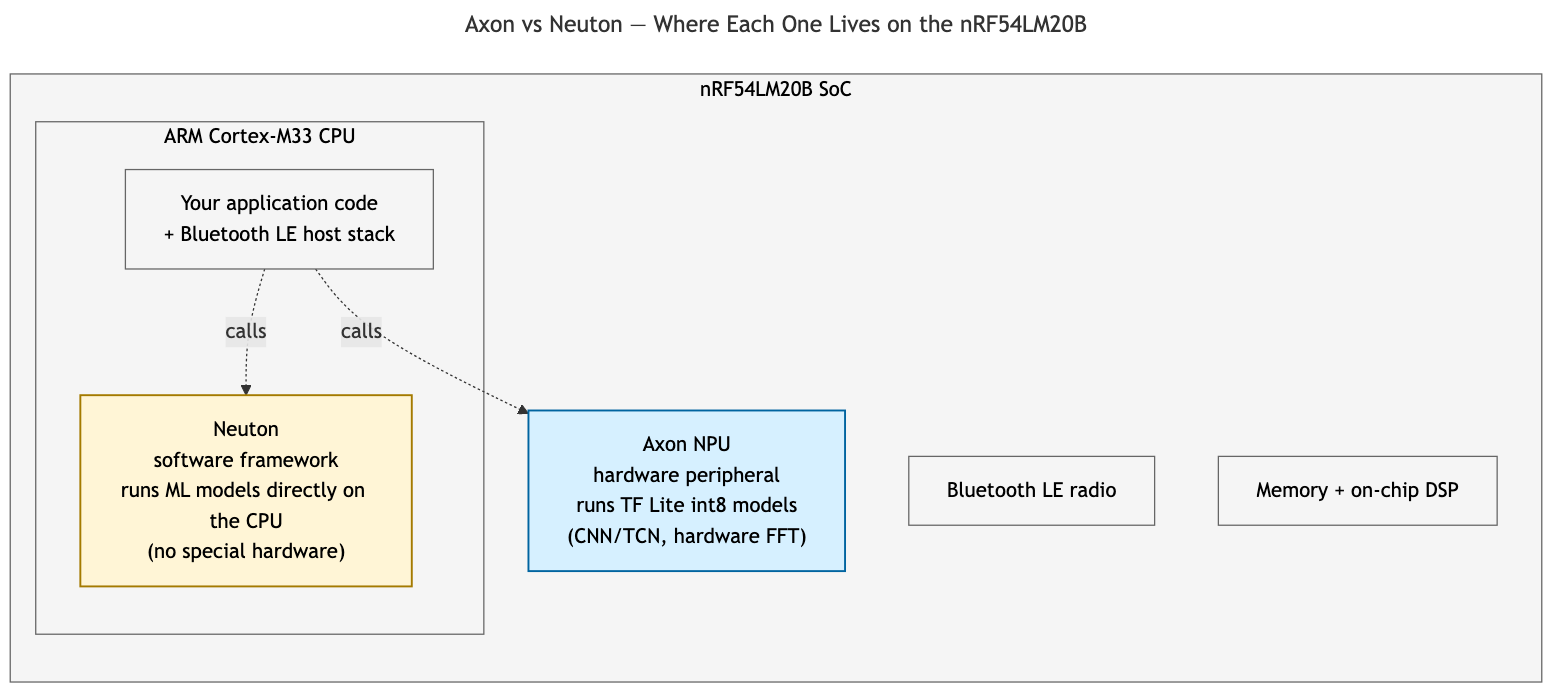
A model trained for one won’t run on the other; the toolchains and model formats are entirely separate. Let’s see how the Axon NPU and Neuton framework compare side by side:
| Axon | Neuton | |
|---|---|---|
| Type | Hardware NPU peripheral | Software framework (runs on CPU) |
| Model format | TensorFlow Lite (compiled for Axon) | Proprietary Neuton format |
| Architectures | CNN, TCN, fully connected (int8) | Varies (handled by the framework) |
| Power efficiency | Up to 15x faster than CPU inference | Depends on model complexity and CPU load |
| Hardware required | nRF54LM20B (with NPU) | Any nRF54L series (CPU only) |
| Can run simultaneously | Yes (NPU + CPU) | Yes (CPU) |
| Ideal use-case | Always-on speech recognition, gesture recognition, anomaly detection on audio or motion streams | Lightweight time-series anomaly detection, simple classification on accelerometer or sensor streams (no NPU required) |
For example, the always-on speech recognition we’re building in this post is a natural Axon job, while a small accelerometer-based anomaly detector running on the Cortex-M33 alone is a natural Neuton fit.
Per Nordic’s product page, the Axon NPU runs machine learning models up to 15x faster than the Cortex-M33 CPU, and it operates as a hardware peripheral that runs in parallel with the CPU. That means the Bluetooth LE radio and your application logic keep running unblocked while the NPU runs the model. We use Axon for this post because the Voice Workout demo runs Nordic’s bundled wakeword and 10-keyword KWS networks (both pre-compiled and shipped with the Edge AI Add-on) as-is, and layers a Bluetooth LE GATT service on top.
2. The nRF54LM20B and Toolchain Overview
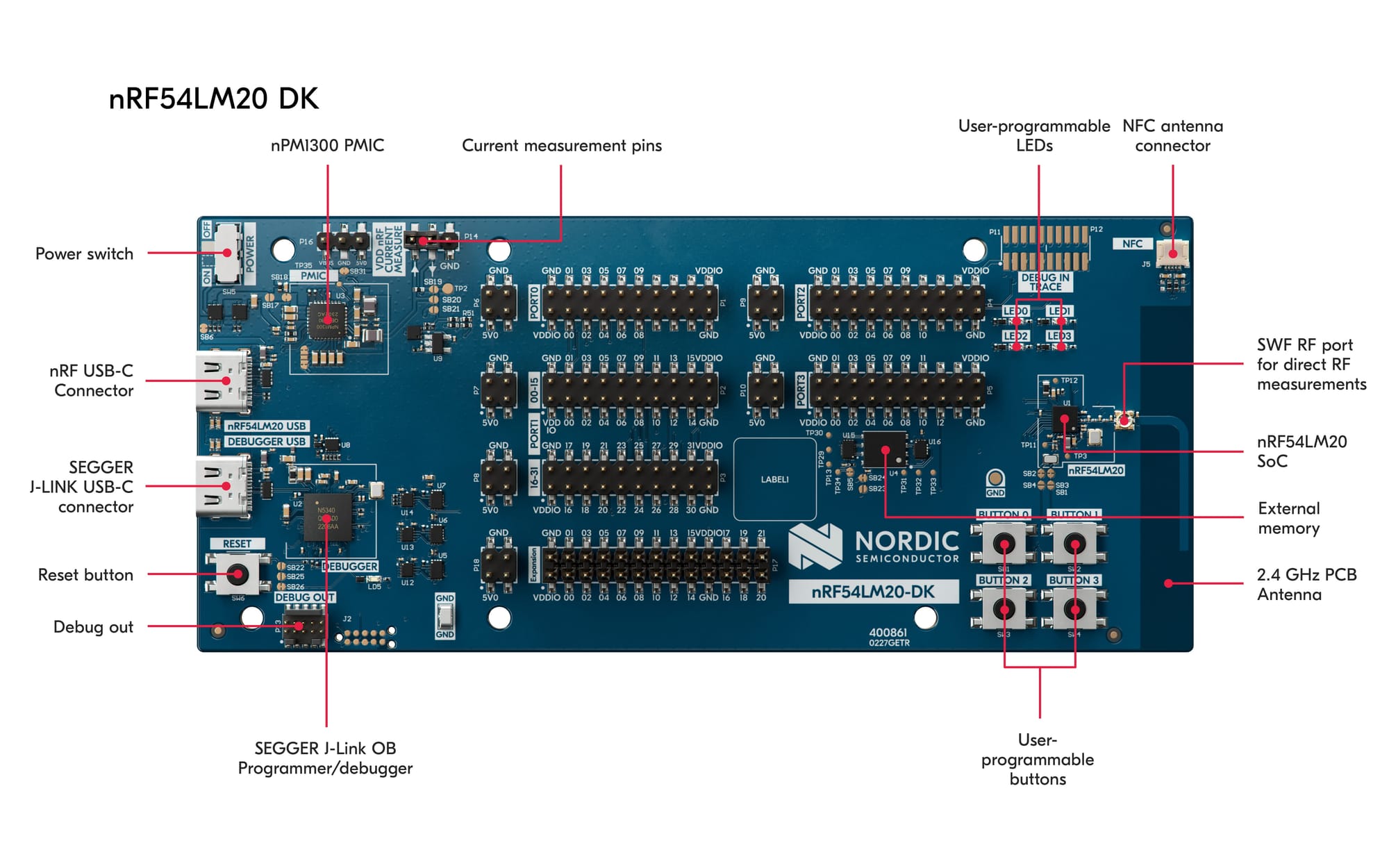
Let’s start with the hardware. The nRF54LM20B
is the SoC we’re building on: ARM Cortex-M33 at 128 MHz, Bluetooth LE
radio, and the Axon NPU in one package. The nRF54LM20
Development Kit (DK) is the board we use throughout. There’s
only one DK version, the Axon NPU is unlocked on all units, the build
target is nrf54lm20dk/nrf54lm20b/cpuapp, and the expansion
headers expose P1.04 and P1.05 for our
PDM microphone with no solder-bridge changes needed.
The Toolchain Pipeline
You don’t run model training or compilation yourself: the wakeword and KWS networks ship pre-trained and pre-compiled inside the Edge AI Add-on. Three steps:
1. Install the nRF Connect for VS Code extension, which pulls in NCS v3.3.0 and the Edge AI Add-on automatically.
2. Build:
west build -b nrf54lm20dk/nrf54lm20b/cpuapp applications/ww_kws \
    -- -DCONFIG_APP_MODE_WW_GATED_KWS=y
3. Flash:
west flash --dev-id <your-DK-serial>To swap in your own model later (custom wakeword, different keyword set, anomaly detector), the longer path adds a training step (Nordic Edge AI Lab for no-code custom wakewords) and an Axon Compiler step before the build.
What you’ll need
- nRF Connect SDK v3.3.0 + the latest Edge AI Add-on, plus nRF Connect for Mobile on a phone for inspection.
- The Axon NPU enabled in your project’s Device Tree Source
(DTS) overlay, since it’s not on by default. The matching
prj.confflags and the full overlay are below.
Here’s the full DTS overlay we use
(applications/ww_kws/boards/nrf54lm20dk_nrf54lm20b_cpuapp.overlay):
/ {
    chosen {
        /* uart20 is the one bridged to the VCOM on this DK, so control_output
         * messages land on the J-Link USB serial port.
         */
        ncs,control-output-uart = &uart20;
    };
};

&pinctrl {
    pdm20_default_alt: pdm20_default_alt {
        group1 {
            psels = <NRF_PSEL(PDM_CLK, 1, 4)>,
                <NRF_PSEL(PDM_DIN, 1, 5)>;
        };
    };
};

dmic_dev: &pdm20 {
    status = "okay";
    pinctrl-0 = <&pdm20_default_alt>;
    pinctrl-names = "default";
    clock-source = "PCLK32M";
};

&axon {
    status = "okay";
};
And the relevant prj.conf additions (full file in the
companion repo):
# nRF Edge AI + Axon NPU
CONFIG_NRF_EDGEAI=y
CONFIG_NRF_AXON=y
CONFIG_NEWLIB_LIBC=y
CONFIG_FPU=y

# Axon model buffer sizes (sized for the bundled wakeword + KWS models)
CONFIG_NRF_AXON_INTERLAYER_BUFFER_SIZE=6656
CONFIG_NRF_AXON_PSUM_BUFFER_SIZE=0

# PDM microphone capture
CONFIG_GPIO=y
CONFIG_AUDIO=y
CONFIG_AUDIO_DMIC=y

# Bluetooth LE Voice Workout GATT service
CONFIG_BT=y
CONFIG_BT_PERIPHERAL=y
CONFIG_BT_DEVICE_NAME="Voice Workout"
CONFIG_BT_DEVICE_APPEARANCE=833
CONFIG_BT_MAX_CONN=1
CONFIG_BT_MAX_PAIRED=1
CONFIG_HEAP_MEM_POOL_SIZE=4096

# Extend the post-wakeword KWS window from upstream's 3 s default so the
# workout flow (Go -> reps -> Stop -> Yes/No) doesn't force a re-wakeword
# between commands.
CONFIG_KWS_PERIOD_MS=10000
3. The Demo: What We’re Building
Let’s walk through what the demo actually does. The goal is a hands-free Voice Workout tracker running entirely on a Nordic DK, talking to a phone over Bluetooth LE, updating in real time as you speak. User flow:
- “Okay Nordic, Go” → device transitions to ACTIVE (workout in progress)
- Do your set, then “Okay Nordic, Stop” → device moves to AWAITING_CONFIRM
- “Okay Nordic, Yes” → saves the workout. The device briefly shows SAVED and auto-returns to IDLE two seconds later.
- “Okay Nordic, No” → discards. Passes through DISCARDED, then back to IDLE.
The phone sees three Bluetooth LE notifications update live at every step: Workout State, Last Command, and Confidence.
Hardware Bill of Materials
- nRF54LM20 DK (Nordic Semiconductor)
- Adafruit 3492 PDM MEMS Microphone Breakout, a common PDM MEMS breakout that drops onto the same CLK/DAT pins (P1.04/P1.05) Nordic’s KWS sample expects
- A USB-C cable
- A phone running nRF Connect Mobile
- Optional: Power Profiler Kit II (PPK2) for the Section 7 power measurements
Wiring the Microphone
Four pins from the Adafruit 3492 connect to the DK’s expansion header: CLK → P1.04, DAT → P1.05, 3V → VDD:IO (the Adafruit 3492 accepts 1.8-3.3 V; the DK’s default works), GND → GND.
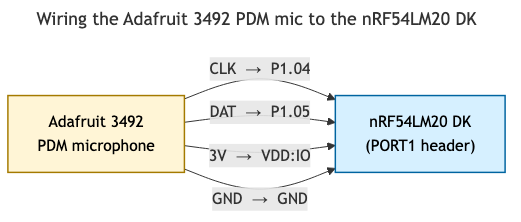
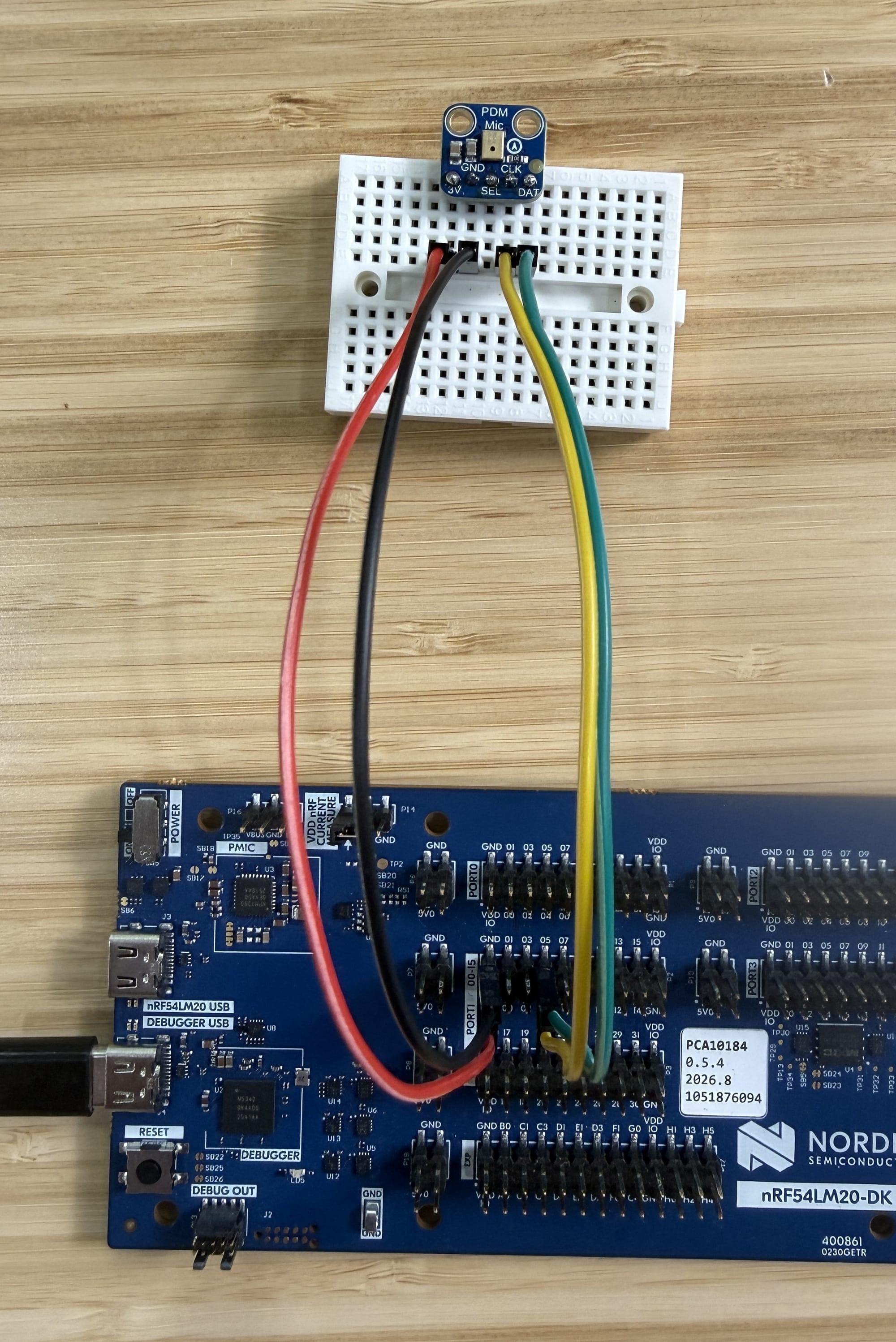
These pin assignments match Nordic’s own KWS sample, so you have a known-good reference to cross-check against if anything misbehaves.
Verify the P14 jumper is installed. Without it, every debug-port operation fails with confusing errors.
For the mic supply: the Adafruit 3492 accepts 1.8 V to 3.3 V on its VDD line, which covers the DK’s full programmable VDD:nRF range, so the DK’s default works regardless of how it was previously configured.
End-to-End Architecture
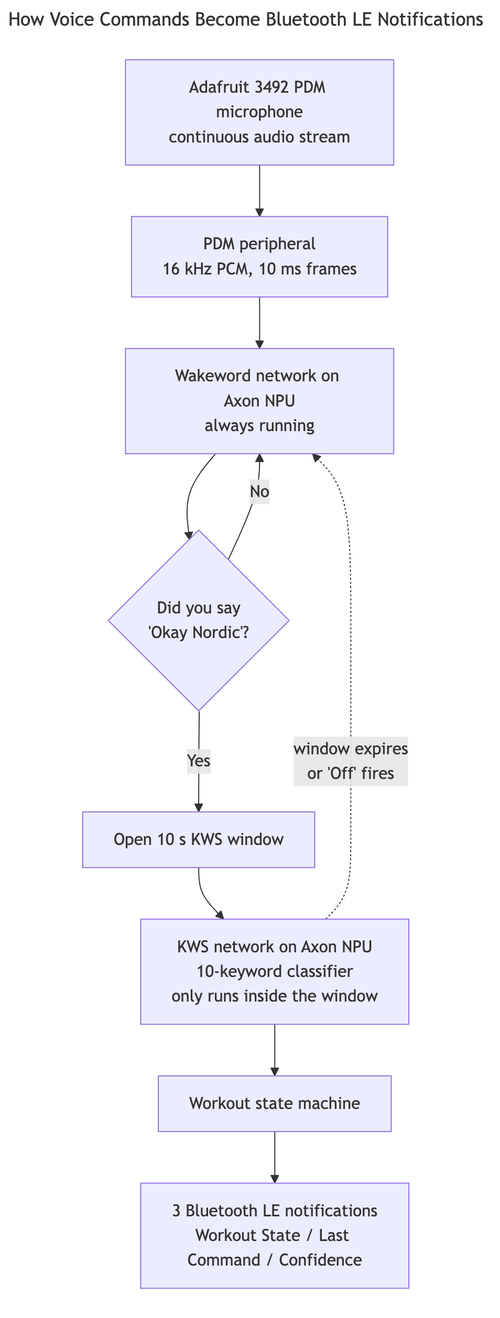
The microphone captures sound as a PDM bitstream that the nRF54LM20B’s PDM peripheral decimates into 16-bit PCM at 16 kHz. The wakeword model runs continuously over those samples (always-on, on the Axon NPU). When it detects “Okay Nordic,” it opens a 10-second window during which the Keyword Spotting (KWS) model runs (also on the Axon NPU) and classifies each frame into one of ten short commands.
The recognized command feeds the workout state machine, which either drives a state transition (Go, Stop, Yes, No) or reports through (Up, Down, On, Right, Left, Off). On every detection, three Bluetooth LE notifications go out: Workout State, Last Command, and Confidence.
4. Nordic’s Bundled Wakeword and Keyword-Spotting Models
Both networks ship pre-trained and pre-compiled with the Edge AI
Add-on. The smaller wakeword model (~25 KB int8
weights, 12 layers, with 6 recurrent state buffers that carry context
across audio frames) runs continuously and sets the always-on listening
floor we measure in Section 7. The larger KWS model
only runs inside the 10-second window after a wakeword detection,
classifying each frame into one of ten short commands: Go,
Stop, Yes, No, Up,
Down, On, Off,
Right, Left.
Both are stored as C headers compiled by the Axon
Compiler and included directly by ww_kws. To swap
in your own model later (a custom wakeword from Nordic Edge AI Lab, or your
own TF Lite model through the Axon Compiler), this is a clean baseline
to extend.
5. Firmware Walkthrough
Let’s open up the firmware. I kept the diff against Nordic upstream
as small as possible: three small hooks in main.c plus one
new sibling directory, so the demo survives Edge AI Add-on upgrades
cleanly.
We layer a small Voice Workout GATT service on top of Nordic’s
bundled applications/ww_kws
sample, which already does the hard parts: PDM capture, wakeword and KWS
model loading, the wakeword-gated state machine, and the main loop. Our
additions land in one new sibling subdirectory plus a few small edits in
two host files:
applications/ww_kws/
├── src/
│   ├── main.c                  ← three small additions (hooks for our service)
│   ├── voice_workout/          ← NEW: our GATT service
│   │   ├── voice_workout.c
│   │   └── voice_workout.h
│   └── ...                     ← Nordic upstream (unchanged)
├── prj.conf                    ← three Bluetooth LE additions + KWS_PERIOD_MS
└── ...
This shape keeps the diff against Nordic upstream small (and survives Edge AI Add-on upgrades cleanly). Full source is in the companion repo; the rest of this section walks through the design decisions rather than the line-by-line code.
The Voice Workout GATT Service
A single primary GATT service with three notify characteristics. Each carries an ASCII payload, so values render as human-readable text in nRF Connect Mobile’s UTF-8 view with no client-side decoding:
| Characteristic | UUID suffix | Sample payload | What it tells you |
|---|---|---|---|
| Workout State | 7c000002… |
"IDLE", "ACTIVE",
"AWAITING_CONFIRM", "SAVED",
"DISCARDED" |
Where the state machine is right now |
| Last Command | 7c000003… |
"Go", "Stop", "Yes",
"No", "Up", … |
The most recent keyword the KWS spotted |
| Confidence | 7c000004… |
"94%" |
Smoothed classification probability |
The service base UUID is
7c00000X-c0ff-ee00-0001-1e2b3c4d5e6f, with the leading 32
bits incrementing per characteristic. Each characteristic is
READ | NOTIFY with a BT_GATT_CCC() descriptor
so the central can subscribe; the CCC change callback lets our code skip
the notify when no one is listening.
Here’s the service definition from voice_workout.c:
BT_GATT_SERVICE_DEFINE(voice_workout_svc,
    BT_GATT_PRIMARY_SERVICE(VW_SERVICE_UUID),

    BT_GATT_CHARACTERISTIC(VW_STATE_CHRC_UUID,
                           BT_GATT_CHRC_READ | BT_GATT_CHRC_NOTIFY,
                           BT_GATT_PERM_READ,
                           read_state, NULL, NULL),
    BT_GATT_CCC(state_ccc_cfg_changed,
                BT_GATT_PERM_READ | BT_GATT_PERM_WRITE),

    BT_GATT_CHARACTERISTIC(VW_LAST_CMD_CHRC_UUID,
                           BT_GATT_CHRC_READ | BT_GATT_CHRC_NOTIFY,
                           BT_GATT_PERM_READ,
                           read_last_cmd, NULL, NULL),
    BT_GATT_CCC(last_cmd_ccc_cfg_changed,
                BT_GATT_PERM_READ | BT_GATT_PERM_WRITE),

    BT_GATT_CHARACTERISTIC(VW_CONFIDENCE_CHRC_UUID,
                           BT_GATT_CHRC_READ | BT_GATT_CHRC_NOTIFY,
                           BT_GATT_PERM_READ,
                           read_confidence, NULL, NULL),
    BT_GATT_CCC(confidence_ccc_cfg_changed,
                BT_GATT_PERM_READ | BT_GATT_PERM_WRITE),
);
The Workout State Machine
Five states, four user-driven transitions, and a 2-second timer that
auto-returns from SAVED and DISCARDED back to
IDLE:
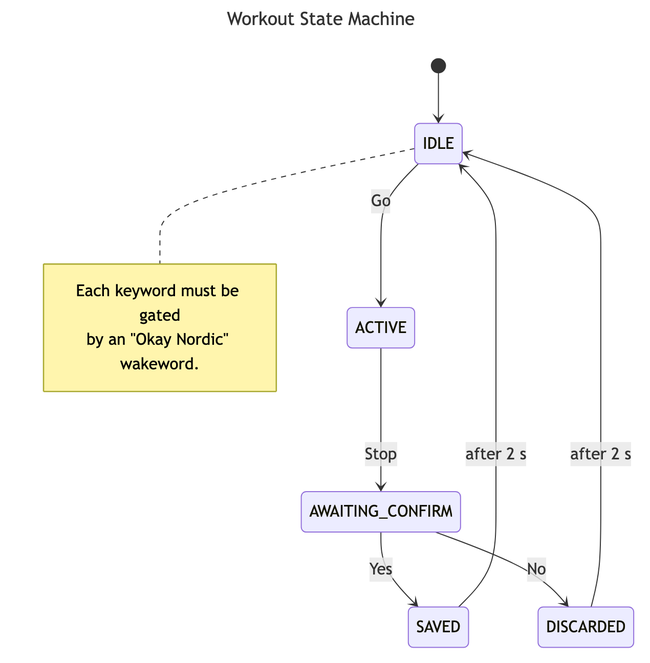
Three implementation details not visible in the figure:
- Every keyword input is gated by an “Okay Nordic” wakeword detection. The KWS spotter only runs inside the 10-second window opened by a successful wakeword. Outside that window the spotter literally cannot fire (privacy-friendly by construction).
- The KWS model recognizes ten keywords. Four
(
Go,Stop,Yes,No) drive the state machine; the other six (Up,Down,On,Right,Left,Off) update Last Command and Confidence but don’t change State.Offalso closes the active listening window early (think “Alexa, stop”), via a singleif (strcmp(name, "Off") == 0) { spotting_timeout = 0; }. - Invalid transitions are no-ops. Saying “Yes” while
in
IDLEleaves State unchanged but still updates Last Command.
KWS window, DT
overlay, Kconfig, and main.c hooks
The ww_kws sample exposes the KWS active window as
CONFIG_KWS_PERIOD_MS, defaulting to 3 seconds upstream, too
tight for a workout flow where you do reps between commands. Our
prj.conf overrides it to 10000 (10 s). Each
detection inside the window resets the timer, so an active conversation
stays active for as long as you keep talking. Section 7 shows how this
knob shapes the power profile.
Our DT overlay enables &pdm20 (the LM20B’s PDM
peripheral, not pdm0 as in older Nordic
samples; biggest porting trip-up) on P1.04/P1.05, and sets
&axon to okay. Our prj.conf
adds three Bluetooth LE Kconfigs (CONFIG_BT=y,
CONFIG_BT_PERIPHERAL=y,
CONFIG_BT_DEVICE_NAME="Voice Workout") plus the
KWS_PERIOD_MS override.
One PDM gotcha worth flagging even though the code is in the repo:
don’t set clock-frequency on the PDM node.
The binding doesn’t accept it. Use clock-source = "PCLK32M"
and configure the sample rate at runtime through the DMIC API.
Our additions to main.c are well under 30 lines,
organized as three hooks: (1) voice_workout_init() at
startup, which registers the GATT service and starts advertising; (2)
voice_workout_handle_result(name, avg_probability) inside
the KWS loop, called once per keyword detection to update the three
characteristics and run the state machine; and (3) the Off
early-exit that sets spotting_timeout = 0.
Hook (1), the startup call, sits in main() right after
the wakeword and KWS init:
err = voice_workout_init();
if (err) {
    return err;
}

LOG_INF("Initialization completed");
Hooks (2) and (3) live inside the KWS loop, right after a valid keyword detection:
if (prediction.valid) {
    leds_blink_led1();
    spotting_timeout = k_uptime_get_32() + CONFIG_KWS_PERIOD_MS;
    print_control_output(
        (struct control_message){.type = CONTROL_MESSAGE_KW_SPOTTED,
                     .kw_class = prediction.class,
                     .name = prediction.name});
    voice_workout_handle_result(prediction.name,
                                prediction.avg_probability);

    /* "Off" closes the active KWS window early and returns the device
     * to wakeword-only listening. Pure listening-window control: the
     * workout state machine is untouched.
     */
    if (strcmp(prediction.name, "Off") == 0) {
        LOG_INF("Listening window closed by 'Off' keyword");
        spotting_timeout = 0;
    }
}
And the keyword-to-state-transition cascade inside
voice_workout_handle_result(), which is the heart of the
state machine:
if (strcmp(name, "Go") == 0 && current_state == WORKOUT_STATE_IDLE) {
    state_change_to(WORKOUT_STATE_ACTIVE);
} else if (strcmp(name, "Stop") == 0 && current_state == WORKOUT_STATE_ACTIVE) {
    state_change_to(WORKOUT_STATE_AWAITING_CONFIRM);
} else if (strcmp(name, "Yes") == 0 && current_state == WORKOUT_STATE_AWAITING_CONFIRM) {
    state_change_to(WORKOUT_STATE_SAVED);
} else if (strcmp(name, "No") == 0 && current_state == WORKOUT_STATE_AWAITING_CONFIRM) {
    state_change_to(WORKOUT_STATE_DISCARDED);
}
state_change_to() updates current_state,
writes the new state name into the GATT characteristic buffer, and calls
bt_gatt_notify() only if the central has subscribed (the
state_ccc_enabled flag).
One race-condition gotcha worth knowing: when a connected central
drops the link, don’t call bt_le_adv_start()
directly from the disconnected callback. It can
race with the Bluetooth LE host’s connection-teardown bookkeeping and
return -ENOMEM. Schedule a system workqueue item with a 100
ms delay instead.
The pattern in voice_workout.c:
static void disconnected(struct bt_conn *conn, uint8_t reason)
{
    LOG_INF("Central disconnected (reason %u)", reason);
    ble_connected = false;
    state_ccc_enabled = false;
    last_cmd_ccc_enabled = false;
    confidence_ccc_enabled = false;

    if (current_conn) {
        bt_conn_unref(current_conn);
        current_conn = NULL;
    }

    /* Defer through the system workqueue: bt_le_adv_start() can race
     * with the Bluetooth LE host's connection-teardown bookkeeping if
     * called directly from this callback.
     */
    k_work_schedule(&adv_restart_work, K_MSEC(100));
}
6. Running the Demo
From a flashed DK and a phone with nRF Connect Mobile installed, you should be at a working demo in a few minutes.
1. Sanity-check the stock sample first. I recommend
this even if you’re confident in your wiring, since it catches mic-clock
or P14 issues in under a minute. Build and flash the upstream
applications/ww_kws sample (without our
voice_workout/ directory) using the same
west build / west flash commands. With a UART
terminal open, say “Okay Nordic, Go”. The firmware should log a wakeword
detection followed by a Go keyword detection. If it
doesn’t, debug the baseline first (most likely the mic wiring or the P14
jumper).
2. Build and flash the demo from your Edge AI Add-on
workspace root, with our voice_workout/ directory copied
into applications/ww_kws/src/:
west build -b nrf54lm20dk/nrf54lm20b/cpuapp edge-ai/applications/ww_kws \
    -- -DCONFIG_APP_MODE_WW_GATED_KWS=y
west flash --dev-id <your-DK-serial>
3. Watch the boot log at 115200 baud. The two lines you’re looking for:
Bluetooth initialized
Advertising as 'Voice Workout'
4. Connect from the phone. In nRF Connect
Mobile, tap Scan, find Voice
Workout, Connect, then expand the service
whose UUID base starts with 7c000001-c0ff-ee00-....
5. Subscribe to the three notifications. Tap the
triple-down-arrow on each characteristic (...0002 State,
...0003 Last Command, ...0004 Confidence). The
UART log prints State notifications enabled (and the
equivalents) once each subscription lands.
6. Run a Save cycle. Speak the four commands one at a time, with a short pause after each to watch the phone:
- “Okay Nordic, Go” → State
ACTIVE, Last CommandGo, Confidence ~94% - “Stop” → State
AWAITING_CONFIRM - “Yes” → State
SAVED, then auto-returns toIDLEafter 2 seconds
If all four notifications fire in order, the demo is working end to end. Common bring-up snags (no advertising message, wakeword detects but State doesn’t change, mic wiring debugging) are documented in the companion repo’s troubleshooting guide.
7. Power Profile
Let’s measure what this listening loop actually costs. I’d recommend
starting with Nordic’s axon_low_power sample before
measuring the full firmware: it isolates the NPU on its own, and the
numbers it produces line up directly with what Nordic publishes for the
Axon. Once that baseline is in hand, the full-firmware measurement is
much easier to interpret.
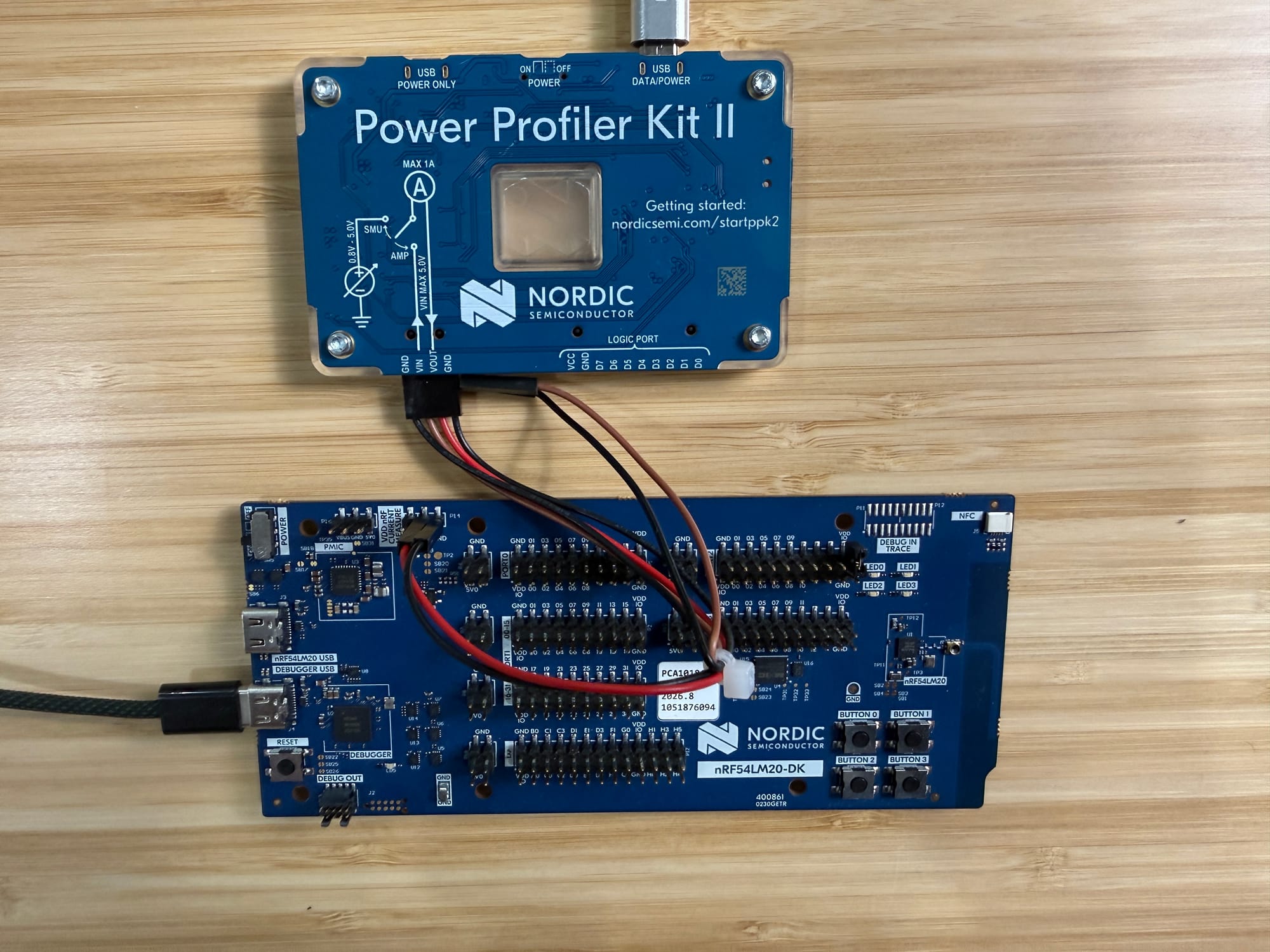
The remaining technical question is where the current goes once the firmware is running, so I put the firmware on a Power Profiler Kit II (PPK2) in source measure mode at 3.0 V (Nordic’s MLPerf Tiny operating point), wired into the DK’s P14 SoC current-measurement header. P14 isolates the VDDM rail of the nRF54LM20B SoC itself, which excludes the J-Link debugger, the on-board PMIC, and the external microphone (the mic sits on VDD:IO, a voltage follower of VDD:nRF designed specifically to keep external loads off the SoC measurement).
The full listening loop
We captured a full Save cycle: 113 seconds with three commands (“Go”, “Stop”, “Yes”) and a phone subscribed to the three notify characteristics. Four phases stand out across the trace:
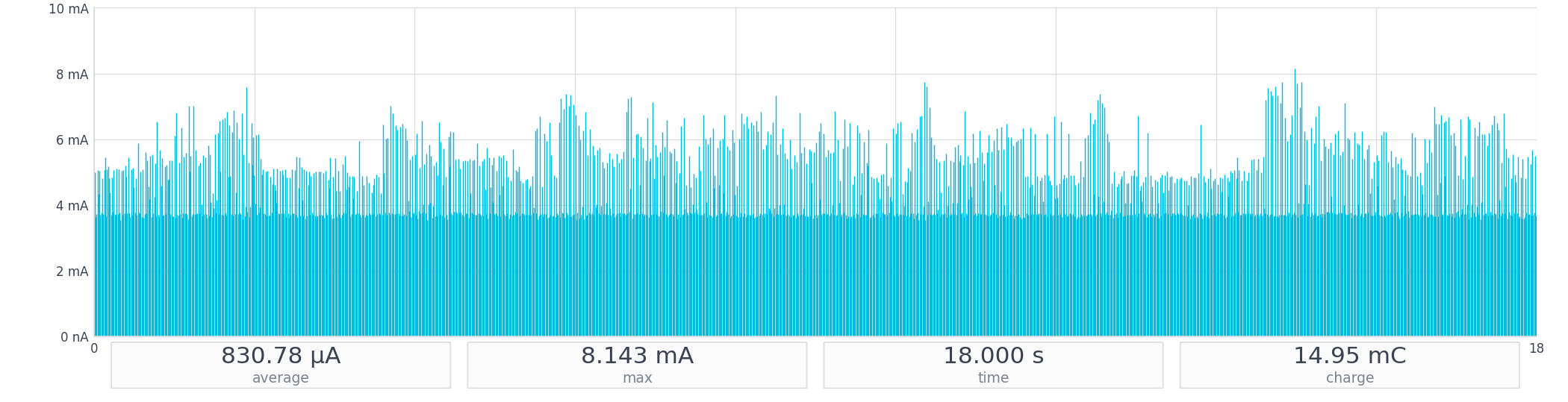
- Wakeword-listening baseline at roughly 831 µA average when the phone is connected (PDM streaming continuously, wakeword network running every ~30 ms, Bluetooth LE connection events on top).
- KWS shelves that lift the running average by ~125 µA whenever the wakeword fires and the larger KWS network runs alongside it for the 10-second window (subtle on the trace because PDM dominates the y-axis, but measurable: the 10-second active window averages ~955 µA against the ~831 µA quiet baseline).
- Notification bursts of up to three taller spikes per detection (Workout State, Last Command, Confidence).
- KWS timeout that drops the device back to
wakeword-only when the window expires (or
Offcloses it early).
Here’s one of those events up close. The 955 µA WINDOW in this slice covers the full event (baseline + KWS shelf + three notification spikes), which is why it’s higher than the quiet baseline:
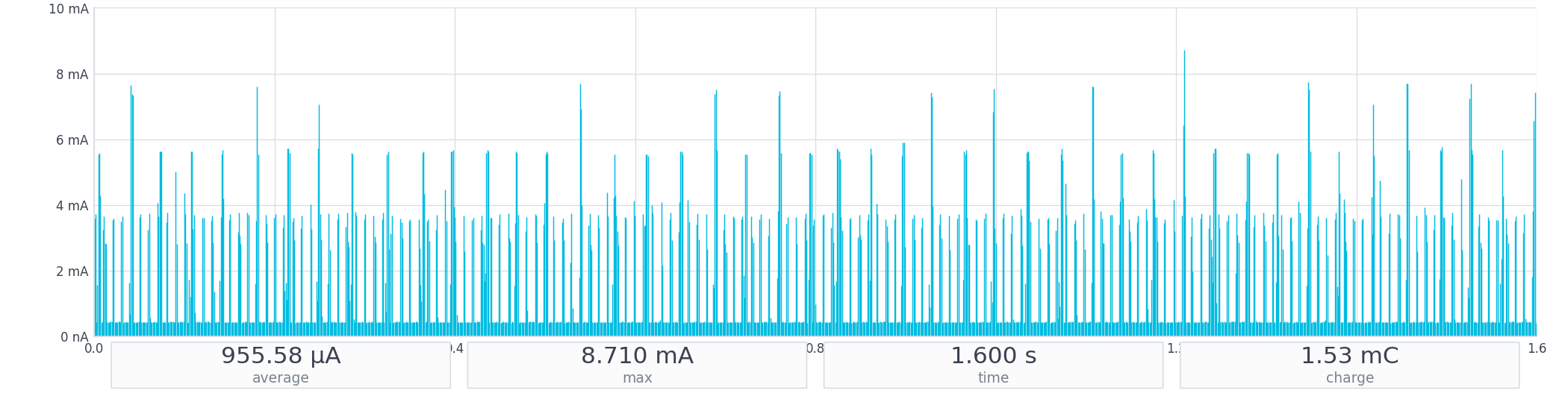
ww_kws + WW_GATED_KWS=y).
The “Stop” and “Yes” events show the same triplet pattern. The quiet baseline itself, measured on a separate per-segment capture of steady-state connected listening with no commands, averages ~831 µA:
Disconnecting the phone increases current (the counter-intuitive part)
The first time I ran this measurement, I expected disconnecting the phone to drop the current. It doesn’t:
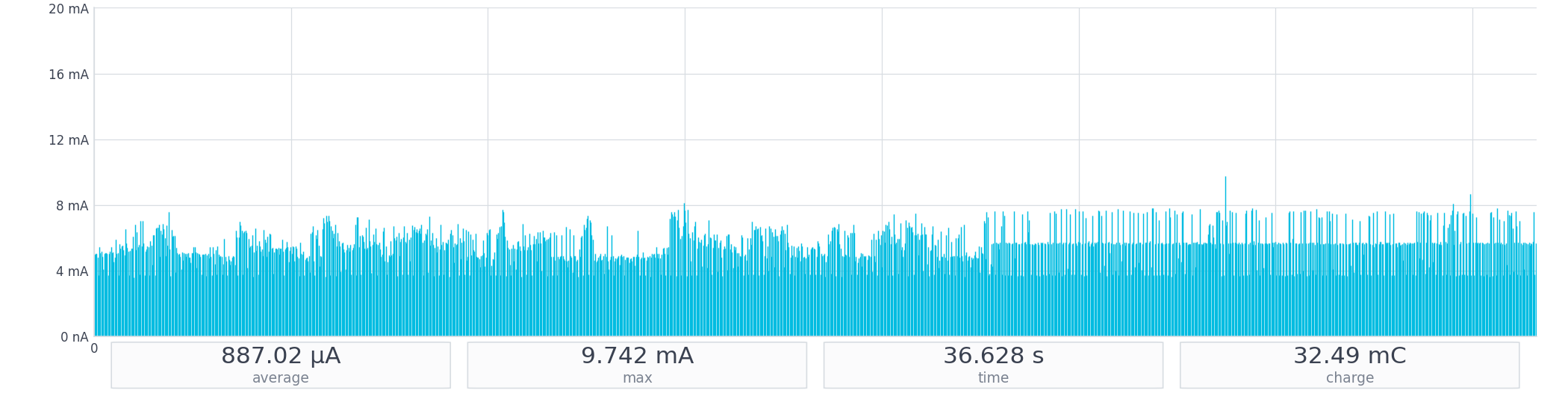
The 887 µA shown in the WINDOW is the average over the whole capture.
Sliced into per-segment WINDOWs, the connected half averages
~831 µA (the B-connected.ppk2 figure shown
earlier) and the disconnected half averages ~971 µA, a
~140 µA delta:
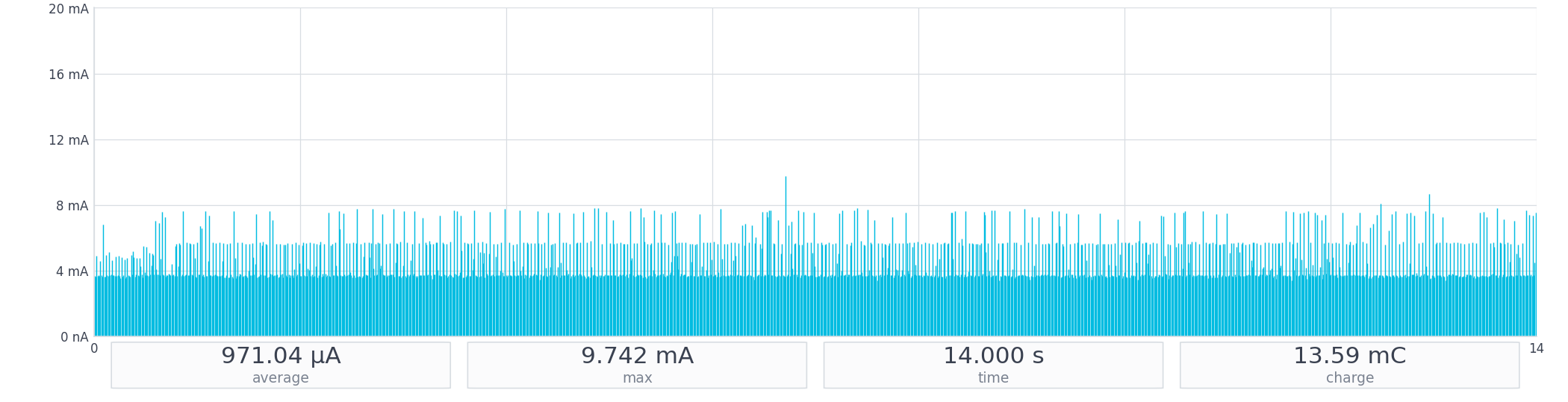
Disconnecting the phone increases listening current by
roughly 140 µA. The reason: our firmware advertises with
FAST_1
parameters (Zephyr’s BT_LE_ADV_CONN_FAST_1, mapping to the
Core Spec’s Advertising_Interval_Min/Max set to a fast
cadence), which transmits short bursts on the three primary advertising
channels (37, 38, 39) per event. When a central is connected, the radio
runs scheduled connection events at the negotiated interval instead, and
because our characteristics carry only a few bytes per notification,
most of those events ship empty Data PDUs. On a per-second basis
the radio spends less air time servicing empty connection events than
firing repeated FAST_1 advertising on three channels.
Decomposing the 971 µA listening floor
The headline number is 971 µA for the disconnected
listening floor. To attribute where that current goes, we built a
stripped variant with the entire audio path wrapped in
#if 0 (PDM init, wakeword and KWS init, audio loop) and an
early return 0 after voice_workout_init(). The
kernel keeps running and Bluetooth LE keeps advertising, but the PDM
peripheral never enables (FLASH usage drops by roughly 22 percentage
points, from ~31.5% to ~7.0%, confirming the audio path is fully
excluded).
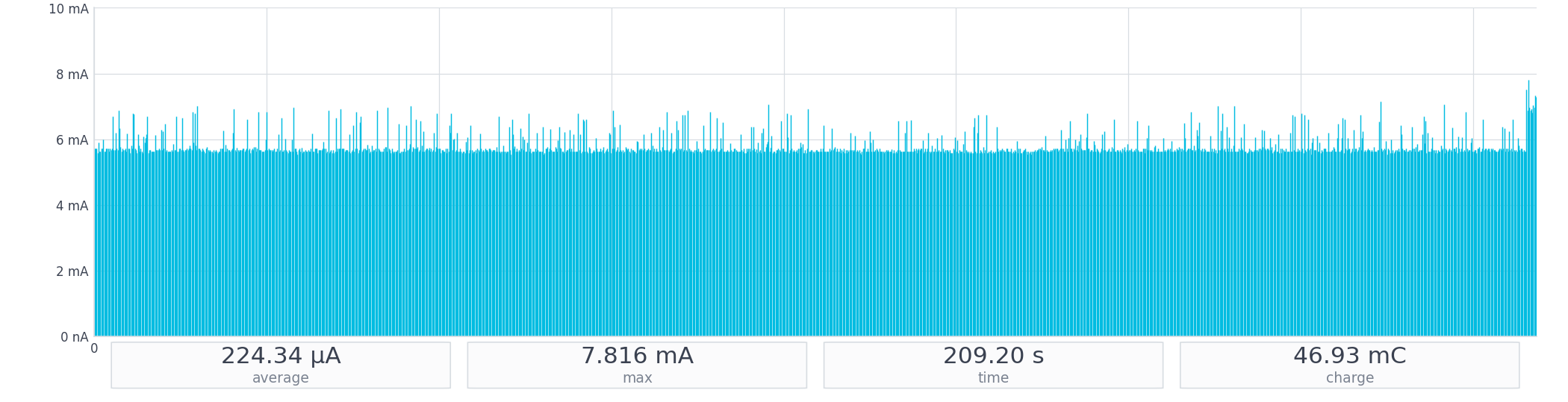
That ~224 µA is the directly-measured cost of the
Bluetooth LE peripheral with FAST_1 advertising and nothing else. With
the per-inference cost of the wakeword network independently measurable
on Nordic’s axon_low_power sample (next subsection), the
residual is everything else, dominated by PDM:
| Component | Average current | How it was attributed |
|---|---|---|
| Bluetooth LE peripheral, FAST_1 advertising | ~224 µA | Measured directly via the stripped variant |
| PDM streaming and audio plumbing | ~655 µA | Residual: 971 − 224 − 92 |
| Axon wakeword inference cadence | ~92 µA | From axon_low_power per-inference data: 2.77 µC per
inference at the firmware’s ~30 ms wakeword stride (2.77 µC / 30 ms ≈ 92
µA averaged) |
| Total | ~971 µA | Matches measured 971 µA |
The takeaway: PDM streaming dominates the listening floor, not the NPU and not the radio. The path to dropping the floor below ~700 µA on this SoC class is to break the always-on PDM assumption (button press, motion sensor, low-power voice-activity detector), not to optimize the wakeword network or the radio further.
The NPU itself, in isolation
Where does the ~92 µA Axon figure come from? Nordic
ships an axon_low_power
measurement-reference build that runs the same okay_nordic
wakeword model our demo uses, with no live mic, no Bluetooth LE, and no
UART, with the CPU sleeping between sweeps:
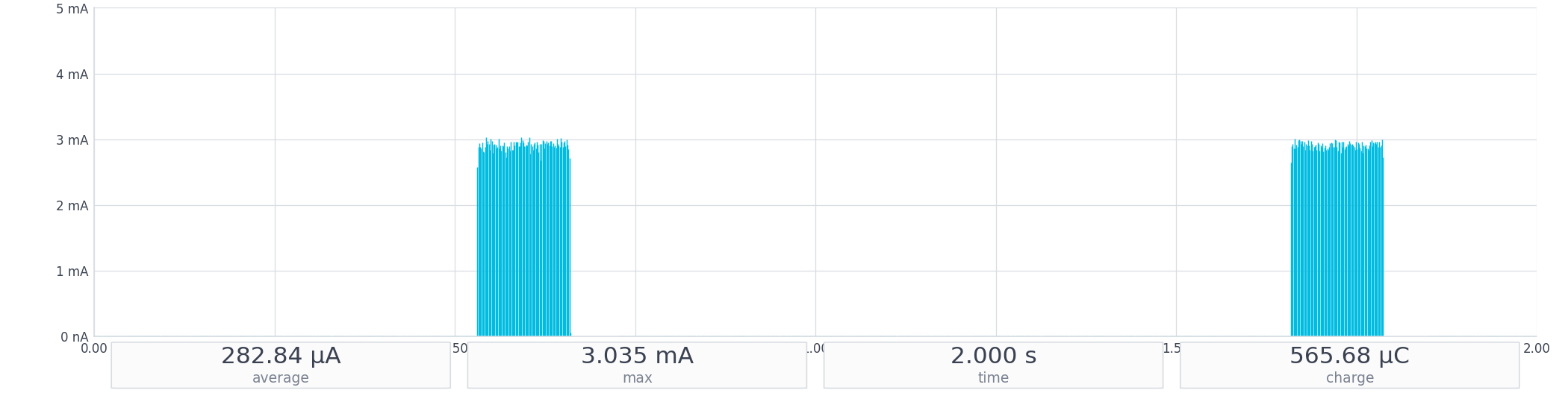
axon_low_power sample, same DK and PPK2
setup.
The figure averages 282.84 µA over 2 seconds because
the trace is mostly deep-sleep idle (visibly near zero between sweeps)
punctuated by two brief inference sweeps. Each sweep contains 100
back-to-back inferences peaking at ~3 mA (the figure’s
max = 3.035 mA) for ~1.3 ms per inference
(~8.3 µJ each, from each sweep’s ~278 µC charge ÷ 100 inferences ÷ 3
V).
For context, Nordic’s
published Axon MLPerf Tiny figure shows the heavier MLPerf KWS
reference model averaging 3.0 mA during a 4.5 ms
inference (40.5 µJ). Our okay_nordic wakeword is a
lighter model, so its inference is faster and the per-inference energy
is lower. Drag a WINDOW across a between-sweeps quiet region and it
averages ~6 µA (Nordic publishes
<10 µA), orders of magnitude lower than the 971 µA
full-firmware floor. Even at the wakeword cadence, the NPU’s
time-averaged cost is ~92 µA, under a tenth of the listening floor.
Axon vs. CPU, and what’s not in the measurement
Nordic’s Embedded World 2026 video on the LM20B (YouTube)
compares the same okay_nordic pipeline on the Axon NPU
versus the Cortex-M33 CPU, framing the Axon as “up
to 15x faster, 15x more energy-efficient” for
short-vocabulary speech recognition. If you imagine swapping Axon for
CPU in this firmware, the ~92 µA inference component scales by roughly
9–15× (to roughly 0.8–1.4 mA averaged) and pushes the total floor well
above 1.5 mA. The Axon NPU is what keeps the always-on floor
under 1 mA on this SoC.
Two caveats before you take these numbers anywhere else.
First, the microphone is on VDD:IO, not VDDM. The Adafruit 3492 mic sits on the GPIO header’s VDD:IO rail, a voltage follower of VDD:nRF (we have VDD:nRF set to 1.8 V via Board Configurator) that keeps external loads off the SoC measurement. The mic itself draws around 500–600 µA, so a realistic system total for always-listening is closer to ~1.5 mA, not 971 µA. (The J-Link and PMIC are on USB 5 V; a battery-powered product would remove the J-Link entirely.)
Second, PPK2 range-switching artifacts produce 1–4 sample-wide transient spikes at internal range boundaries. The matplotlib renders above apply a 9-sample median despike that preserves real signals (Bluetooth LE TX events span 25+ samples, Axon sweeps 130+) while filtering the artifacts. Averages are unaffected.
This firmware fits an ultra-low-power always-on voice budget on this SoC: sub-1-mA SoC-only, ~1.5 mA system with the mic. The path to multi-week or multi-month battery life on a small primary cell is to break the always-on PDM assumption (button, motion sensor, low-power voice-activity detector), as the decomposition above makes clear.
8. When This Fits, and What to Build Next
Let’s step back. When do you reach for the Axon NPU, and when does it not fit?
Reach for the Axon NPU when you need always-on speech recognition on a microcontroller running on a battery, or frequent on-device inference where the model is short-vocabulary classification or anomaly detection (compact CNN or TCN, int8-quantizable), and a sub-1-mA always-on floor matters. Reach for Neuton when you don’t have ML expertise and the model is small enough to run on the M33 CPU within budget. Reach for a more powerful SoC or cloud inference when the vocabulary is large, you need natural-language understanding, or model size/latency exceeds what the Axon NPU supports.
The architecture here (PDM capture → wakeword-gated KWS on Axon → small state machine → Bluetooth LE notifications) is a starting point, not a finished product. For example, swap the workout state machine for “Light On / Off / Brighter / Dimmer” and you have hands-free smart-home control; swap it for a short safety vocabulary and you have hands-free industrial PPE. The model and vocabulary change; the firmware wiring stays the same.
Nordic’s Edge AI Lab is an automated no-code platform for building compact models and embedding them across all of Nordic’s wireless SoCs. Its Use Cases page (free Nordic Edge AI Lab sign-in required) has a curated set of pre-built demos (gesture-based smartwatch and remote control, daily activity recognition, handwashing and toothbrushing tracking, smart-ring control, on-device package tracking, accessibility-focused activity recognition, etc.), fast ways to see what else the Axon NPU can do without training a model yourself.

To swap “Okay Nordic” for your own wakeword in this firmware, the Edge AI Lab’s no-code My Solutions workflow trains a custom phrase and produces a compiled header that drops into the same slot the bundled wakeword sits in.
The companion code (DT overlay, prj.conf, Voice Workout
source files, and a troubleshooting guide) is at https://github.com/NovelBits/nordic-axon-voice-workout-tracker.
From a flashed DK and a phone with nRF Connect Mobile, you should be at
a working hands-free voice-controlled Bluetooth LE device on your bench
within fifteen minutes.
9. Conclusion
In this post we covered:
- The Axon NPU and how it differs from Neuton (hardware NPU vs. software framework on the Cortex-M33).
- The nRF54LM20 DK and toolchain setup, plus the Adafruit PDM mic wiring.
- The Voice Workout demo end to end: state machine, three Bluetooth LE notify characteristics, GATT service.
- The small Bluetooth LE layer we add on top of Nordic’s bundled
ww_kwssample. - A measured power profile that decomposes the 971 µA SoC-only listening floor into ~224 µA Bluetooth LE + ~655 µA PDM + ~92 µA Axon.
Bottom line: the Axon NPU contributes under 10% of the listening floor. PDM streaming dominates always-on voice on this SoC, and without the Axon’s hardware acceleration that floor would be well above 1 mA.
You should now be able to flash the companion code, connect from nRF Connect Mobile, and have a hands-free voice-controlled Bluetooth LE device working on your bench within fifteen minutes. From here, swap the keywords or the state machine and you’re 80% of the way to a different product running on the same battery.


