


Bluetooth Channel Sounding is having a moment. Devices like Google’s Pixel 10 and Pixel Watch 4 can do it today, Apple is bringing it to iPhone, and the question I keep hearing from developers is a practical one: what hardware do I actually prototype with?
Nordic Semiconductor’s answer is the nRF54L15 Tag. It’s a 33 mm, coin-cell-powered tag that puts the ultra-low-power nRF54L15 SoC on a tiny round board, with one feature you won’t find on a standard development kit: two antennas.
That second antenna is the whole story. It’s what makes the Tag the first Nordic board you can use to prototype multi-antenna Channel Sounding designs for trackers and asset tags.
In this post, and in the walkthrough video, I’ll unbox the Tag, walk through what’s on the board, flash it with Channel Sounding Reflector firmware, and range against it from an Android phone, with an early look at the iPhone path on iOS 27 too, all from a single firmware build. Let’s take a closer look.
Watch the hands-on demo
What’s in the box
The kit is about as minimal as it gets: the Tag itself, a CR2032 coin-cell battery, and a small intro card. That’s intentional. The Tag is a prototyping platform, not a finished product, and the whole design is optimized to stay small and cost-effective.
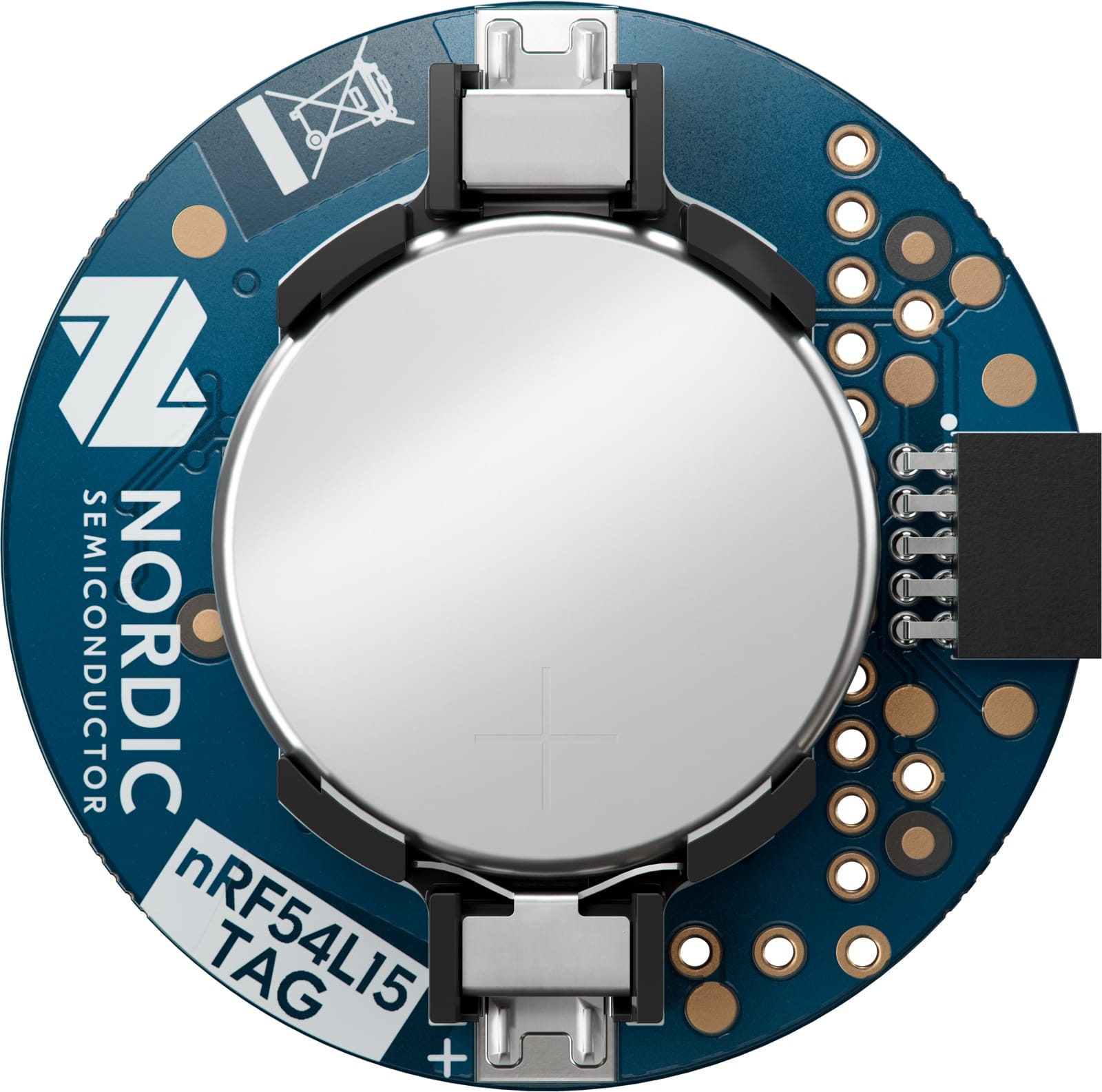
To power it up, you pull the isolator tab that separates the battery from the contacts. The RGB LED starts blinking, which tells you the Tag is running its preprogrammed firmware: the Peripheral LBS (LED Button Service) sample. If you open nRF Toolbox on your phone and scan, you’ll see it advertising as “Nordic_LBS,” and toggling the button in the app changes the LED color on the Tag.
One thing to note: that out-of-the-box LBS firmware isn’t power-optimized. It’s there so you can confirm the Tag works before you flash it with something else.
A tour of the board
The Tag packs a surprising amount onto a 33 mm circle. Let’s go through what’s on it.
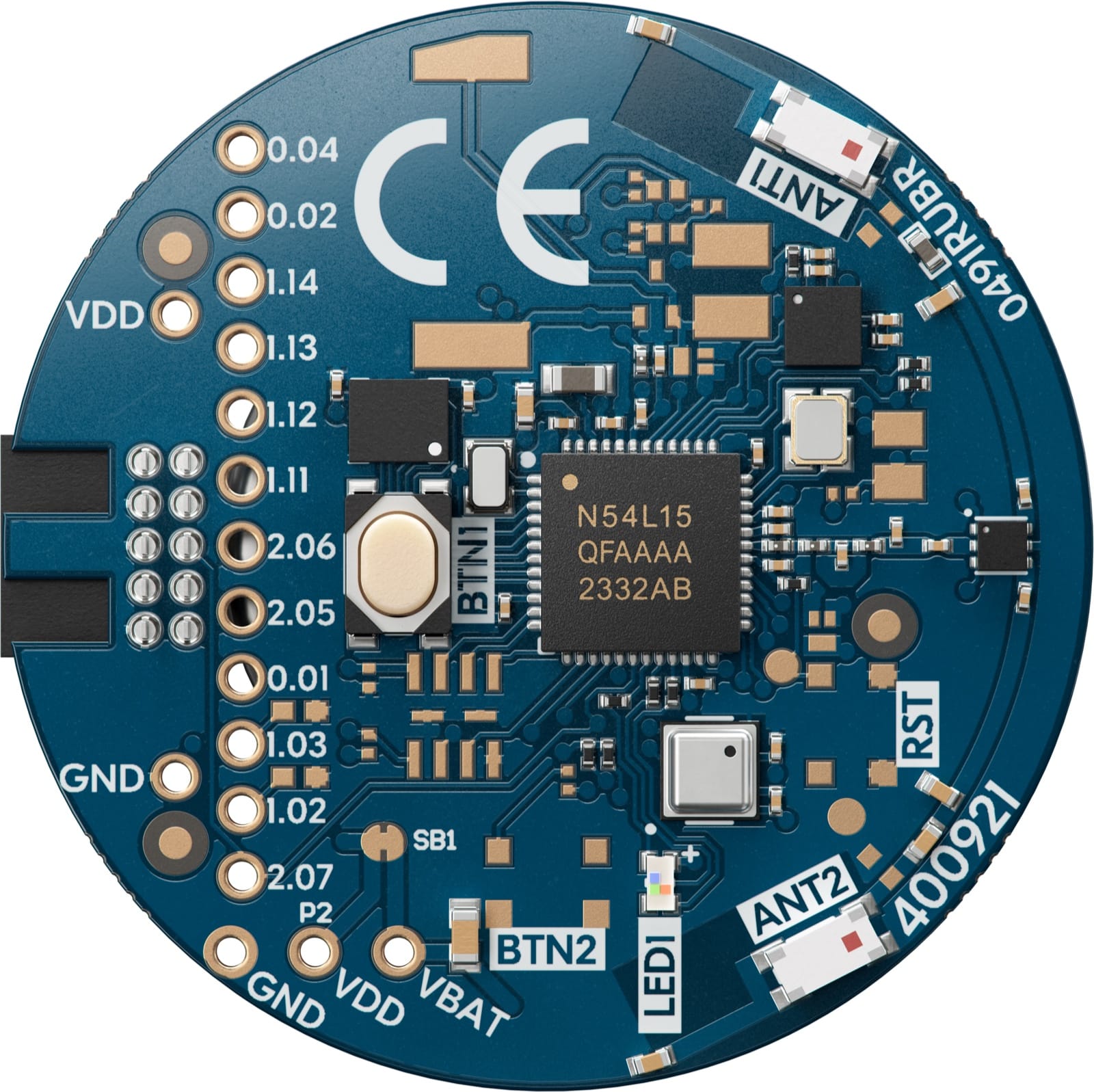
At the center is the nRF54L15 SoC, Nordic’s ultra-low-power multiprotocol wireless chip. It has 1.5 MB of non-volatile memory and 256 kB of RAM, which is a lot of headroom for a coin-cell device, and a next-generation 2.4 GHz radio. On the protocol side, it supports Bluetooth LE, Bluetooth Channel Sounding, Bluetooth Mesh, Matter, Thread, Zigbee, NFC, and 2.4 GHz proprietary, so you’re not locked into a single ecosystem.
Around the SoC, you’ll find three sensors, each chosen for a specific job:
- A Bosch BMI270 six-axis inertial measurement unit (IMU), combining a high-accuracy accelerometer and gyroscope. This is the sensor you’d use for motion tracking, gesture recognition, and collecting training data for edge AI.
- An Analog Devices ADXL367 low-power accelerometer, whose job is to wake the Tag from deep sleep when it detects motion. That’s a key trick for battery life: the Tag can sleep most of the time and only spin up when something actually moves.
- A Bosch BME688 environmental sensor, which measures temperature, humidity, air pressure, and gas. This is what makes the Tag useful for smart-home and Matter applications.
You also get a user-programmable RGB LED and a user button, plus exposed GPIO and footprints for adding your own components: a second button, a reset button, a buzzer, or external memory. Those parts are left unpopulated to keep the kit cost-effective, but the pads are there if you want to expand.
And then there are the two 2.4 GHz chip antennas and an RF switch. This is the headline feature, and we’ll dig into why it matters shortly.
What you won’t find is an onboard debugger, which is part of how the board stays this small. To program and debug the Tag, you have two options:
- Plug it into the DEBUG OUT port of an nRF54L Series or nRF91 Series development kit.
- Use a SEGGER J-Link debugger with SEGGER’s 10-pin Needle Adapter, which connects directly to the Tag’s 10-pin SWD footprint.
One detail that tripped me up at first: when you dock the Tag into a development kit, the kit doesn’t power it by default. Keep the CR2032 in place (or supply 3.3 V through the kit, but never both at the same time, since that can damage the board).
If you want to go deeper on the hardware, Nordic publishes the Tag’s full design package, schematics, PCB layout, and bill of materials (BoM), on the nRF54L15 Tag Downloads page. It’s a useful reference whether you want to design your own Channel Sounding tag or just check how this one is put together.
Where the Tag fits
Before we get into Channel Sounding specifically, it’s worth framing what this board is for.
The Tag is built for prototyping small, battery-powered wireless products: trackers, asset tags, key fobs, smart rings, beacons, and remote controls. Anything where size and battery life matter, and where the device might want to know how far away it is from something.
A good real-world reference point is Chipolo, whose Bluetooth trackers Nordic cites as built on the nRF54L15 SoC. The Tag is essentially the platform you’d reach for to prototype a product in that class.
Because the nRF54L15 is multiprotocol, the same board also covers two other areas: edge AI (using the IMU) and Matter smart-home devices (using the environmental sensor). We’ll touch on the samples for those later.
A quick Channel Sounding refresher
Let’s step back for a minute and cover what Channel Sounding does, because the dual-antenna story only makes sense once that’s clear.
Channel Sounding measures the distance between two Bluetooth LE devices. One device acts as the Initiator (typically a phone), and the other acts as the Reflector (typically a small embedded device like a tag). The Initiator sends a series of tones, the Reflector sends them back, and the Initiator works out the distance from how the signal’s phase and amplitude change across the channels of the 2.4 GHz band. This is called phase-based ranging.
The reason this matters is that it’s a direct measurement, not a guess. In the past, you might have used signal strength (RSSI) to guess at distance, but RSSI is easily thrown off by interference and obstacles. Channel Sounding measures distance directly, and in practice it can reach sub-meter accuracy.
The Reflector role is the natural fit for a tag. Reflectors typically do less of the heavy lifting than Initiators, which usually run the ranging algorithm, so they tend to need less processing power. That keeps a battery-operated, pocket-sized device efficient and long-lived, which is exactly the kind of device the Tag is built to model.
I covered the fundamentals in two earlier posts, so I won’t re-tread all of that here. If you want the deeper background, start with these:
What those posts didn’t dig into is the second antenna, and that’s exactly what the Tag is built to explore.
Why two antennas matter
In the real world, a radio signal rarely travels in a clean straight line. It bounces off walls, furniture, and people, so the Reflector hears a mix of the direct path and a collection of reflections arriving slightly later. That multipath is the enemy of an accurate distance estimate, because the algorithm has to separate the signal that took the direct route from everything that bounced around to get there.
This is where the second antenna earns its place. With two antennas and an RF switch, the Tag can sample the incoming signal across more than one antenna path. That gives a ranging algorithm more information to work with, which improves the robustness and stability of the distance measurement, especially indoors where a clean line-of-sight path isn’t guaranteed.
There are really two payoffs here.
- Robustness. More than one antenna path means the algorithm is less likely to be fooled by a strong reflection, so your distance numbers hold up better in a cluttered room.
- More advanced ranging. With multiple antennas available, Find Hub’s Precision Finding can take advantage of both of them when you’re locating a nearby device, though that’s still an emerging capability on the platform side. And for your own designs, the Tag gives you a place to develop and test multi-antenna ranging algorithms before you commit to building custom hardware.
That last point is the real reason the Tag exists. Up to now, if you wanted to experiment with multiple antenna paths for Channel Sounding on Nordic silicon, you didn’t have an off-the-shelf board to do it on. The Tag is that board.
Getting started: flashing the Channel Sounding Reflector
Let’s get the Tag running as a Channel Sounding Reflector and range it from an Android phone. Here’s what you’ll need:
- The nRF54L15 Tag plus its CR2032 battery
- An nRF54L Series or nRF91 Series development kit (or a J-Link), plus a USB-C cable
- nRF Connect for VS Code with nRF Connect SDK (NCS) v3.3.0 or newer
- A Channel Sounding-capable Android phone (such as the Google Pixel 10) with nRF Toolbox installed, to range against the reflector
In the nRF Connect for VS Code extension, the build is a handful of steps:
- Create a new application from the Bluetooth LE Channel Sounding Reflector with Ranging Responder sample. Ranging Responder (RRSP) is the role the Tag plays in the Ranging Profile: it serves the ranging data over the GATT-based Ranging Service (RAS) so the phone can collect what it needs.
- Set the board target to
nrf54l15tag/nrf54l15/cpuappso the firmware is built for the Tag, not a development kit. - Add the
android_ranging.confKconfig fragment (under Extra Kconfig fragments in the build configuration). Nordic ships this as the configuration required for Android 16 ranging: it makes the reflector bondable (Android ranging needs a bond, and the base sample isn’t) and sets the maximum antenna paths to two. Without it, the Tag won’t pair and the phone won’t range. See Nordic’s Building for testing with Android 16 ranging module instructions. The Tag’s antenna-switch devicetree overlay already ships in the sample’s board files, so that part is applied automatically once you pick the Tag board target. - Build the sample.
- Dock the Tag into your development kit’s DEBUG OUT port (powered by the CR2032) and flash it the same way you’d program the SoC on the kit itself.
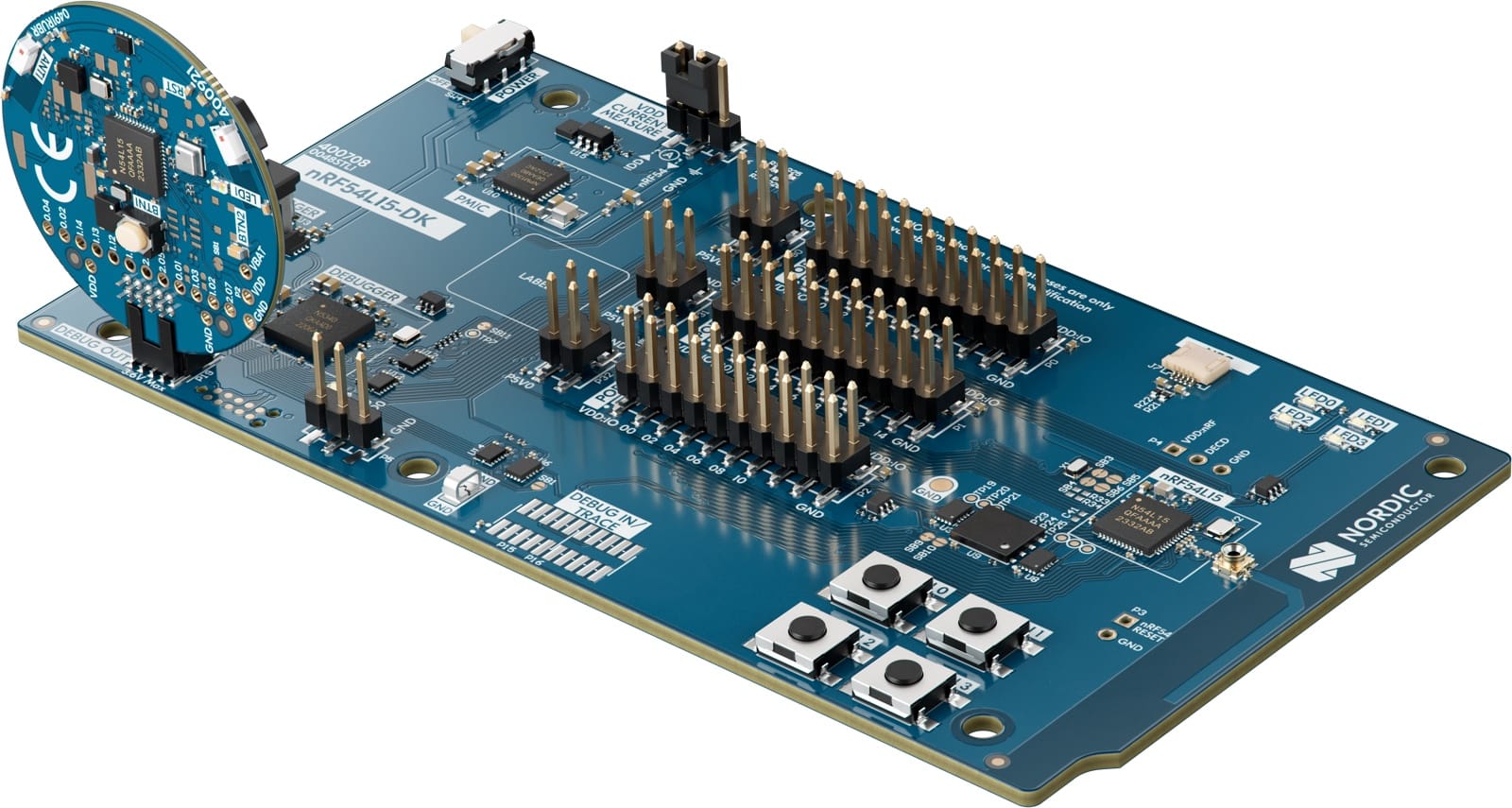
Once it’s flashed, you can detach the Tag and confirm it’s running. Open nRF Toolbox and you should see the Tag advertising as a Channel Sounding Reflector, ready to range against an Initiator.
That’s it. The Tag is now a Channel Sounding Reflector, ready to range against an Initiator. If you want to update the firmware later without docking the Tag again, you can also build the sample with Over-the-Air Device Firmware Update (OTA DFU) support, which lets you push new firmware to the Tag straight from your phone.
What else you can build with the Tag
The Channel Sounding Reflector is one starting point, but several other nRF Connect SDK samples list the Tag as a supported target. A few worth knowing about:
- Bluetooth Fast Pair: Locator tag. This is a Google Find Hub-compatible tracker, and it’s the natural next step if you’re building a Find My-style device. It’s also where the dual antennas pay off, since Find Hub’s Precision Finding can take advantage of them.
- Edge AI gesture recognition. From Nordic’s Edge AI Add-on for nRF Connect SDK, this sample uses the Tag’s BMI270 IMU to recognize gestures like swiping, shaking, tapping, and rotating, all with an on-device machine learning model. It’s a good showcase of running edge AI on a coin-cell device.
- Matter weather station. This one turns the BME688 environmental sensor into a Matter accessory that periodically measures temperature, air pressure, and humidity, which you can then read from a Matter controller.
Each of these targets the same
nrf54l15tag/nrf54l15/cpuapp board, so they’re a quick way
to spin up a proof of concept across Find My, edge AI, and Matter from a
single piece of hardware. That flexibility is a big part of the Tag’s
appeal: one small board, several very different demos.
Testing Channel Sounding from a phone
The fun part is seeing real distance numbers come back, and you don’t need a lab bench to do it. A Channel Sounding-capable Android phone, like the Google Pixel 10, can act as the Initiator and range against the Tag directly.
With the Tag running the Reflector firmware and nRF Toolbox installed on the phone, you connect to the Tag and watch the distance update as you move it around the room. It’s a genuinely satisfying demo, and it’s the clearest way to show what Channel Sounding really is: the phone isn’t guessing from signal strength, it’s measuring the signal itself to work out how far away the Tag is.
This is also where you start to appreciate the dual-antenna design. Ranging that holds steady as you walk around a furnished room, rather than jumping around, is exactly the kind of robustness those two antennas are there to provide.
I’ll walk through the phone-side setup step by step in the walkthrough video.
Ranging from an iPhone, too (iOS 27 beta)
The Tag ranges against Android today. The question I really wanted to answer was whether the same Tag could range against an iPhone.
As of iOS 27, Apple has added Channel Sounding to iPhone, introduced at WWDC 2026 in the session Find your accessory with Bluetooth Channel Sounding. The APIs live in both Core Bluetooth and NearbyInteraction, and the hardware requirement is an iPhone with Apple’s N1 networking chip, which means the iPhone 17 family. The N1 brings Bluetooth 6 to the iPhone, and Channel Sounding is a Bluetooth 6 feature.
iOS 27 is still in beta. Earlier betas were not returning ranging results at all; building a small app against the NearbyInteraction Channel Sounding configuration on an iPhone 17, the APIs now do hand back distance values, which is real progress. The accuracy isn’t there yet, though: at close range the readings come back several meters high and noisy, the signature of coarse round-trip timing rather than precise phase-based ranging. So treat the iPhone side as a promising preview, not a precise measurement, and expect it to tighten as iOS 27 matures. (This is my own testing on a beta OS, not a Nordic-validated result, and it is distance only.)
The interesting part was what it took to make one Tag talk to both phones, because the two platforms ask for different things on the wire.
The Reflector firmware we flashed earlier hands its ranging data to the phone over a normal Bluetooth LE connection, through a GATT service called the Ranging Service (RAS). That is the path an Android phone like the Pixel 10 uses: it reads the raw measurements off the Tag and computes the distance itself.
The iPhone expects Inline PCT Transfer (IPT) instead, a Channel Sounding feature defined in the Bluetooth Core Specification, where the Reflector folds its contribution into the radio tones themselves rather than relaying it over GATT, so the phone works out the distance from the signal alone. Inline PCT was added in Bluetooth 6.3, so the iPhone path specifically requires Bluetooth 6.3 and Inline PCT.
Nordic ships these as two separate samples: a RAS reflector for Android, and an Inline PCT reflector for iPhone. But the spec treats Inline PCT as an optional, negotiated capability, which means one reflector is allowed to serve both an IPT iPhone and a RAS Android initiator. So I combined them into a single firmware image: it advertises the Ranging Service for Android and the Inline PCT pairing service for iPhone, holds a bond for each phone at the same time, and runs Channel Sounding with both from one Tag. That is the interoperability story: one coin-cell Tag that pairs and exchanges Channel Sounding with a Pixel and an iPhone off a single build. The Android side is accurate today; the iPhone side, as noted above, returns results but is still rough in this beta.
One note on antennas: the iPhone negotiates a single antenna path, so the combined image runs single-antenna. The dual-antenna advantage from earlier still applies on the Android RAS path, where the initiator can take both paths.
Setting up Channel Sounding on iOS
If you want to range against the Tag from your own iOS app, the NearbyInteraction path is compact. Here are the pieces that matter.
First, confirm the device can do Channel Sounding. It needs an iPhone 17 (N1) on iOS 27:
let caps = NISession.deviceCapabilities
guard caps.supportsBluetoothChannelSounding else {
    // No N1 / not on iOS 27: Channel Sounding is unavailable.
    return
}
Next, pair with the Tag using AccessorySetupKit, which presents the system pairing sheet and discovers the reflector by the service UUID it advertises:
let descriptor = ASDiscoveryDescriptor()
descriptor.bluetoothServiceUUID = CBUUID(string: reflectorServiceUUID)
descriptor.supportedOptions = [.bluetoothPairingLE]   // pair and bond over Bluetooth LE

let item = ASPickerDisplayItem(name: "Nordic CS Tag", productImage: image, descriptor: descriptor)
session.showPicker(for: [item]) { error in
    // handle picker errors
}
The bond itself is triggered when iOS reads an encryption-protected characteristic on the Tag, which is why the reflector firmware exposes a tiny characteristic that requires encryption to read. That read is what makes iOS start Bluetooth LE Secure Connections pairing.
With the Tag paired, create a NearbyInteraction session configured
for Channel Sounding. The key is
NINearbyAccessoryConfiguration(bluetoothChannelSoundingIdentifier:),
which takes the paired peripheral’s identifier:
let config = NINearbyAccessoryConfiguration(
    bluetoothChannelSoundingIdentifier: peripheralID,
    previousBluetoothIdentifier: nil)

let session = NISession()
session.delegate = self
session.run(config)
Finally, the distance arrives in the session delegate on each update:
func session(_ session: NISession, didUpdate nearbyObjects: [NINearbyObject]) {
    for obj in nearbyObjects {
        if let meters = obj.distance {
            // meters is the live Channel Sounding distance to the Tag.
        }
    }
}
From there, the NearbyInteraction session delivers distance updates to your delegate as the devices move, and you surface them in the UI.
Wrapping up
In this post, we covered a lot of ground with a very small board.
We:
- Unboxed the nRF54L15 Tag and toured everything packed onto its 33 mm body
- Framed where the Tag fits: prototyping trackers, asset tags, and other compact battery-powered products
- Looked at why its two antennas matter for robust Channel Sounding when line-of-sight isn’t guaranteed
- Flashed it as a Channel Sounding Reflector and ranged against it from a Pixel over the Ranging Service
- Combined the RAS and Inline PCT paths into one firmware image so the same Tag also pairs with an iPhone 17 on iOS 27 beta and returns ranging results through a small NearbyInteraction app (iPhone-side accuracy still maturing)
- Walked through the other Find My, edge AI, and Matter samples you can build with it
With this, you should have a clear picture of where the Tag fits: it’s a compact, battery-powered platform for prototyping multi-antenna Channel Sounding trackers, with accurate ranging from an Android phone today and an early iPhone path opening up on iOS 27.
If you end up building something with it, I’d genuinely like to hear what you make.


